







Question: Python Consider a Python GUI program that produces a window with the following widgets: a text box to display the value of one element of
Python
Consider a Python GUI program that produces a window with the following widgets:
a text box to display the value of one element of a given list (e.g., a list of the five vowels);
a button to retrieve the previous value in that list (if there is one). This button is disabled if there is no previous value in the list.
a button to retrieve the next value in that list (if there is one). This button is disabled if there is no next value in the list.
a label to display the number of the item being displayed and the total number of items (e.g., "1/5")
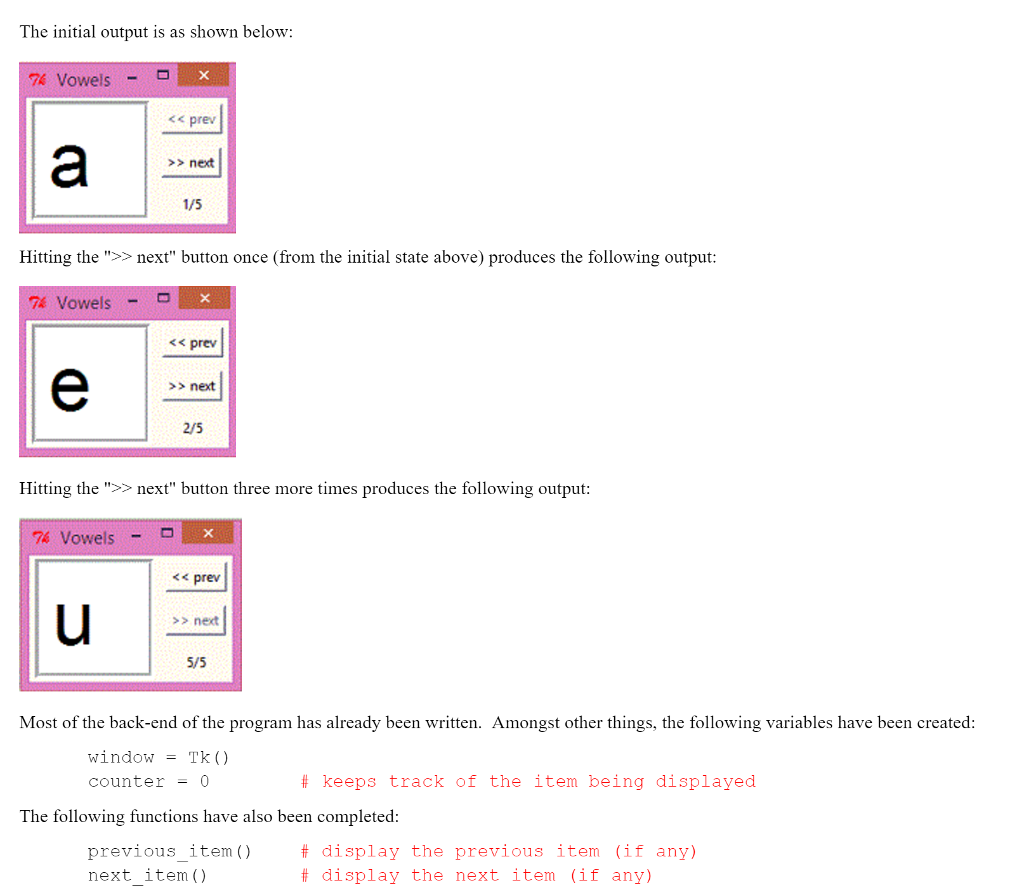
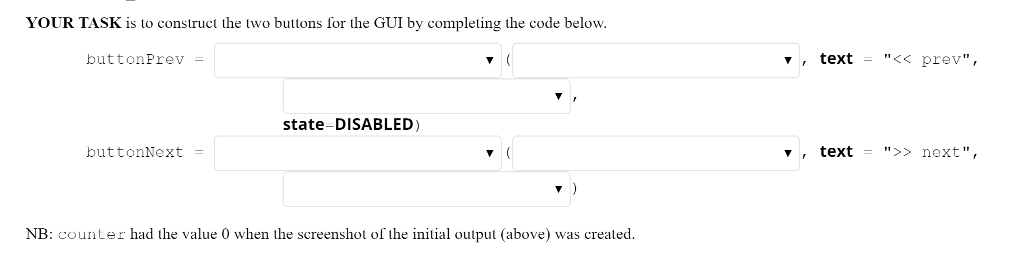
The initial output is as shown below: Vowels 7K prev next 1/5 Hitting the next" button once (from the initial state above) produces the following output vowels 7A prev next 2/5 Hitting the next" button three more times produces the following output Vowels 76 prev next 5/5 Most of the back-end of the program has already been written. Amongst other things, the following variables have been created Window Tk keeps track of the item being displayed counter 0 The following functions have also been completed previous item f display the previous item (if any) next item display the next item (if any)
Step by Step Solution
There are 3 Steps involved in it

Get step-by-step solutions from verified subject matter experts
 Study Help