







Question: Consider the beam shown in ( Figure 1 ) . Follow the sign convention. Figure 1 of 1 Draw the moment diagram for the beam.
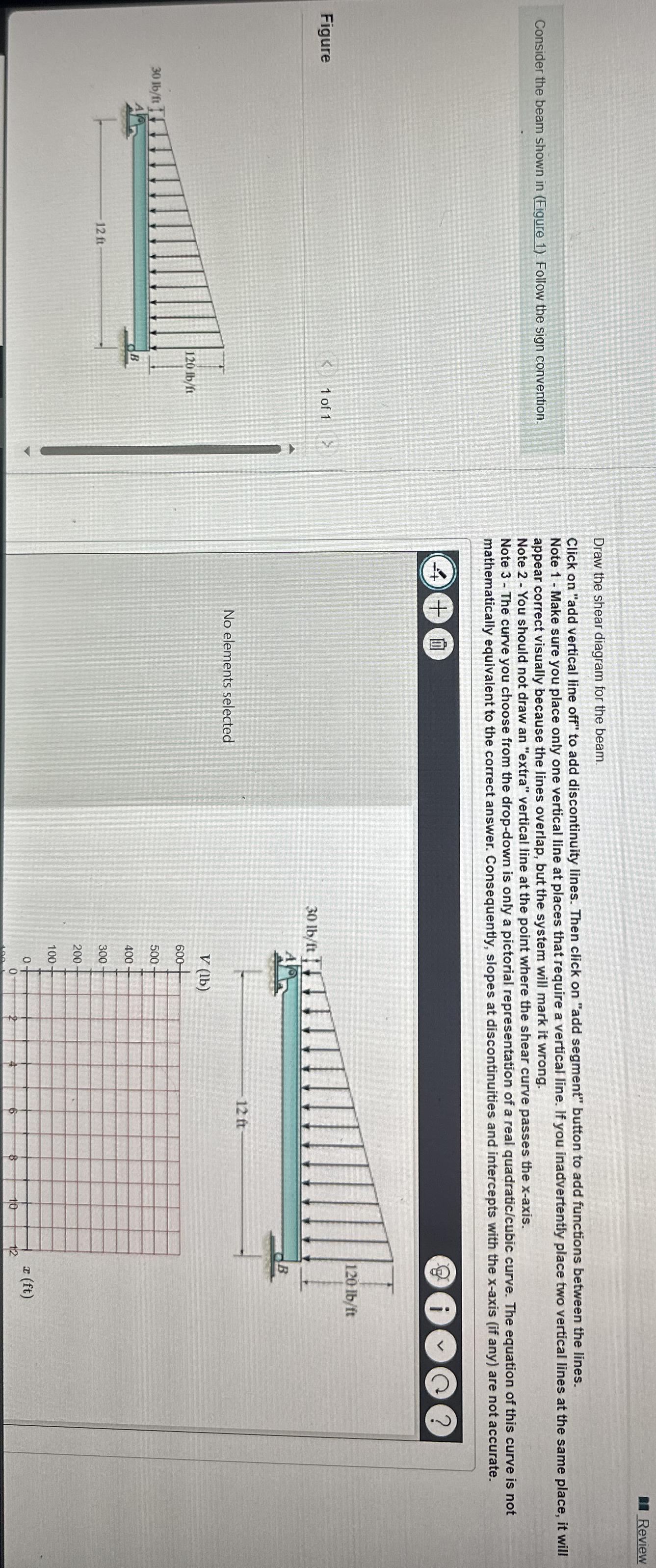
Consider the beam shown in Figure Follow the sign convention.
Figure
of
Draw the moment diagram for the beam.
Click on "add vertical line off" to add discontinuity lines. Then click on "add segment" button to add functions between the lines. Note Make sure you place only one vertical line at places that require a vertical line. If you inadvertently place two vertical lines at the same place, it will appear correct visually because the lines overlap, but the system will mark it wrong.
Note Draw a vertical line to denote local maximum or minimum
Note The curve you choose from the dropdown is only a pictorial representation of a real quadraticcubic curve. The equation of this curve is not mathematically equivalent to the correct answer. Consequently, slopes at discontinuities and intercepts with the x axis if any are not accurate.
No elements selected
Review
Consider the beam shown in Figure Follow the sign convention
Draw the shear diagram for the beam.
Click on "add vertical line off" to add discontinuity lines. Then click on "add segment" button to add functions between the lines.
Note Make sure you place only one vertical line at places that require a vertical line. If you inadvertently place two vertical lines at the same place, it will appear correct visually because the lines overlap, but the system will mark it wrong.
Note You should not draw an "extra" vertical line at the point where the shear curve passes the x axis.
Note The curve you choose from the dropdown is only a pictorial representation of a real quadraticcubic curve. The equation of this curve is not mathematically equivalent to the correct answer. Consequently, slopes at discontinuities and intercepts with the x axis if any are not accurate.
No elements selected
Review
Consider the beam shown in Figure Follow the sign convention
Draw the shear diagram for the beam.
Click on "add vertical line off" to add discontinuity lines. Then click on "add segment" button to add functions between the lines.
Note Make sure you place only one vertical line at places that require a vertical line. If you inadvertently place two vertical lines at the same place, it will appear correct visually because the lines overlap, but the system will mark it wrong.
Note You should not draw an "extra" vertical line at the point where the shear curve passes the x axis.
Note The curve you choose from the dropdown is only a pictorial representation of a real quadraticcubic curve. The equation of this curve is not mathematically equivalent to the correct answer. Consequently, slopes at discontinuities and intercepts with the x axis if any are not accurate.
No elements selected
Step by Step Solution
There are 3 Steps involved in it
1 Expert Approved Answer
Step: 1 Unlock

Question Has Been Solved by an Expert!
Get step-by-step solutions from verified subject matter experts
Step: 2 Unlock
Step: 3 Unlock
 Study Help