







Question: Consider the below ERD and answer all the questions. Note: - You are requested to deliver a report after carrying out all the above tasks
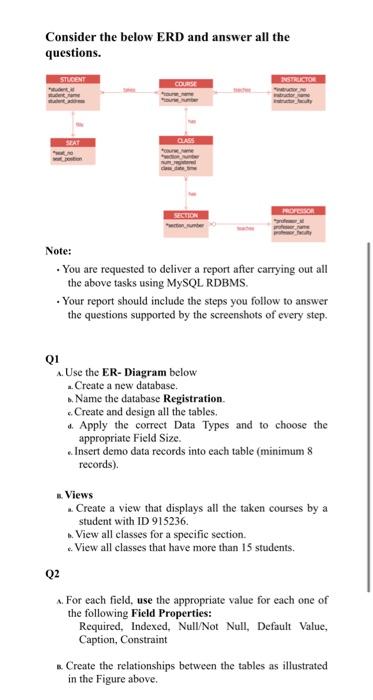
Consider the below ERD and answer all the questions. Note: - You are requested to deliver a report after carrying out all the above tasks using MySQL RDBMS. - Your report should include the steps you follow to answer the questions supported by the screenshots of every step. Q1 A. Use the ER-Diagram below a. Create a new database. b. Name the database Registration. 6. Create and design all the tables. d. Apply the correct Data Types and to choose the appropriate Field Size. a. Insert demo data records into each table (minimum 8 records). n. Views 2. Create a view that displays all the taken courses by a student with ID 915236. b. View all classes for a specific section. c. View all classes that have more than 15 students. Q2 A. For each field, use the appropriate value for each one of the following Field Properties: Required, Indexed, Null/Not Null, Default Value, Caption, Constraint E. Create the relationships between the tables as illustrated in the Figure above. Consider the below ERD and answer all the questions. Note: - You are requested to deliver a report after carrying out all the above tasks using MySQL RDBMS. - Your report should include the steps you follow to answer the questions supported by the screenshots of every step. Q1 A. Use the ER-Diagram below a. Create a new database. b. Name the database Registration. 6. Create and design all the tables. d. Apply the correct Data Types and to choose the appropriate Field Size. a. Insert demo data records into each table (minimum 8 records). n. Views 2. Create a view that displays all the taken courses by a student with ID 915236. b. View all classes for a specific section. c. View all classes that have more than 15 students. Q2 A. For each field, use the appropriate value for each one of the following Field Properties: Required, Indexed, Null/Not Null, Default Value, Caption, Constraint E. Create the relationships between the tables as illustrated in the Figure above
Step by Step Solution
There are 3 Steps involved in it

Get step-by-step solutions from verified subject matter experts
 Study Help