







Question: Consider the following source code snippet describing in Activity with a Button (Assume the Activity's and Button's respective XML ID's are R.layout.activity wifi and R.id.button,
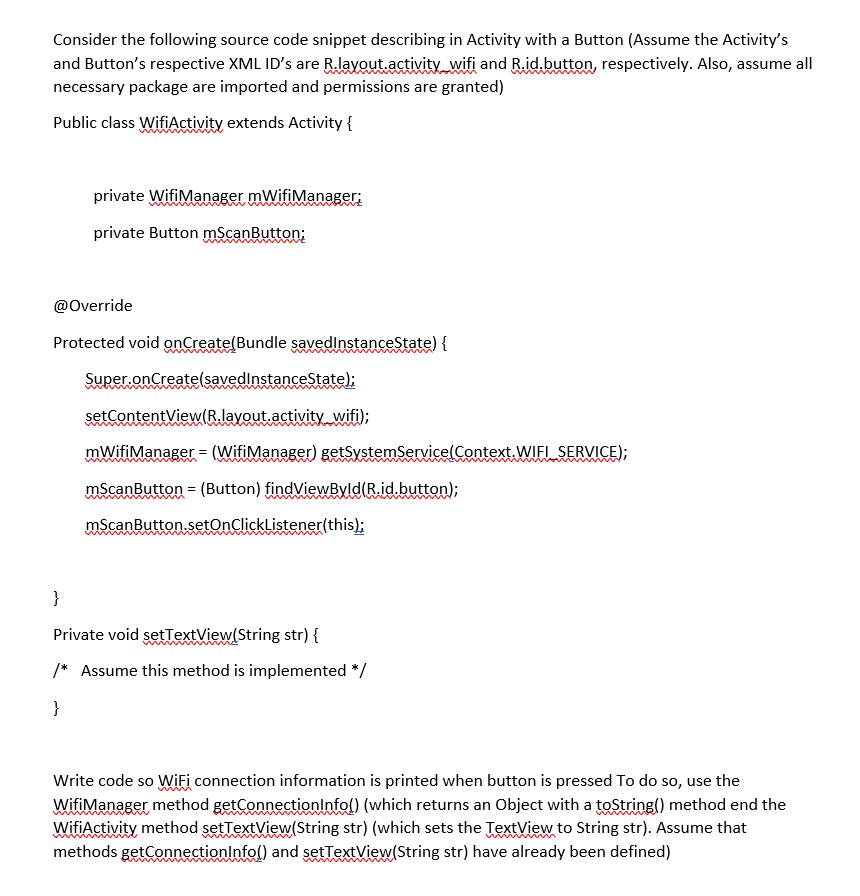
Consider the following source code snippet describing in Activity with a Button (Assume the Activity's and Button's respective XML ID's are R.layout.activity wifi and R.id.button, respectively. Also, assume all necessary package are imported and permissions are granted) Public class Wifi Activity extends Activity { private Wifi Manager mWifi Manager: private Button mScanButton; @Override Protected void onCreate(Bundle savedInstanceState) { Super.onCreate(savedInstanceState); setContentView(R.layout.activity wifi); mWifiManager = (WifiManager) getSystemService(Context.WIEL SERVICE); mScanButton = (Button) findViewById(R.id.button); mScanButton.setOnClickListener(this); } Private void setTextView(String str) { /* Assume this method is implemented */ } Write code so WiFi connection information is printed when button is pressed to do so, use the WifiManager method getConnectionInfo() (which returns an Object with a toString() method end the WifiActivity method setTextView(String str) (which sets the TextView to String str). Assume that methods getConnectionInfo!) and setTextView(String str) have already been defined)
Step by Step Solution
There are 3 Steps involved in it

Get step-by-step solutions from verified subject matter experts
 Study Help