Question: Consider the following two use cases for a software system for managing restaurant services. There are three (disjoint) kinds of humans involved in this scenario:
Consider the following two use cases for a software system for managing restaurant services. There are three (disjoint) kinds of humans involved in this scenario: Waiters, Chefs, and Customers. Each waiter uses a wireless handheld device (like a Palm Pilot) to communicate with the chefs. Waiters enter Customer orders and receive notices that orders are ready through their handheld devices. The given use cases cover placing orders and paying bills. Required Tasks : 1. Develop an object model for the two Restaurant use cases. Identify the boundary, entity, and control objects that these two use cases require. For the entity objects, identify their attributes and the associations between them. You do not need to identify the methods for any of the objects. 2. What use cases would you develop to handle exceptional behavior for these two restaurant use cases? Provide a name and a brief (few words) description for the situation each case would handle. Do not write the use cases specification.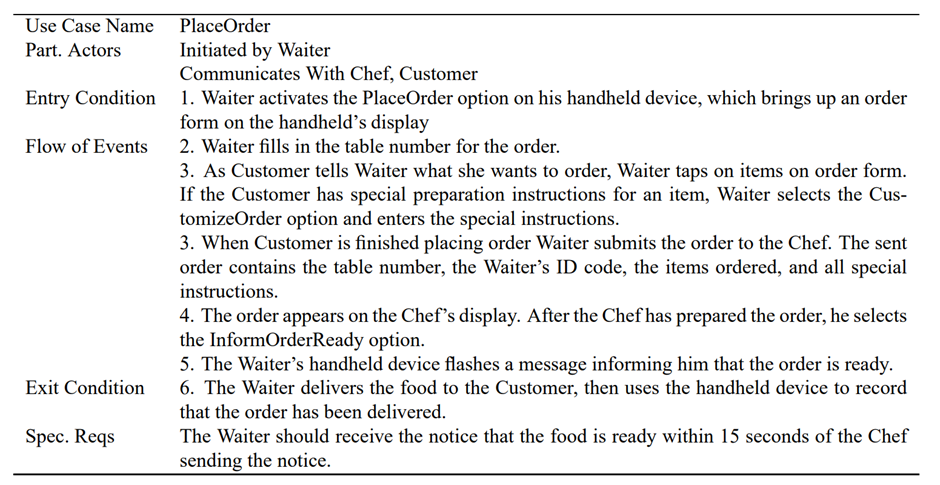
Use Case Name Part. Actors Entry Condition Flow of Events Exit Condition Spec. Reqs PlaceOrder Initiated by Waiter Communicates With Chef, Customer 1. Waiter activates the PlaceOrder option on his handheld device, which brings up an order form on the handheld's display 2. Waiter fills in the table number for the order. 3. As Customer tells Waiter what she wants to order, Waiter taps on items on order form. If the Customer has special preparation instructions for an item, Waiter selects the Cus- tomizeOrder option and enters the special instructions. 3. When Customer is finished placing order Waiter submits the order to the Chef. The sent order contains the table number, the Waiter's ID code, the items ordered, and all special instructions. 4. The order appears on the Chef's display. After the Chef has prepared the order, he selects the InformOrderReady option. 5. The Waiter's handheld device flashes a message informing him that the order is ready. 6. The Waiter delivers the food to the Customer, then uses the handheld device to record that the order has been delivered. The Waiter should receive the notice that the food is ready within 15 seconds of the Chef sending the notice. Use Case Name Part. Actors Entry Condition Flow of Events Exit Condition Spec. Reqs PlaceOrder Initiated by Waiter Communicates With Chef, Customer 1. Waiter activates the PlaceOrder option on his handheld device, which brings up an order form on the handheld's display 2. Waiter fills in the table number for the order. 3. As Customer tells Waiter what she wants to order, Waiter taps on items on order form. If the Customer has special preparation instructions for an item, Waiter selects the Cus- tomizeOrder option and enters the special instructions. 3. When Customer is finished placing order Waiter submits the order to the Chef. The sent order contains the table number, the Waiter's ID code, the items ordered, and all special instructions. 4. The order appears on the Chef's display. After the Chef has prepared the order, he selects the InformOrderReady option. 5. The Waiter's handheld device flashes a message informing him that the order is ready. 6. The Waiter delivers the food to the Customer, then uses the handheld device to record that the order has been delivered. The Waiter should receive the notice that the food is ready within 15 seconds of the Chef sending the notice









 Study Help