







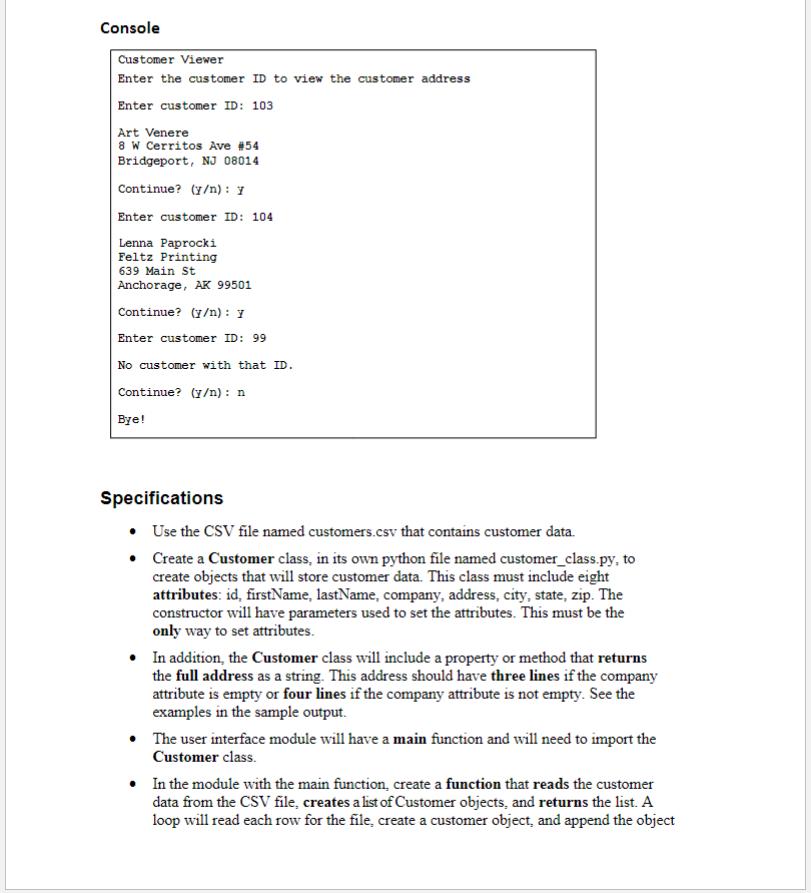
Question: Console ` ` ` Customer Viewer Enter the customer ID to view the customer address Enter customer ID: 1 0 3 Art Venere 8 W
Console
Customer Viewer
Enter the customer ID to view the customer address
Enter customer ID:
Art Venere
W Cerritos Ave #
Bridgeport, NJ
Continue? yn:Y
Enter customer ID:
Lenna Paprocki
Feltz Printing
Main St
Anchorage, AK
Continue? Yn: Y
Enter customer ID:
No customer with that ID
Continue? yn: n
Bye!
Specifications
Use the CSV file named customers.csv that contains customer data.
Create a Customer class, in its own python file named customerclass.py to create objects that will store customer data. This class must include eight attributes: id firstName, lastName, company, address, city, state, zip. The constructor will have parameters used to set the attributes. This must be the only way to set attributes.
In addition, the Customer class will include a property or method that returns the full address as a string. This address should have three lines if the company attribute is empty or four lines if the company attribute is not empty. See the examples in the sample output.
The user interface module will have a main function and will need to import the Customer class.
In the module with the main function, create a function that reads the customer data from the CSV file, creates a list of Customer objects, and returns the list. A loop will read each row for the file, create a customer object, and append the object to a list before returning the list. This function will not take any parameters.
Be sure to skip the first row of data in the file that has the header text for the file custid "firstname", "lastname", "companyname", "address", "city", "state", "zip" Remember that each row in the CSV reader is a list with one element for each of the pieces of data.
To find the customer with the specified ID loop through each Customer object in the list of Customer objects and check whether the ID inputted from the user matches the ID stored in the Customer object.
If the specified ID matches the ID in a Customer object print the address with the objects address method and exit the loop. If the specified ID isn't found, display an appropriate message.
Step by Step Solution
There are 3 Steps involved in it
1 Expert Approved Answer
Step: 1 Unlock

Question Has Been Solved by an Expert!
Get step-by-step solutions from verified subject matter experts
Step: 2 Unlock
Step: 3 Unlock
 Study Help