







Question: const courses = [{ prefix: 'ITIS', id: 4166, title: 'Network based app development' }, { prefix: 'ITIS', id: 4180, title: 'Mobile application development' }, {
const courses = [{ prefix: 'ITIS', id: 4166, title: 'Network based app development' }, { prefix: 'ITIS', id: 4180, title: 'Mobile application development' }, { prefix: 'ITCS', id: 4156, title: 'Intro to machine learning' }, { prefix: 'ITCS', id: 3160, title: 'Database desgin' } ]; //return a course that matches the id function findById(id) { return courses.find(course => course.id === id); } //To do: implement save(course) //To do: implement findByPrefix(prefix) //To do: implement updateById(id, course) //To do: implement removeById(id) //To do: uncomment the following testing code when you are ready to test your functions // save({ prefix: 'ITIS', id: 3310, title: 'Software architecture & design' }); // save({ prefix: 'ITIS', id: 4250, title: 'Computer forensics' }); // save({ prefix: 'ITIS', id: 4420, title: 'Usable security and privacy' }); // console.log(courses); // console.log(findById(4166)); // console.log(findByPrefix('ITIS')); // console.log(removeById(4000)); // console.log(updateById(4000)); // console.log(updateById(4166, { // prefix: 'ITIS', // id: 4166, // title: 'Network-based app development' // }, )); // console.log(removeById(4420)); // console.log(courses); 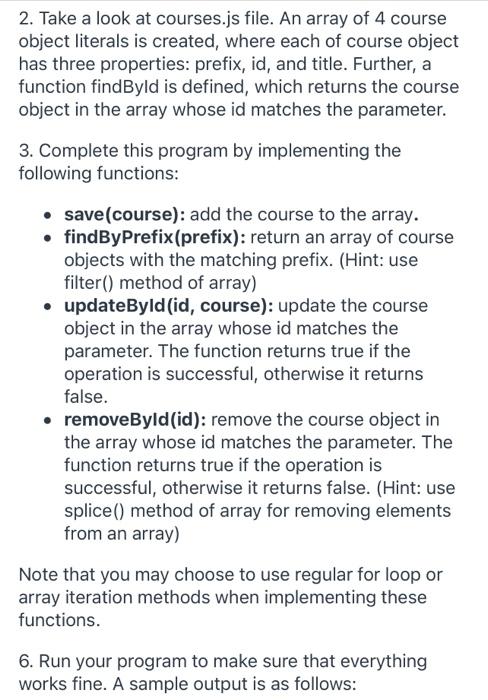
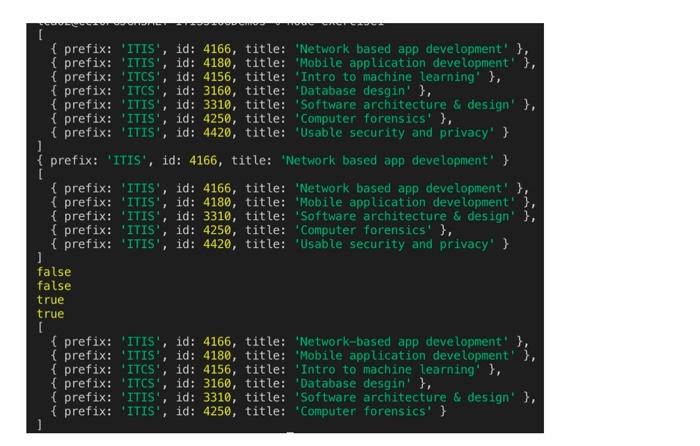
2. Take a look at courses.js file. An array of 4 course object literals is created, where each of course object has three properties: prefix, id, and title. Further, a function findByld is defined, which returns the course object in the array whose id matches the parameter. 3. Complete this program by implementing the following functions: save(course): add the course to the array. findByPrefix(prefix): return an array of course objects with the matching prefix. (Hint: use filter() method of array) updateById(id, course): update the course object in the array whose id matches the parameter. The function returns true if the operation is successful, otherwise it returns false. removeById(id): remove the course object in the array whose id matches the parameter. The function returns true if the operation is successful, otherwise it returns false. (Hint: use splice() method of array for removing elements from an array) Note that you may choose to use regular for loop or array iteration methods when implementing these functions. 6. Run your program to make sure that everything works fine. A sample output is as follows: SW {prefix: 'ITIS', id: 4166, title: 'Network based app development' }, { prefix: 'ITIS', id: 4180, title: 'Mobile application development' }, { prefix: 'ITCS', id: 4156, title: 'Intro to machine learning' }, { prefix: 'ITCS', id: 3160, title: 'Database desgin' }, { prefix: 'ITIS', id: 3310, title: 'Software architecture & design' }, { prefix: 'ITIS', id: 4250, title: 'Computer forensics' }, { prefix: 'ITIS', id: 4420, title: 'Usable security and privacy' } {prefix: 'ITIS', id: 4166, title: 'Network based app development' } { prefix: 'ITIS', id: 4166, title: 'Network based app development' }, { prefix: 'ITIS', id: 4180, title: "Mobile application development' }, { prefix: 'ITIS', id: 3310, title: "Software architecture & design' }, { prefix: 'ITIS', id: 4250, title: Computer forensics' }, { prefix: 'ITIS', id: 4420, title: 'Usable security and privacy' } ] false false true true [ { prefix: 'ITIS', id: 4166, title: 'Network-based app development' }, { prefix: 'ITIS', id: 4180, title: 'Mobile application development' }, { prefix: 'ITCS', id: 4156, title: 'Intro to machine learning' }, { prefix: 'ITCS', id: 3160, title: 'Database desgin' }, { prefix: 'ITIS', id: 3310, title: Software architecture & design' }, { prefix: 'ITIS', id: 4250, title: "Computer forensics' } ]
Step by Step Solution
There are 3 Steps involved in it

Get step-by-step solutions from verified subject matter experts
 Study Help