







Question: [Continue working on your Word document and complete the Risk Management section of your course project - Section G. To complete this section, follow the
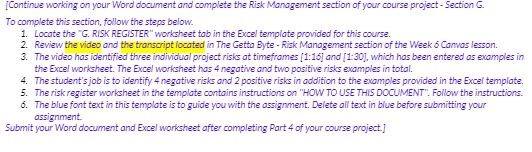
[Continue working on your Word document and complete the Risk Management section of your course project - Section G. To complete this section, follow the steps below. 1. Locate the "G. RISK REGISTER" worksheet tab in the Excel template provided for this course. 2. Review the video and the transcript located in The Getto Byte - Risk Management section of the Week & Canvas lesson. 3. The video has identified three individual project risks at timeframes [1:16] and [1:30], which has been entered as examples in the Excel worksheet. The Excel worksheet has 4 negative and two positive risks examples in total. 4. The student's job is to identify 4 negative risks and 2 positive risks in addition to the examples provided in the Excel template. 5. The risk register worksheet in the template contains instructions on "HOW TO USE THIS DOCUMENT". Follow the instructions. 6. The blue font text in this template is to guide you with the assignment. Delete all text in blue before submitting your assignment. Submit your Word document and Excel worksheet after completing Part 4 of your course project.]
Step by Step Solution
There are 3 Steps involved in it

Get step-by-step solutions from verified subject matter experts
 Study Help