







Question: Convert the attached chapter08-project01.html into a PHP file that looks similar to the one shown below. Instructions : 1. You have been provided with an
Convert the attached chapter08-project01.html into a PHP file that looks similar to the one shown below.
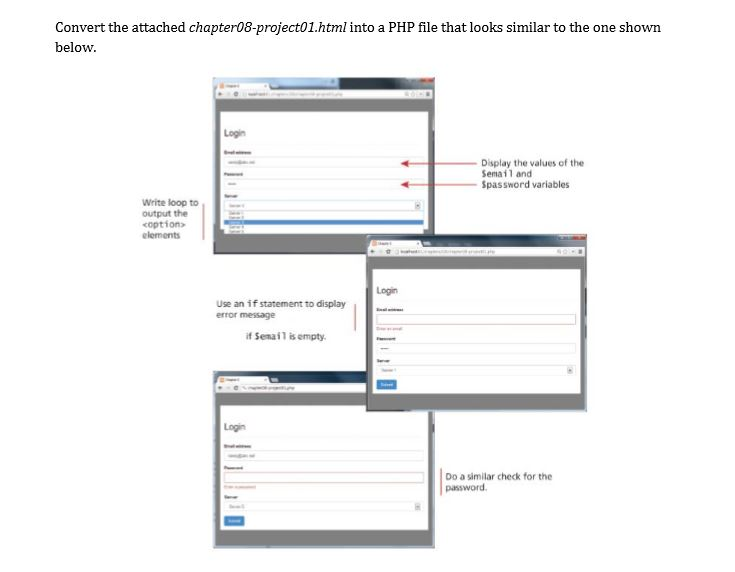
Instructions :
1. You have been provided with an HTML file (chapter08-project01.html) that includes all the necessary markup. Save this file as chapter08-project01.php.
2. Use the PHP include() function to include the file book-data.php. This file sets the values of two variables: $email and $password.
3. Use a for loop to output the elements.
4. Use an if...else statement to display an error message if the $email variable is empty.
5. Do the same thing as Step 4 for the $password variable.
please fulfill the above instructions in php file which i am pasting below and also write the php code where ever its written as write php code
chapter08-project01.html
*** Write PHP code to include 'book-data.php' ***
*** Write PHP code (if-else statements) to set error messages to appropriate variables if $email and $password variables are empty ***
Login
Convert the attached chapter08-project01.html into a PHP file that looks similar to the one showrn below. Login Display the values of the Semai1 and Spassword variables Write loop to output the coptions elements Login Use an if statement to display error message if Senail isempty Logi Do a similar check for the password
Step by Step Solution
There are 3 Steps involved in it
To convert your HTML file into a PHP file following the given instructions heres wha... View full answer

Get step-by-step solutions from verified subject matter experts
 Study Help