







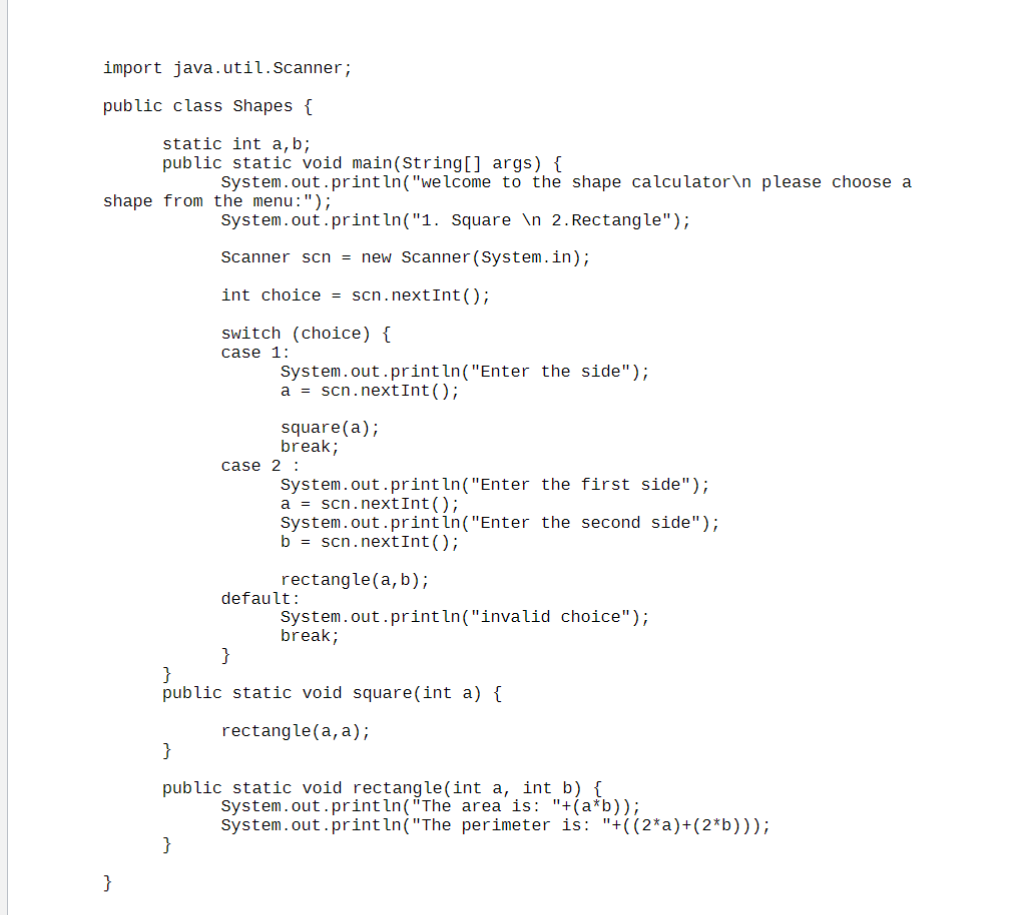
Question: Convert this java code to MIPS assembly: import java.util.Scanner; public class Shapes { static int a , b; public static void main ( String [
Convert this java code to MIPS assembly:
import java.util.Scanner;
public class Shapes
static int ab;
public static void mainString args
System.out.printlnwelcome to the shape calculator
please choose a
shape from the menu:";
System.out.print ln Square
Rectangle";
Scanner scn new Scanner
System.in;
int choice scn nextint ;
switch choice
case :
System.out.print lnEnter the side";
nextint ;
squarea;
break;
case :
System.out.print lnEnter the first side";
nextint ;
System.out.print lnEnter the second side";
nextint ;
rectang ;
default:
System.out.print lninvalid choice";
break;
public static void squareint a
rectanglea a;
public static void rectangleint a int b
System.out.print lnThe area is: ab;
system.out.print The perimeter is: :;
Step by Step Solution
There are 3 Steps involved in it
1 Expert Approved Answer
Step: 1 Unlock

Question Has Been Solved by an Expert!
Get step-by-step solutions from verified subject matter experts
Step: 2 Unlock
Step: 3 Unlock
 Study Help