







Question: Correlation and Target detection in Matlab: Please I need help implement a variation of my solution in Matlab to the task below...That is, I am
Correlation and Target detection in Matlab:
Please I need help implement a variation of my solution in Matlab to the task below...That is, I am looking for another Matlab implementation of my steps below to solve the question. Thank you!
My Steps to solving the problem in the attached Image
1. Read the images 2. Flip the target image vertically 3. Go into a nested for loop. The outer loop constantly resizes the target image, and the second constantly rotates the target image by one degree from 0 to 180. Inside loops: 4. Calculate the gradient of the target image. 5. Pad target with zeros to make it the same size as the original image. 6. Multiply the 2D DFTs in the frequency domain 7. Normalize the result 8. Apply inverse Fourier Transform to get a correlation matrix 9. Find the max value of the correlation matrix. 10. Draw a rectangle around the max value. 11. End all loops, exit program
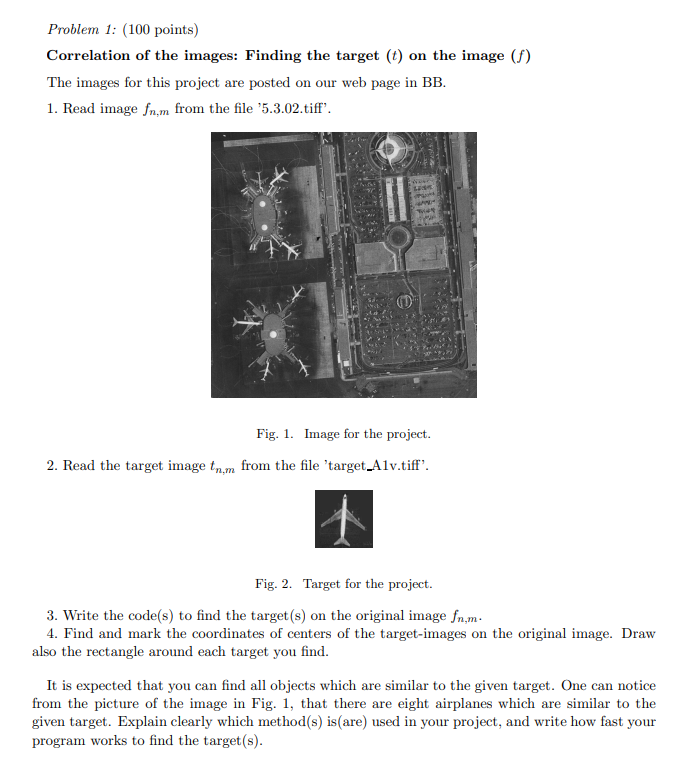
Problem 1: (100 points) Correlation of the images: Finding the target (t) on the image () The images for this project are posted on our web page in BB. 1. Read image fn,m from the file 5.3.02.tiff'. Fig. 1. Image for the project. 2. Read the target image tn,m from the file 'target_Alv.tiff'. Fig. 2. Target for the project. 3. Write the code(s) to find the target (s) on the original image fn,m. 4. Find and mark the coordinates of centers of the target-images on the original image. Draw also the rectangle around each target you find. It is expected that you can find all objects which are similar to the given target. One can notice from the picture of the image in Fig. 1, that there are eight airplanes which are similar to the given target. Explain clearly which method(s) is (are) used in your project, and write how fast your program works to find the target(s). Problem 1: (100 points) Correlation of the images: Finding the target (t) on the image () The images for this project are posted on our web page in BB. 1. Read image fn,m from the file 5.3.02.tiff'. Fig. 1. Image for the project. 2. Read the target image tn,m from the file 'target_Alv.tiff'. Fig. 2. Target for the project. 3. Write the code(s) to find the target (s) on the original image fn,m. 4. Find and mark the coordinates of centers of the target-images on the original image. Draw also the rectangle around each target you find. It is expected that you can find all objects which are similar to the given target. One can notice from the picture of the image in Fig. 1, that there are eight airplanes which are similar to the given target. Explain clearly which method(s) is (are) used in your project, and write how fast your program works to find the target(s)
Step by Step Solution
There are 3 Steps involved in it

Get step-by-step solutions from verified subject matter experts
 Study Help