







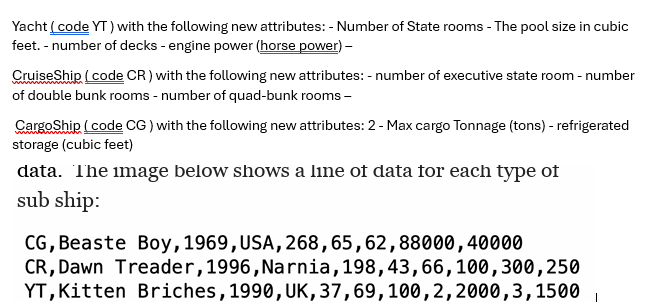
Question: Could someone please debug this program. It should create a driver class called FlotillaDriver that is required to Open the text file called flotilla.csv and
Could someone please debug this program. It should create a driver class called FlotillaDriver that is
required to
Open the text file called flotilla.csv and load all ship using
the appropriate subclass into an ArrayList dedicated to the
super class Ship.
Instantiate the proper sub ship object to add to the list.Only the basic ship information in the initial list,
but when creating the displays when one of the buttons is
clicked, you must provide the additional information of the
individual sub ship. After you have successfully loaded the data, you need to con
figure a popup using the showOptionsDia
log static method of the JOptionPane class.
The Option buttons on this popup should be for each sub
ship and one to quit the program. Clicking on one of the sub
ship options will produce the popups.
Error:
Exception in thread "main" java.lang.ArrayIndexOutOfBoundsException: Index out of bounds for length
at FlotillaDriver.displayMenuFlotillaDriverjava:
at FlotillaDriver.mainFlotillaDriverjava:
C:UsersbigbeAppDataLocalNetBeansCacheexecutorsnippetsrunxml:: The following error occurred while executing this line:
C:UsersbigbeAppDataLocalNetBeansCacheexecutorsnippetsrunxml:: Java returned:
BUILD FAILED total time: seconds
Program:
public class FlotillaDriver
private ArrayList shipList;
public FlotillaDriver
shipList new ArrayList;
public static void mainString args
FlotillaDriver driver new FlotillaDriver;
driver.loadShipsflotillacsv;
driver.displayMenu;
private void loadShipsString filename
try BufferedReader br new BufferedReadernew FileReaderfilename
String line;
while line brreadLine null
String shipData line.split;
Assume the first element indicates the ship type
Ship ship;
switch shipData
case CG:
ship new CargoShip
shipData shipData Integer.parseIntshipData
Integer.parseIntshipData Integer.parseIntshipData
Integer.parseIntshipData Integer.parseIntshipData
Integer.parseIntshipData;
break;
case YT:
ship new Yacht
shipData shipData Integer.parseIntshipData
Integer.parseIntshipData Integer.parseIntshipData
Integer.parseIntshipData Integer.parseIntshipData
Integer.parseIntshipData Integer.parseIntshipData
Integer.parseIntshipDataInteger.parseIntshipData;
break;
case CR:
ship new CruiseShip
shipData shipData Integer.parseIntshipData
Integer.parseIntshipData Integer.parseIntshipData
Integer.parseIntshipData Integer.parseIntshipData
Integer.parseIntshipData Integer.parseIntshipData;
break;
default:
Default to Ship if type is not recognized
ship new Ship
shipData shipData Integer.parseIntshipData
Integer.parseIntshipData Integer.parseIntshipData
Integer.parseIntshipData;
shipList.addship;
catch IOException e
JOptionPane.showMessageDialognull "Error reading file: egetMessage
"File Read Error", JOptionPane.ERRORMESSAGE;
private void displayMenu
String options shipList.streammapShip::getNametoArrayString::new;
String menuMessage "Choose a ship to view details or press 'Cancel' to exit.";
int response;
do
response JOptionPane.showOptionDialognull menuMessage, "Ship Selector",
JOptionPane.DEFAULTOPTION, JOptionPane.PLAINMESSAGE, null, options, options;
if response && response shipList.size
Ship selectedShip shipList.getresponse;
JOptionPane.showMessageDialognull selectedShip.toString
"Ship Details", JOptionPane.INFORMATIONMESSAGE;
while response JOptionPane.CLOSEDOPTION;
Step by Step Solution
There are 3 Steps involved in it
1 Expert Approved Answer
Step: 1 Unlock

Question Has Been Solved by an Expert!
Get step-by-step solutions from verified subject matter experts
Step: 2 Unlock
Step: 3 Unlock
 Study Help