







Question: Could you help me with writing the code for this on Visual Studio 2019? Problem 1 schedule: 50 points if...else switch ... case break The
Could you help me with writing the code for this on Visual Studio 2019?
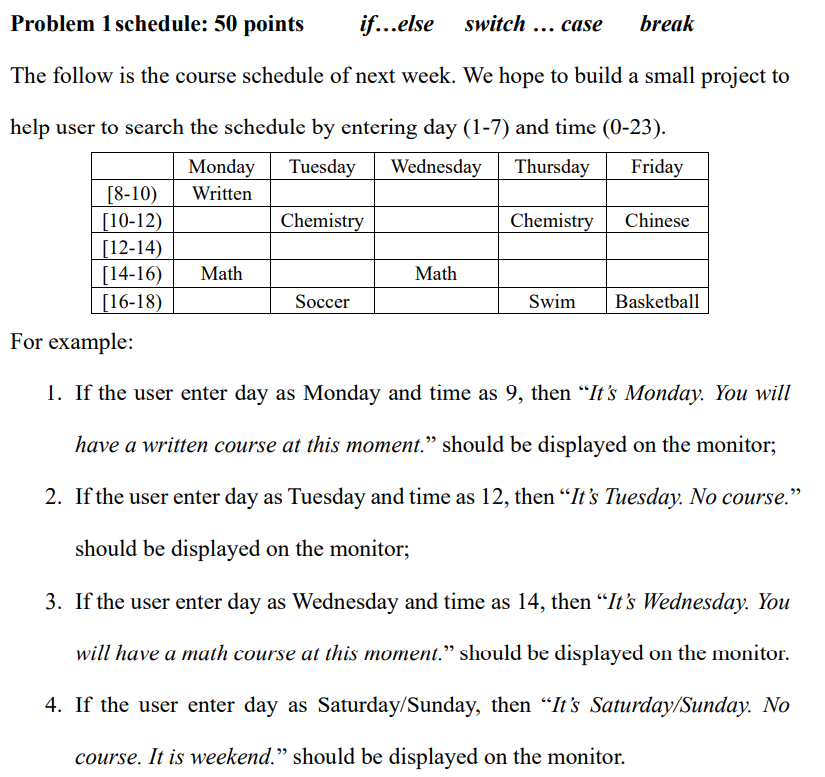
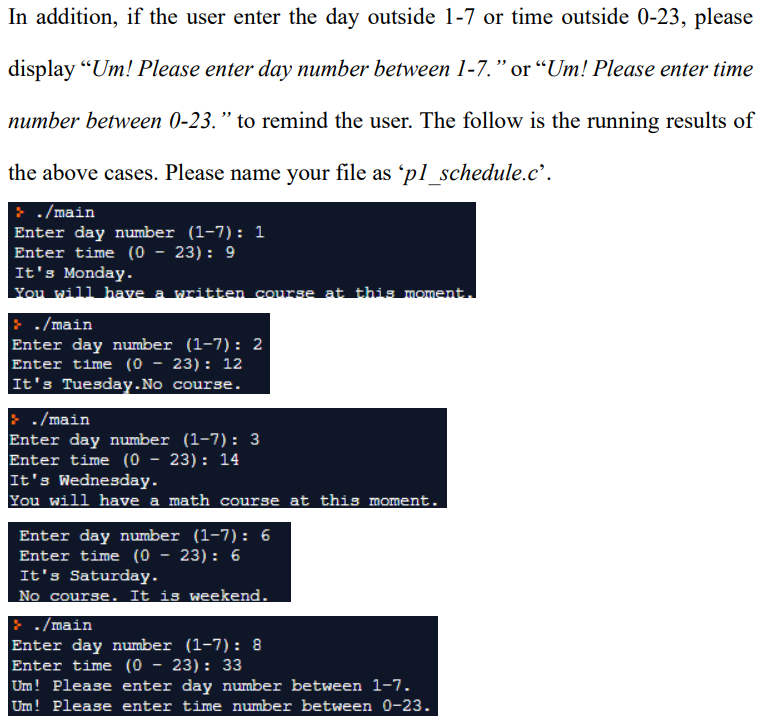
Problem 1 schedule: 50 points if...else switch ... case break The follow is the course schedule of next week. We hope to build a small project to help user to search the schedule by entering day (1-7) and time (0-23). Monday Tuesday Wednesday Thursday Friday [8-10) Written [10-12) Chemistry Chemistry Chinese [12-14) [14-16) Math Math [16-18) Soccer Swim Basketball For example: 1. If the user enter day as Monday and time as 9, then It's Monday. You will have a written course at this moment. should be displayed on the monitor; 2. If the user enter day as Tuesday and time as 12, then It's Tuesday. No course. should be displayed on the monitor; 3. If the user enter day as Wednesday and time as 14, then It's Wednesday. You will have a math course at this moment. should be displayed on the monitor. 4. If the user enter day as Saturday/Sunday, then It's Saturday/Sunday. No course. It is weekend. should be displayed on the monitor. In addition, if the user enter the day outside 1-7 or time outside 0-23, please display Um! Please enter day number between 1-7. or Um! Please enter time number between 0-23. to remind the user. The follow is the running results of the above cases. Please name your file as pl_schedule.c'. ./main Enter day number (1-7): 1 Enter time (0 - 23): 9 It's Monday You will have a written course at this moment. } ./main Enter day number (1-7): 2 Enter time (0 - 23): 12 It's Tuesday.No course. ./main Enter day number (1-7): 3 Enter time (0 - 23): 14 It's Wednesday. You will have a math course at this moment. Enter day number (1-7): 6 Enter time (0 - 23): 6 It's Saturday. No course. It is weekend. ./main Enter day number (1-7): 8 Enter time (0 - 23): 33 Um! Please enter day number between 1-7. Um! Please enter time number between 0-23
Step by Step Solution
There are 3 Steps involved in it

Get step-by-step solutions from verified subject matter experts
 Study Help