Question: Please explain your code with comments and if the photos are too small to read, just open them in new tab or zoom in. Programming
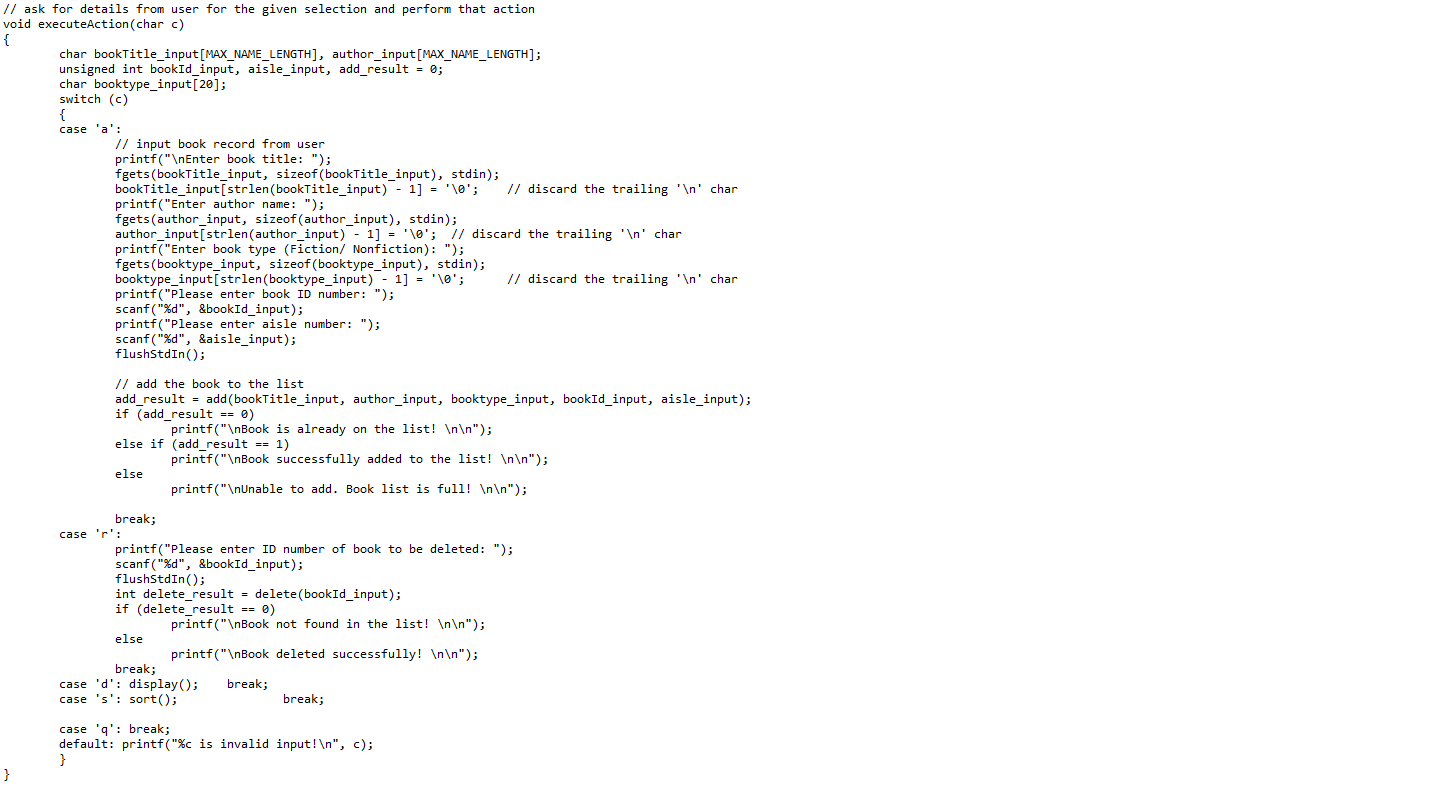
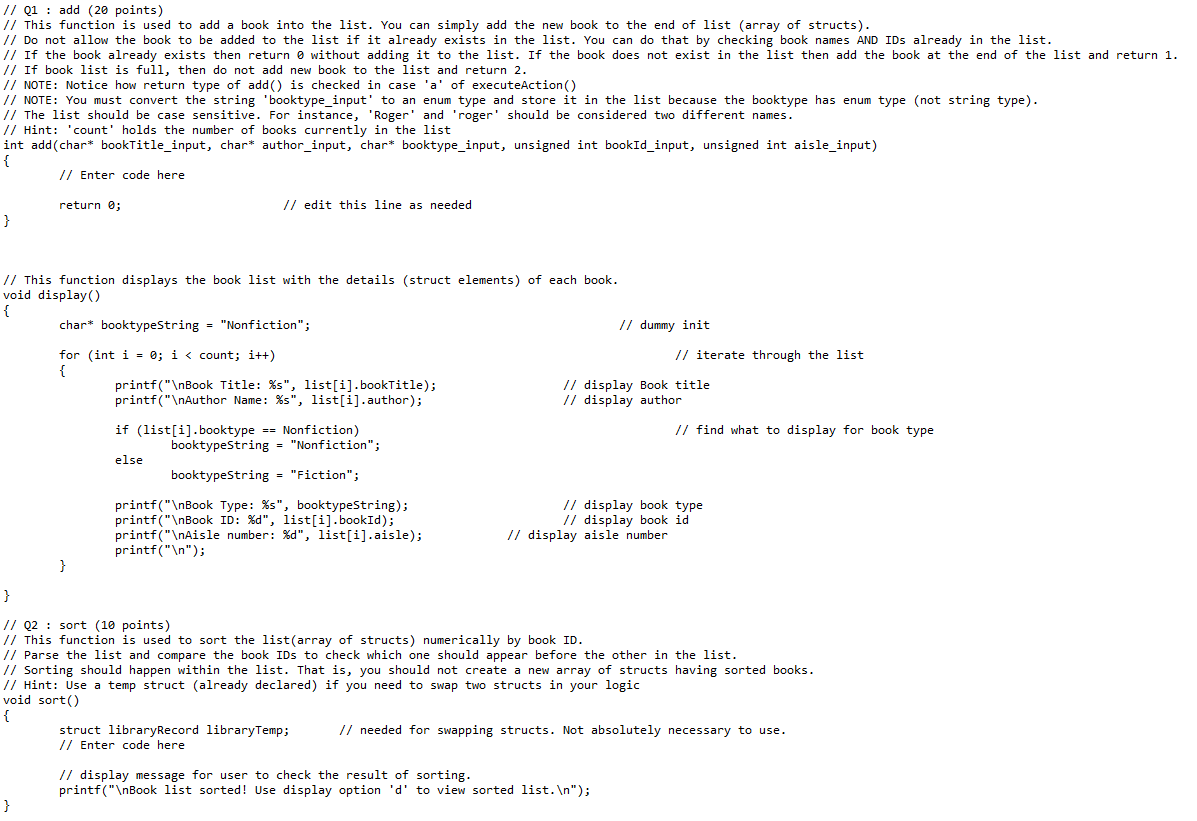
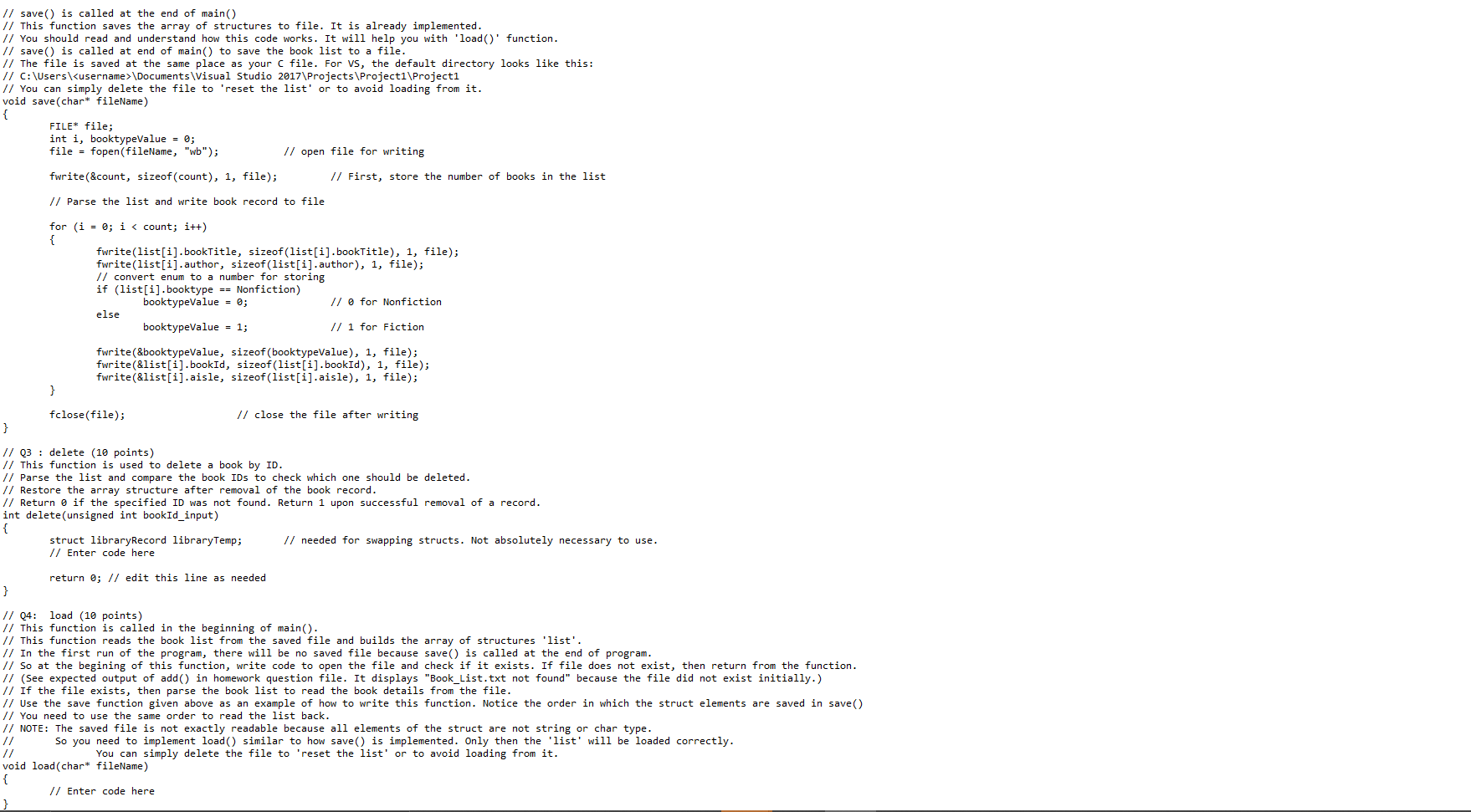
Please explain your code with comments and if the photos are too small to read, just open them in new tab or zoom in.
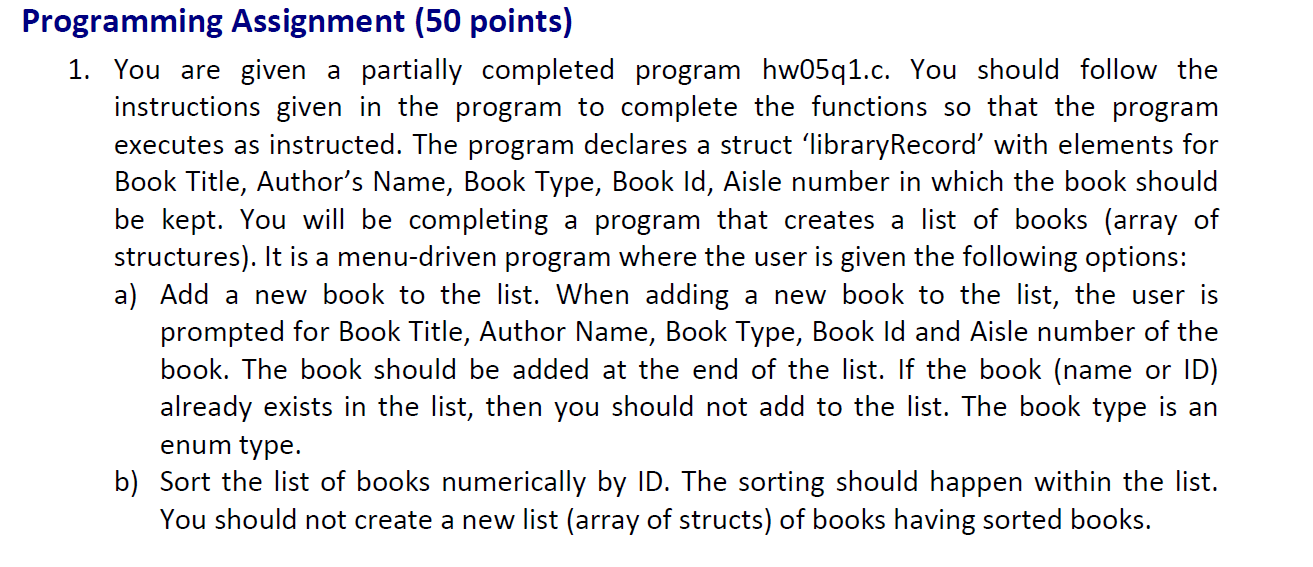
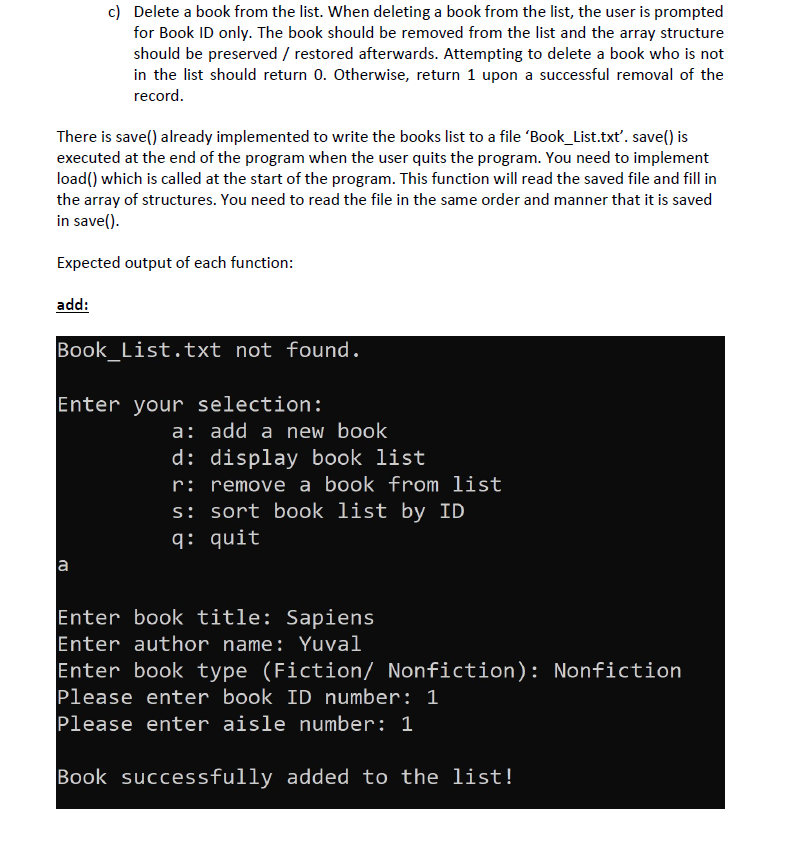
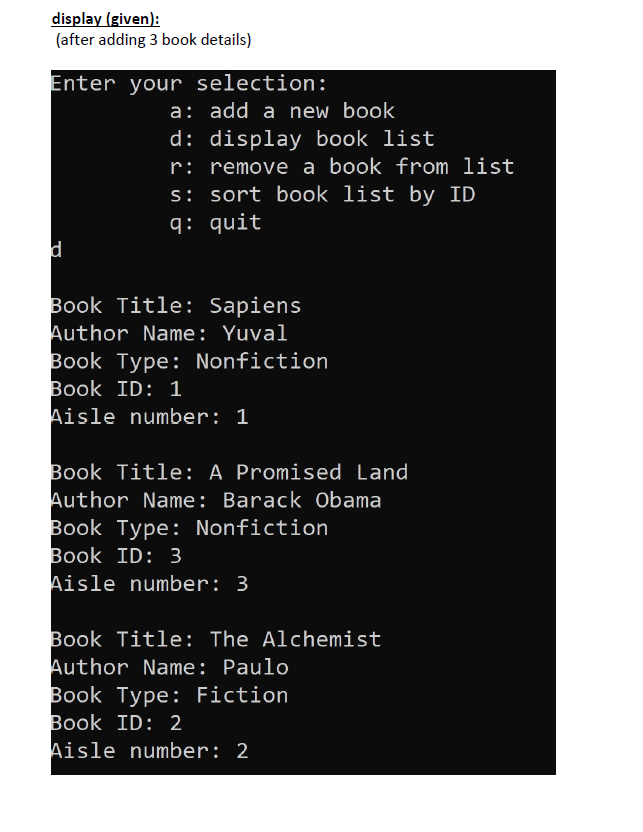
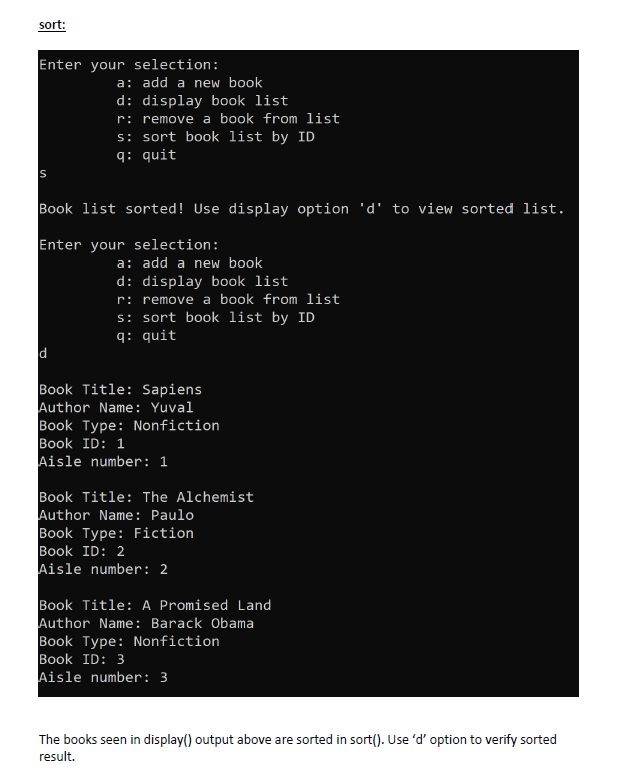
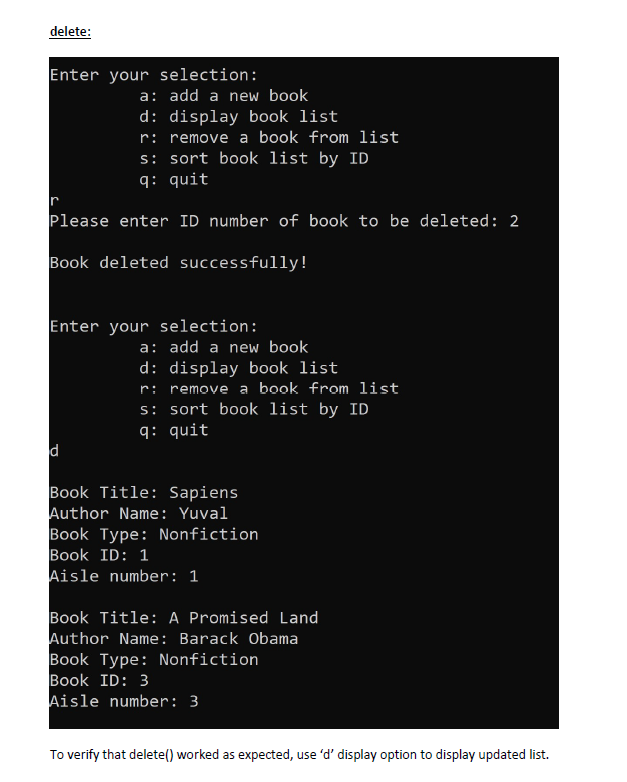
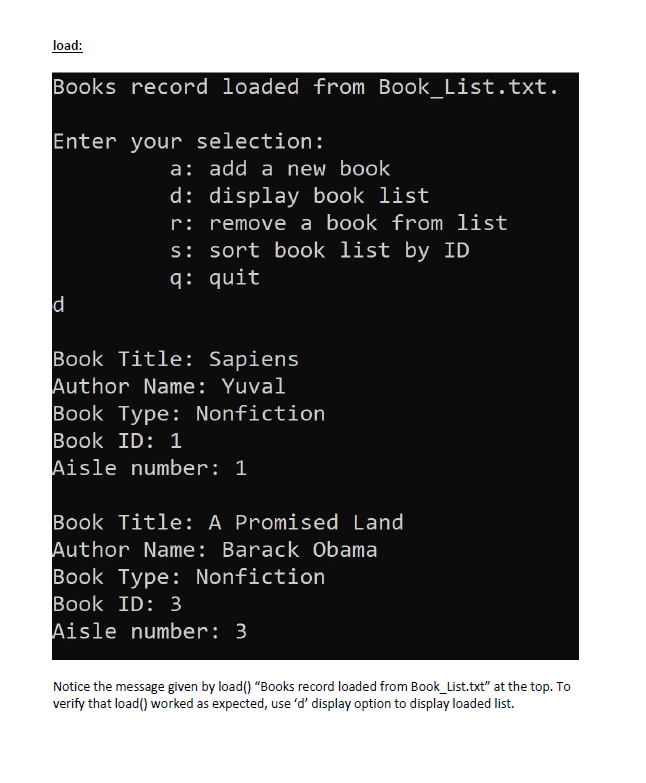
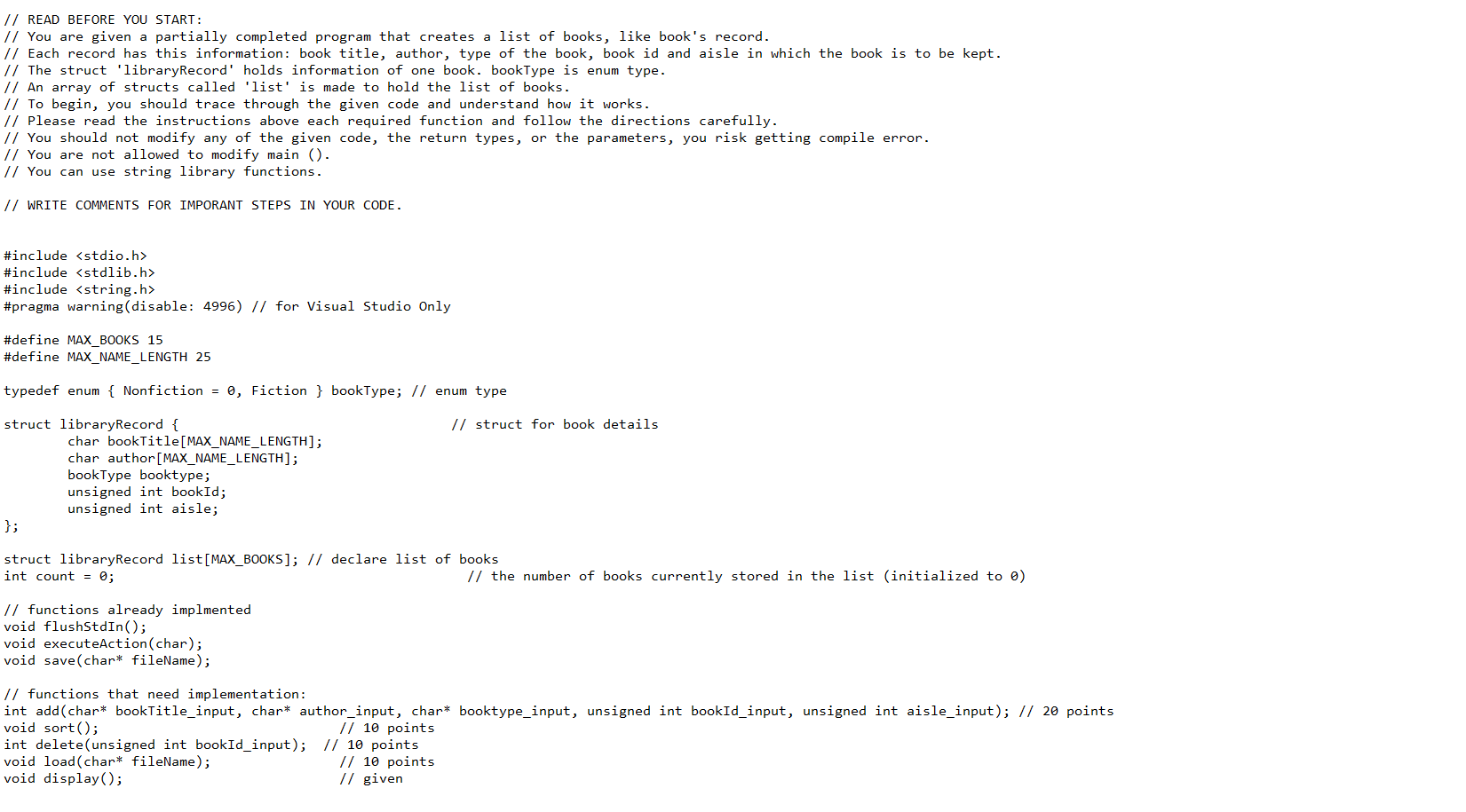
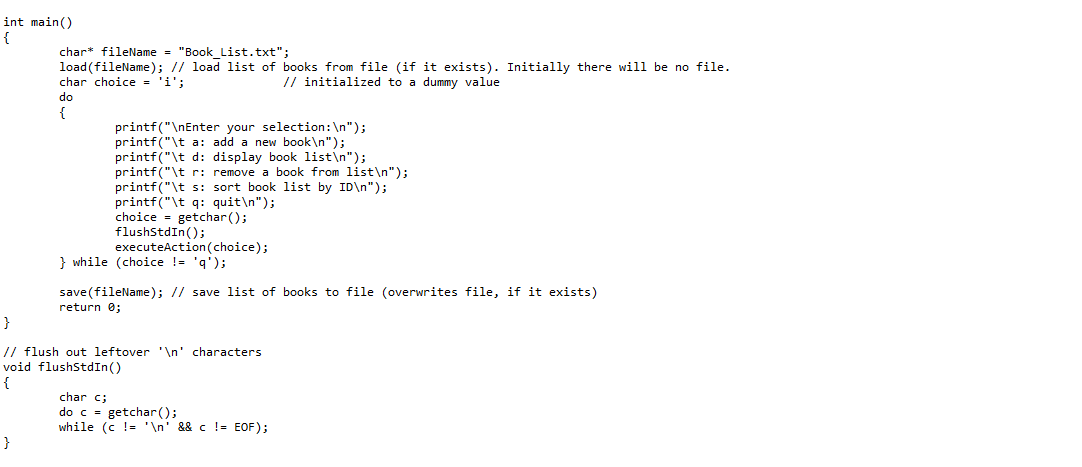
Programming Assignment (50 points) 1. You are given a partially completed program hw05q1.c. You should follow the instructions given in the program to complete the functions so that the program executes as instructed. The program declares a struct 'libraryRecord with elements for Book Title, Author's Name, Book Type, Book Id, Aisle number in which the book should be kept. You will be completing a program that creates a list of books (array of structures). It is a menu-driven program where the user is given the following options: a) Add a new book to the list. When adding a new book to the list, the user is prompted for Book Title, Author Name, Book Type, Book Id and Aisle number of the book. The book should be added at the end of the list. If the book (name or ID) already exists in the list, then you should not add to the list. The book type is an enum type. b) Sort the list of books numerically by ID. The sorting should happen within the list. You should not create a new list (array of structs) of books having sorted books. c) Delete a book from the list. When deleting a book from the list, the user is prompted for Book ID only. The book should be removed from the list and the array structure should be preserved / restored afterwards. Attempting to delete a book who is not in the list should return O. Otherwise, return 1 upon a successful removal of the record. There is save() already implemented to write the books list to a file 'Book_list.txt' save() is executed at the end of the program when the user quits the program. You need to implement load() which is called at the start of the program. This function will read the saved file and fill in the array of structures. You need to read the file in the same order and manner that it is saved in save(). Expected output of each function: add: Book_list.txt not found. Enter your selection: a: add a new book d: display book list r: remove a book from list s: sort book list by ID q: quit Enter book title: Sapiens Enter author name: Yuval Enter book type (Fiction/ Nonfiction): Nonfiction Please enter book ID number: 1 Please enter aisle number: 1 Book successfully added to the list! display (given): (after adding 3 book details) Enter your selection: a: add a new book d: display book list r: remove a book from list s: sort book list by ID q: quit d Book Title: Sapiens Author Name: Yuval Book Type: Nonfiction Book ID: 1 Aisle number: 1 Book Title: A Promised Land Author Name: Barack Obama Book Type: Nonfiction Book ID: 3 Aisle number: 3 Book Title: The Alchemist Author Name: Paulo Book Type: Fiction Book ID: 2 Aisle number: 2 sort: Enter your selection: a: add a new book d: display book list r: remove a book from list s: sort book list by ID q: quit S Book list sorted! Use display option 'd' to view sorted list. Enter your selection: a: add a new book d: display book list r: remove a book from list s: sort book list by ID q: quit Book Title: Sapiens Author Name: Yuval Book Type: Nonfiction Book ID: 1 Aisle number: 1 Book Title: The Alchemist Author Name: Paulo Book Type: Fiction Book ID: 2 Aisle number: 2 Book Title: A Promised Land Author Name: Barack Obama Book Type: Nonfiction Book ID: 3 Aisle number: 3 The books seen in display() output above are sorted in sort(). Use 'd' option to verify sorted result. delete: Enter your selection: a: add a new book d: display book list r: remove a book from list s: sort book list by ID q: quit Please enter ID number of book to be deleted: 2 Book deleted successfully! Enter your selection: a: add a new book d: display book list remove a book from list s: sort book list by ID q: quit d Book Title: Sapiens Author Name: Yuval Book Type: Nonfiction Book ID: 1 Aisle number: 1 Book Title: A Promised Land Author Name: Barack Obama Book Type: Nonfiction Book ID: 3 Aisle number: 3 To verify that delete() worked as expected, use 'd' display option to display updated list. load: Books record loaded from Book_list.txt. Enter your selection: a: add a new book d: display book list r: remove a book from list s: sort book list by ID q: quit d Book Title: Sapiens Author Name: Yuval Book Type: Nonfiction Book ID: 1 Aisle number: 1 Book Title: A Promised Land Author Name: Barack Obama Book Type: Nonfiction Book ID: 3 Aisle number: 3 Notice the message given by load() "Books record loaded from Book_List.txt" at the top. To verify that load() worked as expected, use 'd' display option to display loaded list. // READ BEFORE YOU START: // You are given a partially completed program that creates a list of books, like book's record. // Each record has this information: book title, author, type of the book, book id and aisle in which the book is to be kept. // The struct 'libraryRecord' holds information of one book. bookType is enum type. // An array of structs called 'list' is made to hold the list of books. // To begin, you should trace through the given code and understand how it works. 1/ Please read the instructions above each required function and follow the directions carefully. // You should not modify any of the given code, the return types, or the parameters, you risk getting compile error. // You are not allowed to modify main (). // You can use string library functions. // WRITE COMMENTS FOR IMPORANT STEPS IN YOUR CODE. #include #include #include #pragma warning (disable: 4996) // for Visual Studio Only #define MAX_BOOKS 15 #define MAX_NAME_LENGTH 25 typedef enum { Nonfiction = 0, Fiction } bookType; // enum type // struct for book details struct libraryRecord { char bookTitle[MAX_NAME_LENGTH]; char author[MAX_NAME_LENGTH]; bookType booktype; unsigned int bookId; unsigned int aisle; struct library Record list[MAX_BOOKS]; // declare list of books int count = 0; // the number of books currently stored in the list (initialized to ) // functions already implmented void flushStdIn(); void executeAction(char); void save(char* fileName); // functions that need implementation: int add(char* bookTitle_input, char* author_input, char* booktype_input, unsigned int bookId_input, unsigned int aisle_input); // 20 points void sort(); // 10 points int delete(unsigned int bookId_input); // 10 points void load(char* fileName); // 10 points void display(); // given int main() { char* fileName = "Book_list.txt"; load(fileName); // load list of books from file (if it exists). Initially there will be no file. char choice = 'i'; // initialized to a dummy value do printf(" Enter your selection: "); printf("\t a: add a new book "); printf("\t d: display book list "); printf("\t r: remove a book from list "); printf("\t s: sort book list by ID "); printf("\t q: quit "); choice - getchar(); flushStdIn(); executeAction(choice); } while (choice != 'q'); save(fileName); // save list of books to file (overwrites file, if it exists) return; } // flush out leftover ' ' characters void flushstdIn() { char c; do c = getchar(); while (c != ' ' && c != EOF); } // ask for details from user for the given selection and perform that action void executeAction(char c) { char bookTitle_input[MAX_NAME_LENGTH], author_input[MAX_NAME_LENGTH]; unsigned int bookId_input, aisle_input, add_result = 0; char booktype_input[20]; switch (c) case 'a': // input book record from user printf(" Enter book title: "); fgets (bookTitle_input, sizeof(bookTitle_input), stdin); bookTitle_input[strlen(bookTitle_input) - 1] = '\0'; // discard the trailing ' ' char printf("Enter author name: "); fgets(author_input, sizeof(author_input), stdin); author_input[strlen(author_input) - 1] = '\0'; // discard the trailing ' ' char printf("Enter book type (Fiction/ Nonfiction): "); fgets (booktype_input, sizeof(booktype_input), stdin); booktype_input[strlen(booktype_input) - 1] = '\0'; // discard the trailing ' ' char printf("Please enter book ID number: "); scanf("%d", &bookId_input); printf("Please enter aisle number: "); scanf("%d", &aisle_input); flushStdIn(); 1/ add the book to the list add_result = add(bookTitle_input, author_input, booktype_input, bookId_input, aisle_input); if (add_result == 0) printf(" Book is already on the list! "); else if (add_result == 1) printf(" Book successfully added to the list! "); else printf(" Unable to add. Book list is full! "); break; case 'r': printf("Please enter ID number of book to be deleted: "); scanf("%d", &bookId_input); flushStdIn(); int delete_result = delete (bookId_input); if (delete_result == 0) printf(" Book not found in the list! "); else printf(" Book deleted successfully! "); break; case 'd': display(); break; case 's': sort(); break; case 'q': break; default: printf("%c is invalid input! ", c); } } 1/ Q1 : add (20 points) // This function is used to add a book into the list. You can simply add the new book to the end of list (array of structs). // Do not allow the book to be added to the list if it already exists in the list. You can do that by checking book names AND IDs already in the list. // If the book already exists then return without adding it to the list. If the book does not exist in the list then add the book at the end of the list and return 1. // If book list is full, then do not add new book to the list and return 2. // NOTE: Notice how return type of add checked in case 'a' of executeAction() // NOTE: You must convert the string 'booktype_input' to an enum type and store it in the list because the booktype has enum type (not string type). // The list should be case sensitive. For instance, 'Roger' and 'roger' should be considered two different names. 1/ Hint: 'count' holds the number of books currently in the list int add(char* bookTitle_input, char* author_input, char* booktype_input, unsigned int bookId_input, unsigned int aisle_input) { // Enter code here return; // edit this line as needed } // This function displays the book list with the details (struct elements) of each book. void display() { char* booktypeString = "Nonfiction"; 1/ dummy init for (int i = 0; i \Documents\Visual Studio 2017\Projects Project1\Project1 // You can simply delete the file to 'reset the list' or to avoid loading from it. void save(char* fileName) { FILE* file; int i, booktypeValue = 0; file = fopen(fileName, "wb"); // open file for writing // First, store the number of books in the list fwrite(&count, sizeof(count), 1, file); // Parse the list and write book record to file for (i = 0; i #include #include #pragma warning (disable: 4996) // for Visual Studio Only #define MAX_BOOKS 15 #define MAX_NAME_LENGTH 25 typedef enum { Nonfiction = 0, Fiction } bookType; // enum type // struct for book details struct libraryRecord { char bookTitle[MAX_NAME_LENGTH]; char author[MAX_NAME_LENGTH]; bookType booktype; unsigned int bookId; unsigned int aisle; struct library Record list[MAX_BOOKS]; // declare list of books int count = 0; // the number of books currently stored in the list (initialized to ) // functions already implmented void flushStdIn(); void executeAction(char); void save(char* fileName); // functions that need implementation: int add(char* bookTitle_input, char* author_input, char* booktype_input, unsigned int bookId_input, unsigned int aisle_input); // 20 points void sort(); // 10 points int delete(unsigned int bookId_input); // 10 points void load(char* fileName); // 10 points void display(); // given int main() { char* fileName = "Book_list.txt"; load(fileName); // load list of books from file (if it exists). Initially there will be no file. char choice = 'i'; // initialized to a dummy value do printf(" Enter your selection: "); printf("\t a: add a new book "); printf("\t d: display book list "); printf("\t r: remove a book from list "); printf("\t s: sort book list by ID "); printf("\t q: quit "); choice - getchar(); flushStdIn(); executeAction(choice); } while (choice != 'q'); save(fileName); // save list of books to file (overwrites file, if it exists) return; } // flush out leftover ' ' characters void flushstdIn() { char c; do c = getchar(); while (c != ' ' && c != EOF); } // ask for details from user for the given selection and perform that action void executeAction(char c) { char bookTitle_input[MAX_NAME_LENGTH], author_input[MAX_NAME_LENGTH]; unsigned int bookId_input, aisle_input, add_result = 0; char booktype_input[20]; switch (c) case 'a': // input book record from user printf(" Enter book title: "); fgets (bookTitle_input, sizeof(bookTitle_input), stdin); bookTitle_input[strlen(bookTitle_input) - 1] = '\0'; // discard the trailing ' ' char printf("Enter author name: "); fgets(author_input, sizeof(author_input), stdin); author_input[strlen(author_input) - 1] = '\0'; // discard the trailing ' ' char printf("Enter book type (Fiction/ Nonfiction): "); fgets (booktype_input, sizeof(booktype_input), stdin); booktype_input[strlen(booktype_input) - 1] = '\0'; // discard the trailing ' ' char printf("Please enter book ID number: "); scanf("%d", &bookId_input); printf("Please enter aisle number: "); scanf("%d", &aisle_input); flushStdIn(); 1/ add the book to the list add_result = add(bookTitle_input, author_input, booktype_input, bookId_input, aisle_input); if (add_result == 0) printf(" Book is already on the list! "); else if (add_result == 1) printf(" Book successfully added to the list! "); else printf(" Unable to add. Book list is full! "); break; case 'r': printf("Please enter ID number of book to be deleted: "); scanf("%d", &bookId_input); flushStdIn(); int delete_result = delete (bookId_input); if (delete_result == 0) printf(" Book not found in the list! "); else printf(" Book deleted successfully! "); break; case 'd': display(); break; case 's': sort(); break; case 'q': break; default: printf("%c is invalid input! ", c); } } 1/ Q1 : add (20 points) // This function is used to add a book into the list. You can simply add the new book to the end of list (array of structs). // Do not allow the book to be added to the list if it already exists in the list. You can do that by checking book names AND IDs already in the list. // If the book already exists then return without adding it to the list. If the book does not exist in the list then add the book at the end of the list and return 1. // If book list is full, then do not add new book to the list and return 2. // NOTE: Notice how return type of add checked in case 'a' of executeAction() // NOTE: You must convert the string 'booktype_input' to an enum type and store it in the list because the booktype has enum type (not string type). // The list should be case sensitive. For instance, 'Roger' and 'roger' should be considered two different names. 1/ Hint: 'count' holds the number of books currently in the list int add(char* bookTitle_input, char* author_input, char* booktype_input, unsigned int bookId_input, unsigned int aisle_input) { // Enter code here return; // edit this line as needed } // This function displays the book list with the details (struct elements) of each book. void display() { char* booktypeString = "Nonfiction"; 1/ dummy init for (int i = 0; i \Documents\Visual Studio 2017\Projects Project1\Project1 // You can simply delete the file to 'reset the list' or to avoid loading from it. void save(char* fileName) { FILE* file; int i, booktypeValue = 0; file = fopen(fileName, "wb"); // open file for writing // First, store the number of books in the list fwrite(&count, sizeof(count), 1, file); // Parse the list and write book record to file for (i = 0; i









 Study Help