







Question: could you please help me get the correct code in C using a linux system and i posted the code down below /* copyConvert --
/* copyConvert -- copyConvert namel to name2 */ #include#include #include #include #define BUFSIZE 512 /* size of chunk to be read */ #define PERM 0644 /* file permission for new file */ /* copy namel to name2 */ int copyConvert( const char *namel, const char *name2) { int infile, outfile; ssize_t nread; char buffer[BUFSIZE]; if( ( infile = open(namel, O_RDONLY) ) == -1) return (-1); if((outfile = open(name2,O_WRONLY|O_CREAT|O_TRUNC,PERM))==-1) { close (infile); return (-2); } /*now read from namel BUFSIZE chars at a time*/ while( (nread = read(infile, buffer, BUFSIZE) ) > 0) { /* convert every lower-case char into upper-case char */ /* then you need to write converted chars into outfile */ // // You need to fill up this portion!! // } close(infile); close (outfile); if ( nread == -1) return (-4); /* error on last read*/ else return (0) ; /* all is well*/ } int main(int argc, char**argv) { if(argc!=3) { printf("Usage: copyConvert file1 file2 "); exit(-1); } int retcode=0; retcode = copyConvert(argv[1], argv[2]); if(retcode==0) printf("Success! "); else printf("Failure! "); }
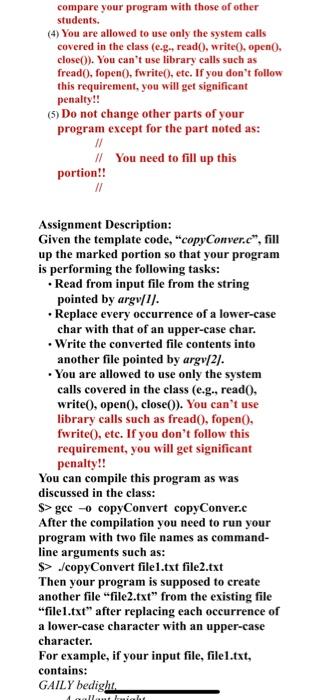
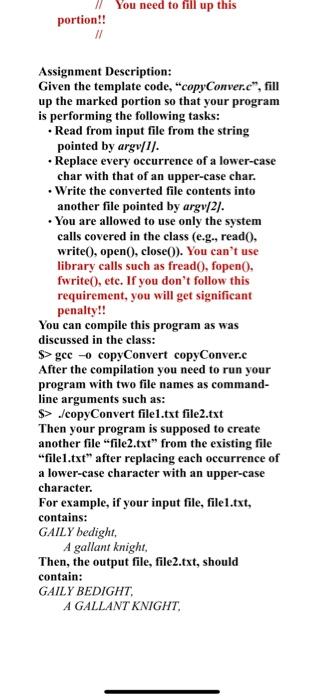
compare your program with those of other students. (4) You are allowed to use only the system calls covered in the elass ( e.g., read () , write (), open( ), close()). You can't use library calls such as fread(), fopen(), fwrite(), etc. If you don't follow this requirement, you will get significant penalty!! (5) Do not change other parts of your program except for the part noted as: If /f You need to fill up this portion!! Assignment Description: Given the template code, "copyConver. cn", fill up the marked portion so that your program is performing the following tasks: - Read from input file from the string pointed by argv/1]. - Replace every occurrence of a lower-case char with that of an upper-case char. - Write the converted file contents into another file pointed by argv /2/. - You are allowed to use only the system calls covered in the class (e,g., read 0 , write( , open( ), close()). You can't use library calls such as fread 0, fopen 0 . fwrite(), etc. If you don't follow this requirement, you will get significant penalty!! You can compile this program as was discussed in the class: $> gce 0 copyConvert copyConver.c After the compilation you need to run your program with two file names as commandline arguments such as: $>./ copyConvert file1.txt file2.txt Then your program is supposed to create another file "file2.txt" from the existing file "file 1,txt" after replacing each occurrence of a lower-case character with an upper-case character. For example, if your input file, file1.txt, contains: GAILY bedight. Assignment Description: Given the template code, "copyConver. cn, fill up the marked portion so that your program is performing the following tasks: - Read from input file from the string pointed by argv/1]. - Replace every occurrence of a lower-case char with that of an upper-case char. - Write the converted file contents into another file pointed by argv/2]. - You are allowed to use only the system calls covered in the class (e.g., read 0 , write( ), open(), close(0). You can't use library calls such as fread , fopen 0 , fwrite0, ete. If you don't follow this requirement, you will get significant penalty!! You can compile this program as was discussed in the class: $> gec 0 copyConvert copyConver.c After the compilation you need to run your program with two file names as commandline arguments such as: $> :/copyConvert file1.txt file2.txt Then your program is supposed to create another file "file2.txt" from the existing file "file1.txt" after replacing each occurrence of a lower-case character with an upper-case character. For example, if your input file, filel.txt, contains: GAIL Y bedight, A gallant knight, Then, the output file, file2.txt, should contain: GAILY BEDIGHT, A GALLANT KNIGHT
Step by Step Solution
There are 3 Steps involved in it

Get step-by-step solutions from verified subject matter experts
 Study Help