







Question: Please help me write this C code. I posted this question before, but got an answer that had nothing to do with the question. Please
Please help me write this C code. I posted this question before, but got an answer that had nothing to do with the question. Please post the correct answer.
We are writing our own bash shell program, I have most of it done, just need to add the following functions. What I have done is below the instructions, just add on to it. Please post screenshots of your code and output along with the actual code, and also be sure the output matches the instructions. Thank You!
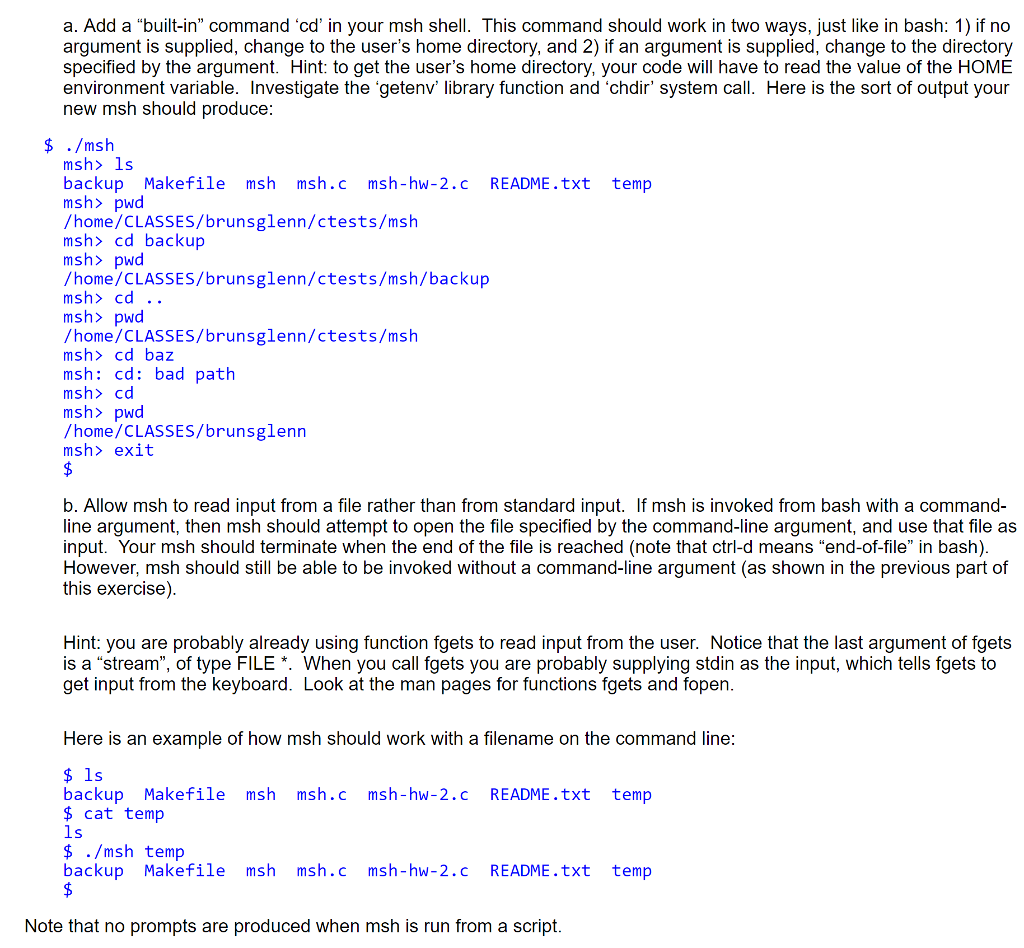
This is msh.c code I have so far:
#include#include #include #include #include /* * A very simple shell */ #define MAX_BUF 160 #define MAX_TOKS 100 int main() { char *pos; char *tok; char s[MAX_BUF]; char *toks[MAX_TOKS]; time_t rawtime; struct tm *timeinfo; static const char prompt[] = "msh> "; while (1) { /* prompt for input */ printf(prompt); /* read input */ char *status = fgets(s, MAX_BUF-1, stdin); /* exit if ^d or "exit" entered */ if (status == NULL || strcmp(s, "exit ") == 0) { if (status == NULL) { printf(" "); } exit(EXIT_SUCCESS); } /* remove any trailing newline */ if ((pos = strchr(s, ' ')) != NULL) { *pos = '\0'; } /* break input line into tokens */ char *rest = s; int i = 0; while ((tok = strtok_r(rest, " ", &rest)) != NULL && i tm_mon, timeinfo->tm_mday, 1900 + timeinfo->tm_year); continue; } /* otherwise fork a process to run the command */ int rc = fork(); if (rc a. Add a "built-in, command 'cd' in your msh shell. This command should work in two ways, Just like in bash: 1) if no argument is supplied, change to the user's home directory, and 2) if an argument is supplied, change to the directory specified by the argument. Hint: to get the user's home directory, your code will have to read the value of the HOME environment variable. Investigate the 'getenv library function and 'chdir' system call. Here is the sort of output your new msh should produce $ ./msh msh> 1s backup Makefile msh msh.c msh-hw-2.c README.txt temp msh> pwod /home/CLASSES/brunsglenn/ctests/msh msh> cd backup msh> pwd /home/CLASSES/brunsglenn/ctests/msh/backup msh> cd .. msh> pwid /home/CLASSES/brunsglenn/ctests/msh msh> cd baz msh: cd: bad path msh> cd msh> pwod /home/CLASSES/brunsglenn msh> exit b. Allow msh to read input from a file rather than from standard input. If msh is invoked from bash with a command- line argument, then msh should attempt to open the file specified by the command-line argument, and use that file as input. Your msh should terminate when the end of the file is reached (note that ctrl-d means "end-of-file" in bash) However, msh should still be able to be invoked without a command-line argument (as shown in the previous part of this exercise) Hint: you are probably already using function fgets to read input from the user. Notice that the last argument of fgets is a "stream", of type FILE *. When you call fgets you are probably supplying stdin as the input, which tells fgets to get input from the keyboard. Look at the man pages for functions fgets and fopen Here is an example of how msh should work with a filename on the command line backup Makefile msh msh.c msh-hw-2.c README.txt temp $ cat temp $ ./msh temp backup Makefile msh msh.c msh-hw-2.c README.txt temp Note that no prompts are produced when msh is run from a script a. Add a "built-in, command 'cd' in your msh shell. This command should work in two ways, Just like in bash: 1) if no argument is supplied, change to the user's home directory, and 2) if an argument is supplied, change to the directory specified by the argument. Hint: to get the user's home directory, your code will have to read the value of the HOME environment variable. Investigate the 'getenv library function and 'chdir' system call. Here is the sort of output your new msh should produce $ ./msh msh> 1s backup Makefile msh msh.c msh-hw-2.c README.txt temp msh> pwod /home/CLASSES/brunsglenn/ctests/msh msh> cd backup msh> pwd /home/CLASSES/brunsglenn/ctests/msh/backup msh> cd .. msh> pwid /home/CLASSES/brunsglenn/ctests/msh msh> cd baz msh: cd: bad path msh> cd msh> pwod /home/CLASSES/brunsglenn msh> exit b. Allow msh to read input from a file rather than from standard input. If msh is invoked from bash with a command- line argument, then msh should attempt to open the file specified by the command-line argument, and use that file as input. Your msh should terminate when the end of the file is reached (note that ctrl-d means "end-of-file" in bash) However, msh should still be able to be invoked without a command-line argument (as shown in the previous part of this exercise) Hint: you are probably already using function fgets to read input from the user. Notice that the last argument of fgets is a "stream", of type FILE *. When you call fgets you are probably supplying stdin as the input, which tells fgets to get input from the keyboard. Look at the man pages for functions fgets and fopen Here is an example of how msh should work with a filename on the command line backup Makefile msh msh.c msh-hw-2.c README.txt temp $ cat temp $ ./msh temp backup Makefile msh msh.c msh-hw-2.c README.txt temp Note that no prompts are produced when msh is run from a script
Step by Step Solution
There are 3 Steps involved in it
1 Expert Approved Answer
Step: 1 Unlock

Question Has Been Solved by an Expert!
Get step-by-step solutions from verified subject matter experts
Step: 2 Unlock
Step: 3 Unlock
 Study Help