







Question: cre can anyone give me the answer for Web Development & Design Foundations with HTML5 9th edition, chapter 5 javajam case study code. the files

 cre
cre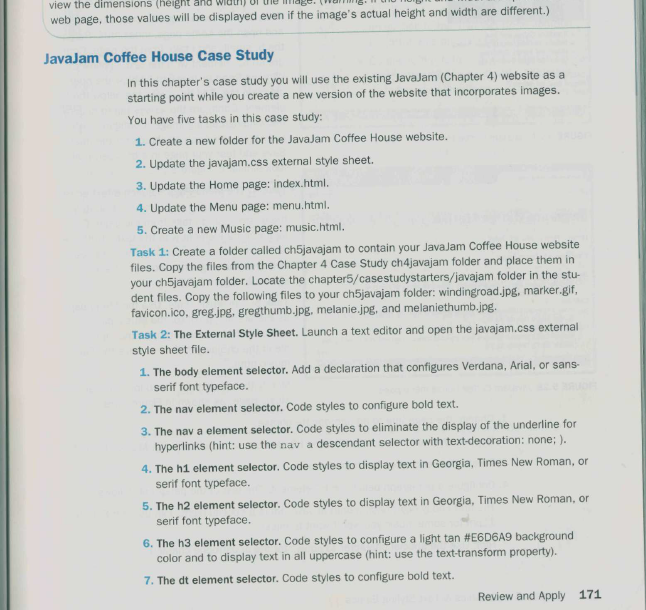
 can anyone give me the answer for Web Development & Design Foundations with HTML5 9th edition, chapter 5 javajam case study code.
the files until 4th chapter
code:
home.html
JavaJam House

Javajam Coffee House
Home
Menu
Music
Jobs
Following the Winding Road to JavaJam
Lorem Ipsum is simply dummy text of the printing and typesetting industry. Lorem Ipsum has been the industry's standard dummy text ever since the 1500s, when an unknown printer took a galley of type and scrambled it to make a type specimen book. It has survived not only five centuries, but also the leap into electronic typesetting, remaining essentially unchanged. It was popularised in the 1960s with the release of Letraset sheets containing Lorem Ipsum passages,
JavaJam Coffee House Features:
- Specialty Coffee and Tea
- Bagels, Muffins, and Organic Snacks
- Music and Poetry Readings
- Open Mic Night
123 Main Street
Mountain Home, CA 93923
1-888-555-5555
JavaJam Copyright 2013 Coffee House
Email:javajam@javajam.com
menu.html
JavaJam Coffee House
JavaJam Coffee House
|
|
Coffee at JavaJam
Indulge in our locally roasted free-trade coffee and enjoy the aroma, the smooth taste, the caffeine! Join our Mug Club and get a 10% discount on each cup of coffee you purchase ask the barista for details.
| Just Java
Regular house blend, decaffeinated coffee, or flavor of the day.
Endless Cup $2.00 Cafe au Lait
House blended coffee infused in to a smooth, steamed milk.
Single $2.00 Double $3.00 Iced Cappuccino
Sweetened espresso blended with icy-cold milk and served in a chilled glass.
Single $4.75 Double $5.75 |
Copyright 2016 JavaJam Coffee House
javaa@jam.com
create a web page
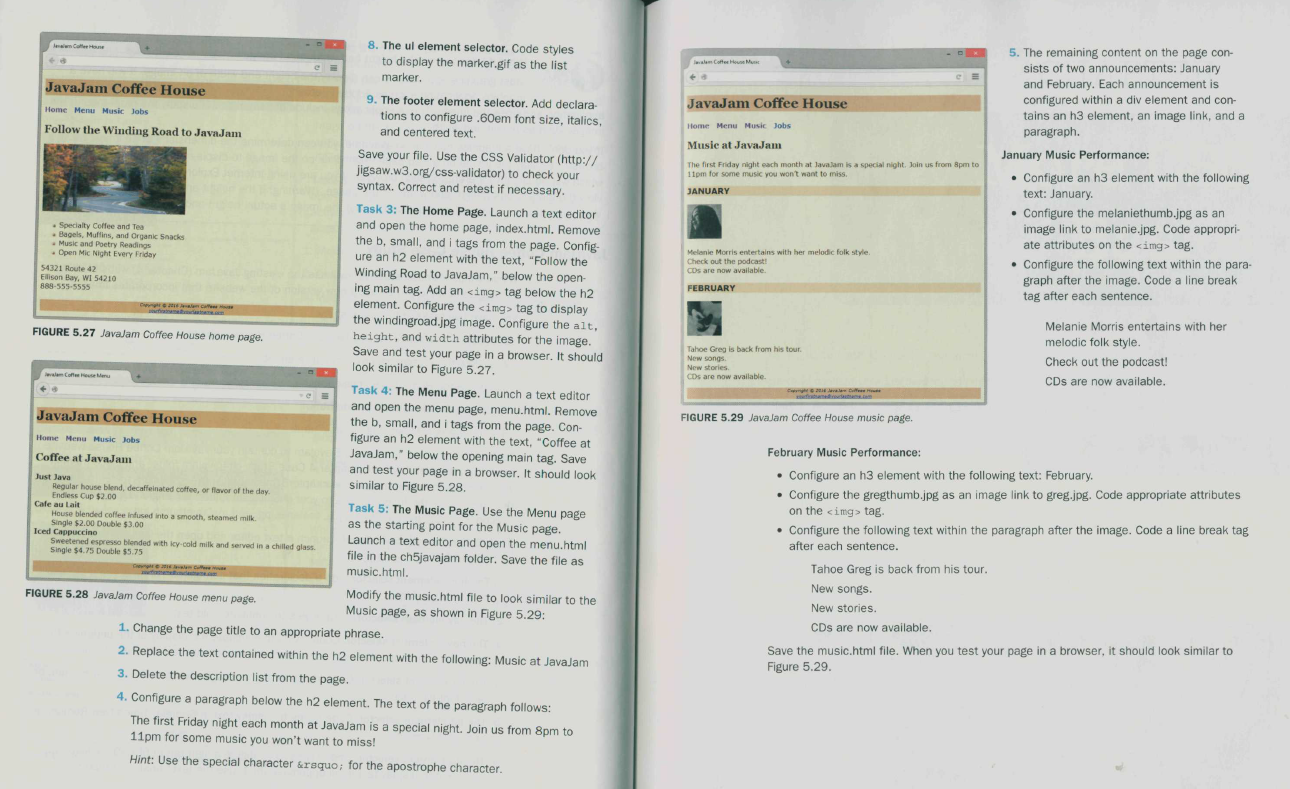
Ole view the dimensions (height and wil web page, those values will be displayed even if the image's actual height and width are different.) JavaJam Coffee House Case Study In this chapter's case study you will use the existing JavaJam (Chapter 4) website as a starting point while you create a new version of the website that incorporates images. You have five tasks in this case study: 1. Create a new folder for the JavaJam Coffee House website. 2. Update the javajam.css external style sheet. 3. Update the Home page: index.html. 4. Update the Menu page: menu.html. 5. Create a new Music page: music.html. Task 1: Create a folder called chSjavajam to contain your JavaJam Coffee House website files. Copy the files from the Chapter 4 Case Study ch4javajam folder and place them in your ch"javajam folder. Locate the chapter5/casestudystarters/javajam folder in the stu- dent files. Copy the following files to your ch5javajam folder: windingroad.jpg, marker.gif favicon.ico, greg.jpg, gregthumb.jpg, melanie.jpg, and melaniethumb.jpg. Task 2: The External Style Sheet. Launch a text editor and open the javajam.css external style sheet file. 1. The body element selector. Add a declaration that configures Verdana, Arial, or sans- serif font typeface. 2. The nav element selector. Code styles to configure bold text. 3. The nav a element selector. Code styles to eliminate the display of the underline for hyperlinks (hint: use the nav a descendant selector with text-decoration: none; ). 4. The hi element selector. Code styles to display text in Georgia, Times New Roman, or serif font typeface 5. The h2 element selector. Code styles to display text in Georgia, Times New Roman, or serif font typeface. 6. The h3 element selector. Code styles to configure a light tan #E6D6A9 background color and to display text in all uppercase (hint: use the text-transform property). 7. The dt element selector. Code styles to configure bold text. Review and Apply 171 om Coffee JavaJam Coffee House Home Menu Music Jobs Music at JavaJam The first Friday night each month at lavadam is a special night. Join us from 8pm to 11pm for some music you won't want to miss. JANUARY 5. The remaining content on the page con- sists of two announcements: January and February. Each announcement is configured within a div element and con- tains an h3 element, an image link, and a paragraph. January Music Performance: Configure an h3 element with the following text: January Configure the melaniethumb.jpg as an image link to melanie.jpg. Code appropri- ate attributes on the tag. Configure the following text within the para- graph after the image. Code a line break tag after each sentence. Melanie Morris entertains with her melodic folk style Check out the podcast! CDs are now available. FEBRUARY Tahoe Greg is back from his tour New songs New stories CDs are now available. Melanie Morris entertains with her melodic folk style. Check out the podcast! CDs are now available. 8. The ul element selector. Code styles to display the marker.gif as the list marker. JavaJam Coffee House 9. The footer element selector. Add declara- Home Menu Music Jobs tions to configure .60em font size, italics, Follow the Winding Road to JavaJam and centered text. Save your file. Use the CSS Validator (http:// jigsaw.w3.org/css-validator) to check your syntax. Correct and retest if necessary. Task 3: The Home Page. Launch a text editor and open the home page, index.html. Remove Specialty Coffee and Tea . Bagels, Muffins, and Organic Snacks the b, small, and i tags from the page. Config. . Music and Poetry Readings Open Mic Night Every Friday ure an h2 element with the text, "Follow the 54321 Route 42 Winding Road to Javajam," below the open- Eilison Bay, WI 54210 888-555-5555 ing main tag. Add an tag below the h2 element. Configure the tag to display Once the windingroad.jpg image. Configure the alt, FIGURE 5.27 JavaJam Coffee House home page. height, and width attributes for the image. Save and test your page in a browser. It should look similar to Figure 5.27. Task 4: The Menu Page. Launch a text editor and open the menu page, menu.html. Remove JavaJam Coffee House the b, small, and i tags from the page. Con figure an h2 element with the text, "Coffee at Home Menu Music Jobs JavaJam,' below the opening main tag. Save Coffee at JavaJam and test your page in a browser. It should look Just Java similar to Figure 5.28. Regular house blend, decaffeinated coffee, or flavor of the day Endless Cup $2.00 Cafe au Lait Task 5: The Music Page. Use the Menu page House blended coffee infused into a smooth, steamed milk Single $2.00 Double $3.00 as the starting point for the Music page. Iced Cappuccino Launch a text editor and open the menu.html Sweetened espresso blended with icy cold milk and served in a chilled glass Single $4.75 Double $5.75 file in the ch5javajam folder. Save the file as Gece music.html. FIGURE 5.28 Javalam Coffee House menu page. Modify the music.html file to look similar to the Music page, as shown in Figure 5.29: 1. Change the page title to an appropriate phrase. 2. Replace the text contained within the h2 element with the following: Music at Javalam 3. Delete the description list from the page. 4. Configure a paragraph below the h2 element. The text of the paragraph follows: The first Friday night each month at JavaJam is a special night. Join us from 8pm to 11pm for some music you won't want to miss! Hint: Use the special character ’ for the apostrophe character. FIGURE 5.29 JavaJam Coffee House music page. February Music Performance: Configure an h3 element with the following text: February. Configure the gregthumb.jpg as an image link to greg.jpg. Code appropriate attributes on the
tag. Configure the following text within the paragraph after the image. Code a line break tag after each sentence. Tahoe Greg is back from his tour. New songs. New stories. CDs are now available. Save the music.html file. When you test your page in a browser, it should look similar to Figure 5.29
Step by Step Solution
There are 3 Steps involved in it

Get step-by-step solutions from verified subject matter experts
 Study Help