







Question: hello . This assignment is from the book web development & design foundations with html5 from chapter 7 and page number363. can anyone give me
hello . This assignment is from the book web development & design foundations with html5 from chapter 7 and page number363. can anyone give me the answers please.i need the code to make both images of the book exactly the same. when the image is big it should look like the picture on the right(desktop browser) and when I click "restore down" it should look like the image on the left (smart phone display) please give me the correct answer. please ask me if you have any question. Thank you
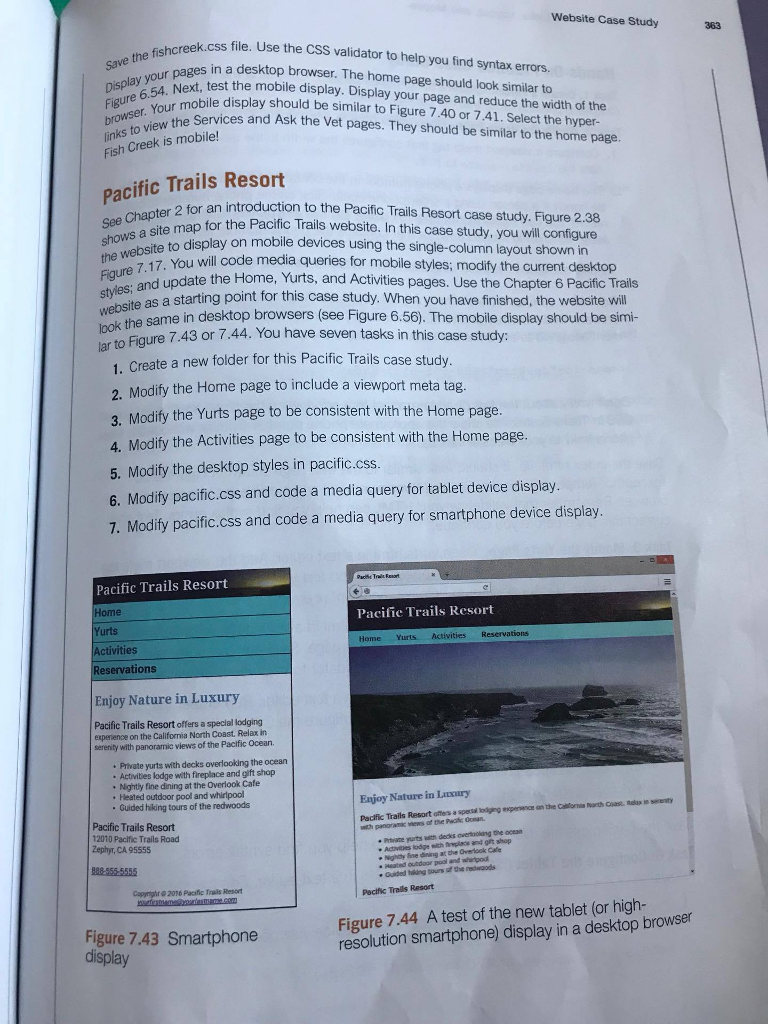
Website Case Study 363 e the fishcreek.css Use nisplay you ext, test the mobile display. Display your page and reduce the width of the k.css file. Use the CSS validator to help you find syntax errors. s in a desktop browser. The home page should look similar to links to view the Fish Creek is mcs Figure 6.54 Eigureur mobile display should be similar to Figure 7.40 or 7.41. Select the hyper- browser. lew the Services and Ask the Vet pages. They should be similar to the home page. Creek is mobile! Pacific Trails Resort er 2 for an introduction to the Pacific Trails Resort case study. Figure 2.38 for the Pacific Trails website. In this case study, you will configure play on mobile devices using the single-column layout shown in dis the website to the ou will code media queries for mobile styles; modify the current desktop 7. You te the Home, Yurts, and Activities pages. Use the Chapter 6 Pacific Trails ite as a starting point for this case study. When you have finished, the website will wei the same in desktop browsers (see Figure 6.56). The mobile display should be simi- ar to Figure 7.43 or 1. Create a new folder for this Pacific Trails case study. 2. Modify the Home page to include a viewport meta tag. 3. Modify the Yurts page to be consistent with the Home page 4. Modify the Activities page to be consistent with the Home page. 5. Modify the desktop styles in pacific.css. 6. Modify pacific.css and code a media query for tablet device display 7. Modify pacific.css and code a media query for smartphone device display Pacific Trails Resort Pacific Trails Resort Yurts Home Yurts Activities ities Reservations Enjoy Nature in Luxury Pacific Trails Resort offers a special lodging experience on the California North Coast. Relax in serenity with panoramic views of the Pacific Ocean. Private yurts with decks overlooking the ocean Activitles lodge with fireplace and gift shop . Nightly fine dining at the Overlook Cafe . Heated outdoor pool and whirlpool Guided hiking tours of the redwoods Enjoy Nature in Litxury Pacific Trails Resort 12010 Pacific Trails Road Zephyr, CA 95555 Pritvate yurts with decks overoolang the oces 85555555 Guided hiking tours af he redwaods Capyrighr @ 2016 Pacific Trails Resort Pocific Trells Resort Figure 7.44 A test of the new tablet (or high- resolution smartphone) display in a desktop browser Figure 7.43 Smartphone display Website Case Study 363 e the fishcreek.css Use nisplay you ext, test the mobile display. Display your page and reduce the width of the k.css file. Use the CSS validator to help you find syntax errors. s in a desktop browser. The home page should look similar to links to view the Fish Creek is mcs Figure 6.54 Eigureur mobile display should be similar to Figure 7.40 or 7.41. Select the hyper- browser. lew the Services and Ask the Vet pages. They should be similar to the home page. Creek is mobile! Pacific Trails Resort er 2 for an introduction to the Pacific Trails Resort case study. Figure 2.38 for the Pacific Trails website. In this case study, you will configure play on mobile devices using the single-column layout shown in dis the website to the ou will code media queries for mobile styles; modify the current desktop 7. You te the Home, Yurts, and Activities pages. Use the Chapter 6 Pacific Trails ite as a starting point for this case study. When you have finished, the website will wei the same in desktop browsers (see Figure 6.56). The mobile display should be simi- ar to Figure 7.43 or 1. Create a new folder for this Pacific Trails case study. 2. Modify the Home page to include a viewport meta tag. 3. Modify the Yurts page to be consistent with the Home page 4. Modify the Activities page to be consistent with the Home page. 5. Modify the desktop styles in pacific.css. 6. Modify pacific.css and code a media query for tablet device display 7. Modify pacific.css and code a media query for smartphone device display Pacific Trails Resort Pacific Trails Resort Yurts Home Yurts Activities ities Reservations Enjoy Nature in Luxury Pacific Trails Resort offers a special lodging experience on the California North Coast. Relax in serenity with panoramic views of the Pacific Ocean. Private yurts with decks overlooking the ocean Activitles lodge with fireplace and gift shop . Nightly fine dining at the Overlook Cafe . Heated outdoor pool and whirlpool Guided hiking tours of the redwoods Enjoy Nature in Litxury Pacific Trails Resort 12010 Pacific Trails Road Zephyr, CA 95555 Pritvate yurts with decks overoolang the oces 85555555 Guided hiking tours af he redwaods Capyrighr @ 2016 Pacific Trails Resort Pocific Trells Resort Figure 7.44 A test of the new tablet (or high- resolution smartphone) display in a desktop browser Figure 7.43 Smartphone display
Step by Step Solution
There are 3 Steps involved in it

Get step-by-step solutions from verified subject matter experts
 Study Help