







Question: Create a basic .html file and .js file for the lab. In the html file there should be a canvas sized 800 by 800. Create
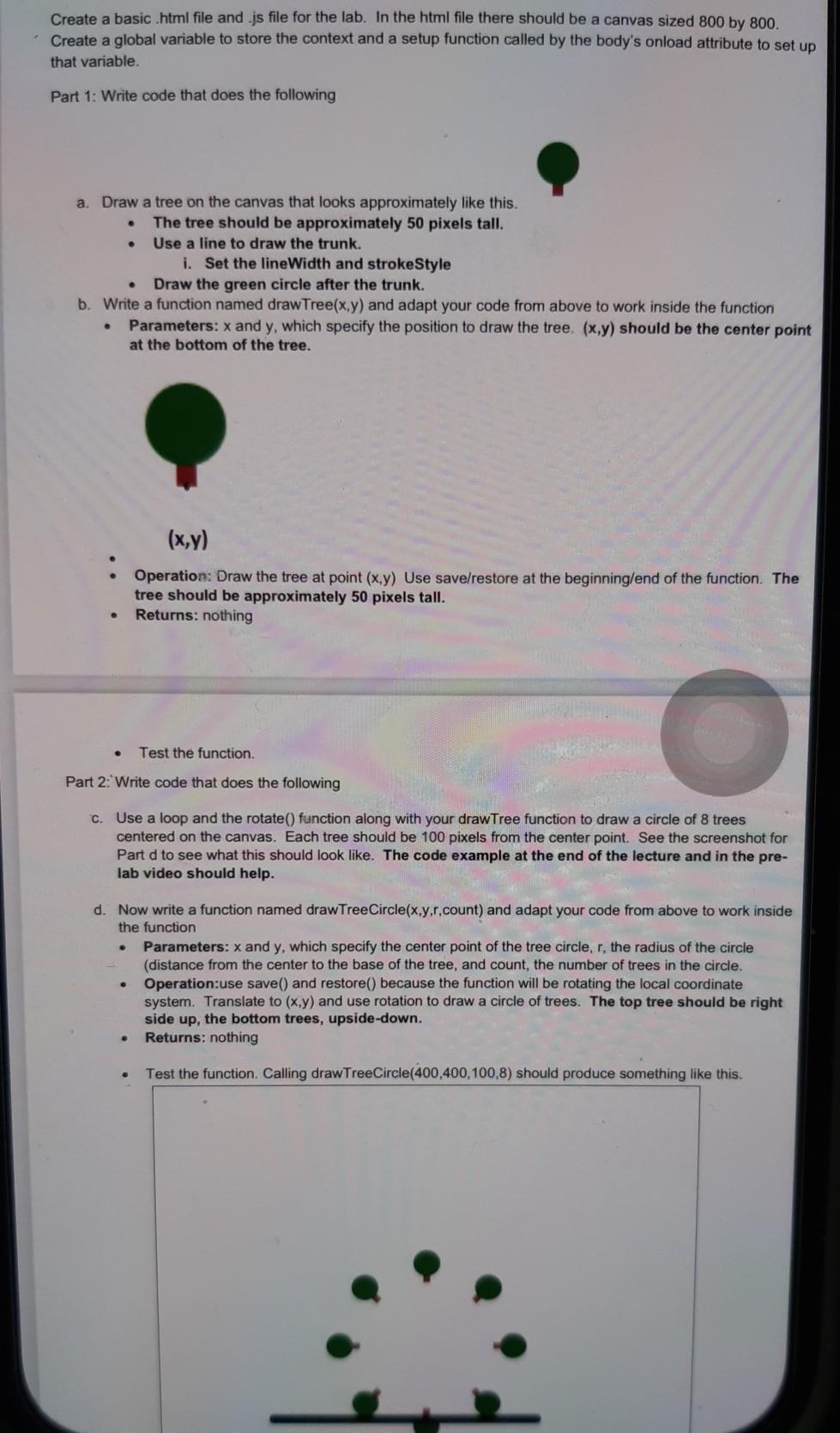
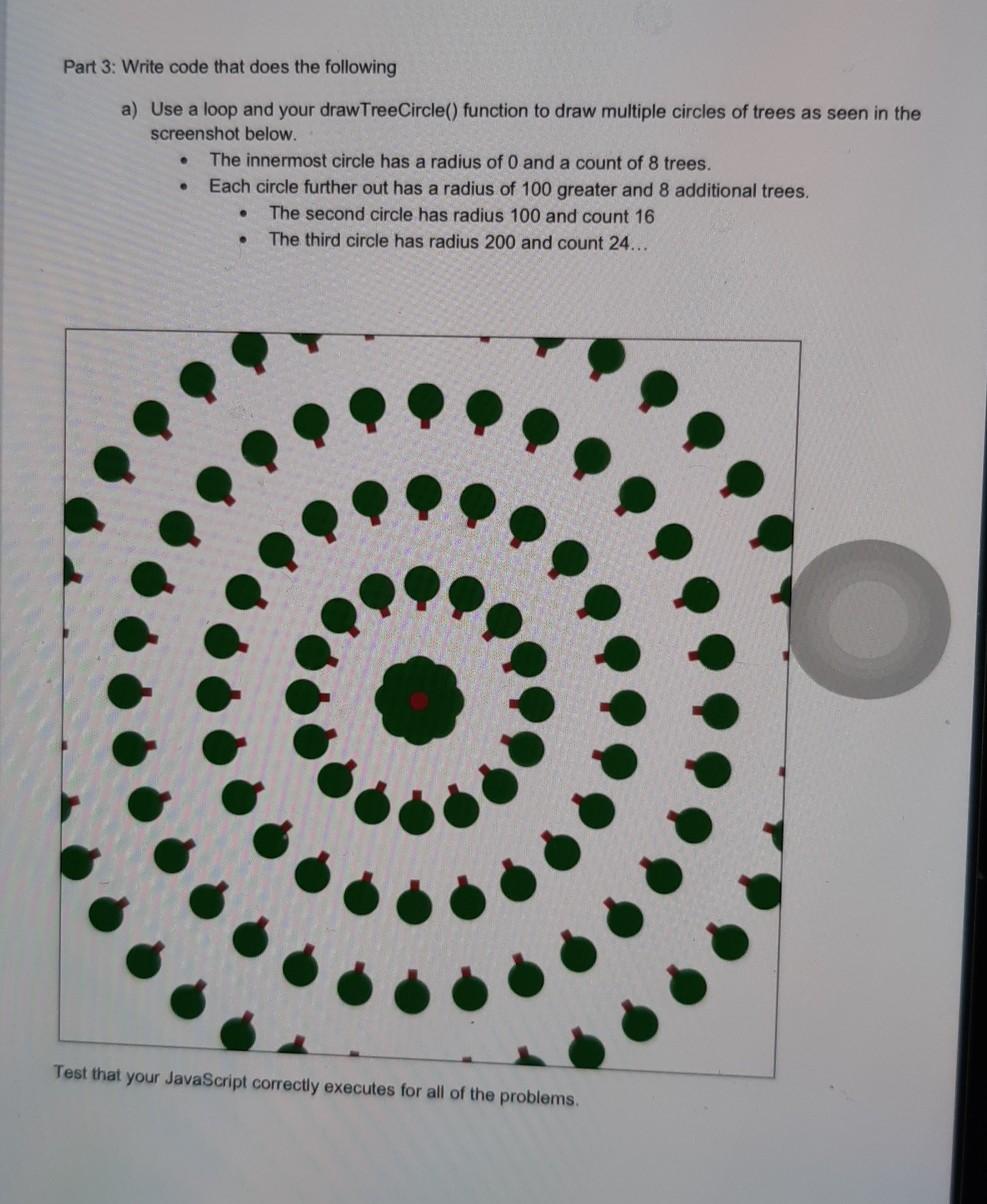
Create a basic .html file and .js file for the lab. In the html file there should be a canvas sized 800 by 800. Create a global variable to store the context and a setup function called by the body's onload attribute to set up that variable. Part 1: Write code that does the following a. Draw a tree on the canvas that looks approximately like this. The tree should be approximately 50 pixels tall. Use a line to draw the trunk. i. Set the lineWidth and strokeStyle Draw the green circle after the trunk. b. Write a function named draw Tree(x,y) and adapt your code from above to work inside the function Parameters: x and y, which specify the position to draw the tree (x,y) should be the center point at the bottom of the tree. : (x,y) Operation: Draw the tree at point (x,y) Use save/restore at the beginning/end of the function. The tree should be approximately 50 pixels tall. Returns: nothing . Test the function. Part 2: Write code that does the following C. Use a loop and the rotate() function along with your drawTree function to draw a circle of 8 trees centered on the canvas. Each tree should be 100 pixels from the center point. See the screenshot for Part d to see what this should look like. The code example at the end of the lecture and in the pre- lab video should help. d. Now write a function named draw TreeCircle(x,y,r,count) and adapt your code from above to work inside the function Parameters: x and y, which specify the center point of the tree circle, r, the radius of the circle (distance from the center to the base of the tree, and count, the number of trees in the circle. Operation:use save() and restore() because the function will be rotating the local coordinate system. Translate to (x,y) and use rotation to draw a circle of trees. The top tree should be right side up, the bottom trees, upside-down. Returns: nothing Test the function. Calling drawTreeCircle(400,400, 100,8) should produce something like this. Part 3: Write code that does the following a) Use a loop and your draw TreeCircle() function to draw multiple circles of trees as seen in the screenshot below. The innermost circle has a radius of O and a count of 8 trees. Each circle further out has a radius of 100 greater and 8 additional trees. The second circle has radius 100 and count 16 The third circle has radius 200 and count 24... Test that your JavaScript correctly executes for all of the problems. Create a basic .html file and .js file for the lab. In the html file there should be a canvas sized 800 by 800. Create a global variable to store the context and a setup function called by the body's onload attribute to set up that variable. Part 1: Write code that does the following a. Draw a tree on the canvas that looks approximately like this. The tree should be approximately 50 pixels tall. Use a line to draw the trunk. i. Set the lineWidth and strokeStyle Draw the green circle after the trunk. b. Write a function named draw Tree(x,y) and adapt your code from above to work inside the function Parameters: x and y, which specify the position to draw the tree (x,y) should be the center point at the bottom of the tree. : (x,y) Operation: Draw the tree at point (x,y) Use save/restore at the beginning/end of the function. The tree should be approximately 50 pixels tall. Returns: nothing . Test the function. Part 2: Write code that does the following C. Use a loop and the rotate() function along with your drawTree function to draw a circle of 8 trees centered on the canvas. Each tree should be 100 pixels from the center point. See the screenshot for Part d to see what this should look like. The code example at the end of the lecture and in the pre- lab video should help. d. Now write a function named draw TreeCircle(x,y,r,count) and adapt your code from above to work inside the function Parameters: x and y, which specify the center point of the tree circle, r, the radius of the circle (distance from the center to the base of the tree, and count, the number of trees in the circle. Operation:use save() and restore() because the function will be rotating the local coordinate system. Translate to (x,y) and use rotation to draw a circle of trees. The top tree should be right side up, the bottom trees, upside-down. Returns: nothing Test the function. Calling drawTreeCircle(400,400, 100,8) should produce something like this. Part 3: Write code that does the following a) Use a loop and your draw TreeCircle() function to draw multiple circles of trees as seen in the screenshot below. The innermost circle has a radius of O and a count of 8 trees. Each circle further out has a radius of 100 greater and 8 additional trees. The second circle has radius 100 and count 16 The third circle has radius 200 and count 24... Test that your JavaScript correctly executes for all of the problems
Step by Step Solution
There are 3 Steps involved in it

Get step-by-step solutions from verified subject matter experts
 Study Help