







Question: Create a Car class using the Car.java template file supplied. You have also been given our auto-grader (CarAutoGraderClient.java) which should give you feedback as to
Create a Car class using the Car.java template file supplied. You have also been
given our auto-grader (CarAutoGraderClient.java) which should give you feedback as to whether your
class is working properly; DO NOT CHANGE the auto-grader file. If you see errors in the auto-grader
code, it most likely means you misspelled a method name or mixed up the parameter order in your
Car.java file.
Your class must have the following instance variables and must have constructors and functions that
fulfill the API below.
NOTE: Be very careful when creating constructors and functions for the API. You
must use exact capitalization, parameter ordering and return types as seen in
the API (or our auto-grader client, which adheres to the API) will not be able to
access your class properly.
Instance Variables
private String carModel; // Car Model (e.g., "Honda Civic")
private double milesPerGallon; // Car's average mpg rating (e.g., 28.5)
private double gasTankSize; // Car's gas tank size, in gallons (e.g., 12.0)
private double gallonsInTank; // Gas (in gallons) remaining in gas tank (e.g., 9.2)
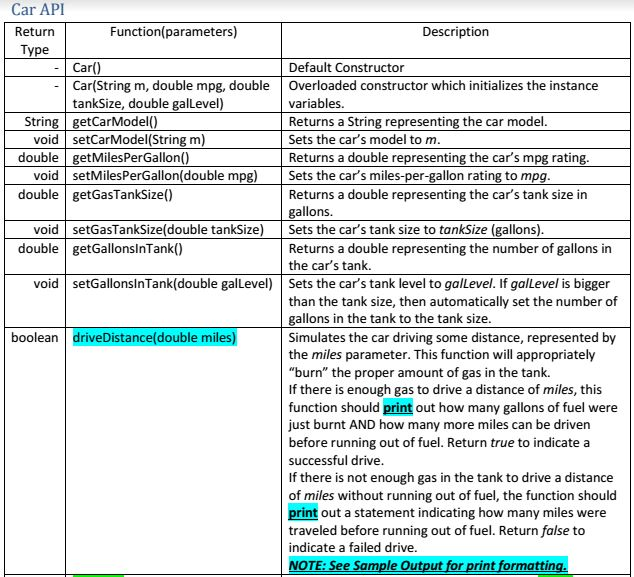
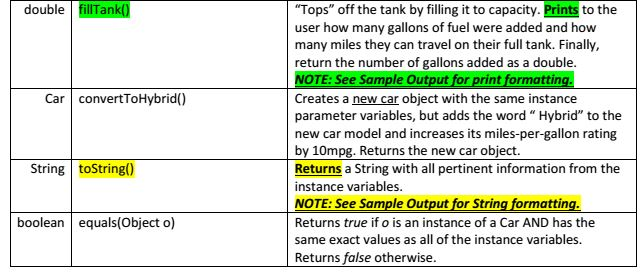
Car API Function (parameters) Description Default Constructor Car(String m, double mpg, double Overloaded constructor which initializes the instance tank Size, double galLevel variables String getCarModel Returns a string representing the car model void set CarModel(String m) Sets the can's model to m double get Miles Per Gallon Returns a double representing the cars mpg ratin void setMiles Per Gallon (double mpg) Sets the cars miles-per-gallon rating to mpg. double getGasTanksize() Returns a double representing the car's tank size in gallons void SetGasTankSize(double tankSizeD Sets the car's tank Size to tanksize (gallons). Returns a double representing the number of gallons in double getGallonslnTank() the car's tank void setGallonslnTank(double galLevel Sets the car's tank level to galLevel. If galLevel is bigger than the tank size, then automatically set the number of gallons in the tank to the tank size. boolean triveDistance(double miles Simulates the car driving some distance, represented by the miles parameter. This function will appropriately "burn" the proper amount of gas in the tank. If there is enough gas to drive a distance of miles, this function should print out how many gallons of fuel were just burnt AND how many more miles can be driven before running out of fuel. Return true to indicate a successful drive. If there is not enough gas in the tank to drive a distance of miles without running out of fuel, the function should print out a statement indicating how many miles were traveled before running out of fuel. Return false to indicate a failed drive. NOTE: See Sample output for print formatting. Car API Function (parameters) Description Default Constructor Car(String m, double mpg, double Overloaded constructor which initializes the instance tank Size, double galLevel variables String getCarModel Returns a string representing the car model void set CarModel(String m) Sets the can's model to m double get Miles Per Gallon Returns a double representing the cars mpg ratin void setMiles Per Gallon (double mpg) Sets the cars miles-per-gallon rating to mpg. double getGasTanksize() Returns a double representing the car's tank size in gallons void SetGasTankSize(double tankSizeD Sets the car's tank Size to tanksize (gallons). Returns a double representing the number of gallons in double getGallonslnTank() the car's tank void setGallonslnTank(double galLevel Sets the car's tank level to galLevel. If galLevel is bigger than the tank size, then automatically set the number of gallons in the tank to the tank size. boolean triveDistance(double miles Simulates the car driving some distance, represented by the miles parameter. This function will appropriately "burn" the proper amount of gas in the tank. If there is enough gas to drive a distance of miles, this function should print out how many gallons of fuel were just burnt AND how many more miles can be driven before running out of fuel. Return true to indicate a successful drive. If there is not enough gas in the tank to drive a distance of miles without running out of fuel, the function should print out a statement indicating how many miles were traveled before running out of fuel. Return false to indicate a failed drive. NOTE: See Sample output for print formatting
Step by Step Solution
There are 3 Steps involved in it

Get step-by-step solutions from verified subject matter experts
 Study Help