





Question: Create a database using microsoft access 2013 or above. . 1. Create the following two tables. (10 pts.) Create fields and their properties as follows.

Create a database using microsoft access 2013 or above. Create a database using microsoft access 2013 or
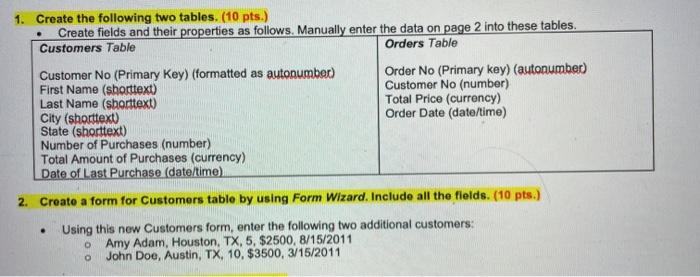
. 1. Create the following two tables. (10 pts.) Create fields and their properties as follows. Manually enter the data on page 2 into these tables. Customers Table Orders Table Customer No (Primary key) (formatted as autonumber) Order No (Primary key) (autonumber) First Name (shorttext) Customer No (number) Last Name (sborttext) Total Price (currency) City (shorttext) Order Date (date/time) State (shorttext) Number of Purchases (number) Total Amount of Purchases (currency) Date of Last Purchase (date/time) 2. Create a form for Customers table by using Form Wizard. Include all the fields. (10 pts.) Using this new Customers form, enter the following two additional customers: Amy Adam, Houston, TX, 5, $2500, 8/15/2011 O John Doe, Austin, TX, 10, $3500, 3/15/2011

Step by Step Solution

There are 3 Steps involved in it

1 Expert Approved Answer
Step: 1 Unlock blur-text-image

Question Has Been Solved by an Expert!

Get step-by-step solutions from verified subject matter experts

Step: 2 Unlock
Step: 3 Unlock

Students Have Also Explored These Related General Management Questions!