







Question: Create a Design Class Diagram based on the Use case description and design sequence diagram below for an expanded use case for the Diagram Editor
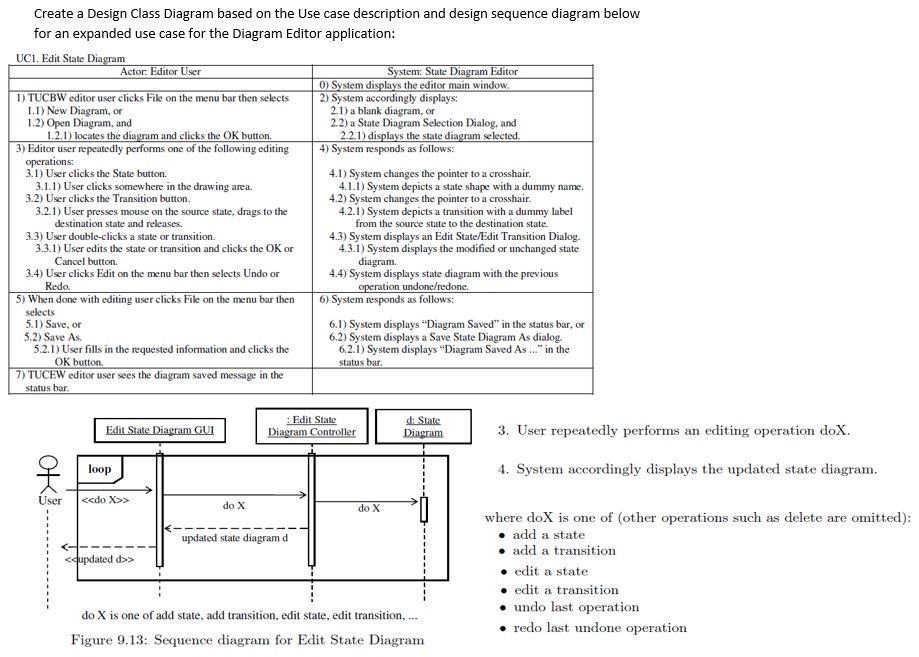
Create a Design Class Diagram based on the Use case description and design sequence diagram below for an expanded use case for the Diagram Editor application:
UC Edit State Diagram
System accordingly displays the updated state diagram.
where doX is one of other operations such as delete are omitted:
add a state
add a transition
edit a state
edit a transition
undo last operation
redo last undone operation
Figure : Sequence diagram for Edit State Diagram
Step by Step Solution
There are 3 Steps involved in it
1 Expert Approved Answer
Step: 1 Unlock

Question Has Been Solved by an Expert!
Get step-by-step solutions from verified subject matter experts
Step: 2 Unlock
Step: 3 Unlock
 Study Help