







Question: Create a flutter dart app create flutter app please In this assignment, you will develop a two-screen web app. First screen: Just like the first
Create a flutter dart app
create flutter app please
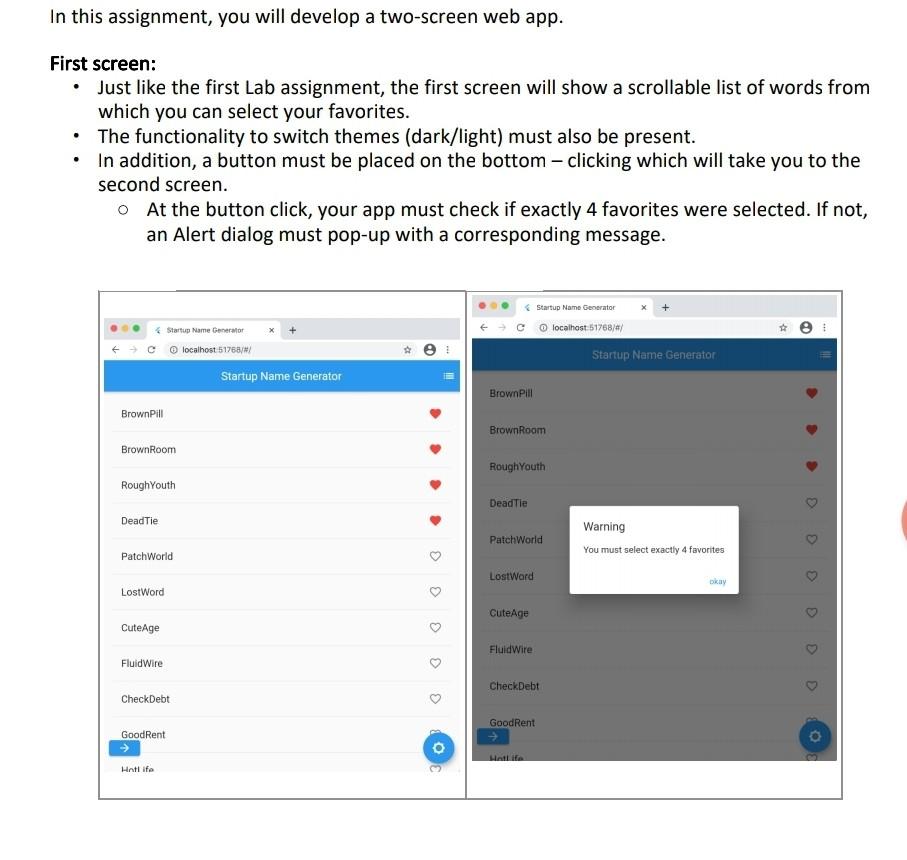
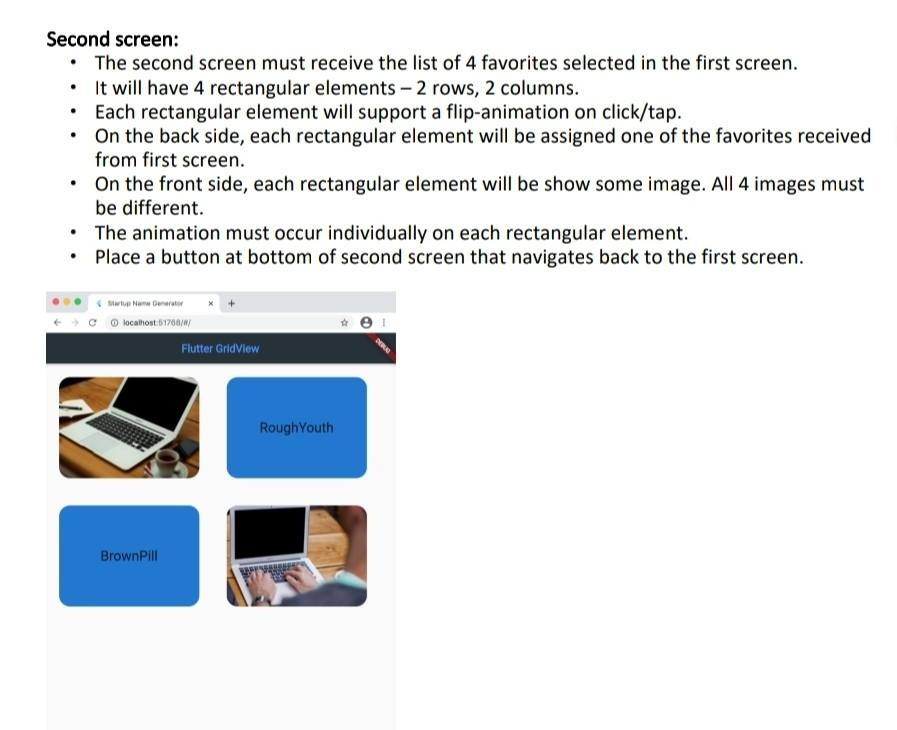
In this assignment, you will develop a two-screen web app. First screen: Just like the first Lab assignment, the first screen will show a scrollable list of words from which you can select your favorites. The functionality to switch themes (dark/light) must also be present. In addition, a button must be placed on the bottom clicking which will take you to the second screen. O At the button click, your app must check if exactly 4 favorites were selected. If not, an Alert dialog must pop-up with a corresponding message. Startup Name Generator localhost 51768/#/ Startup Name Generator localhost 51768/#/ Startup Name Generator A Startup Name Generator BrownPill BrownPill BrownRoom Brown Room RoughYouth RoughYouth Dead Tie Deadlie Patch World Warning You must select exactly 4 favorites PatchWorld LostWard LostWord CuteAge CuteAge FluidWire FluidWire CheckDebt CheckDebt GoodRent GoodRent 0 Hotlife Second screen: The second screen must receive the list of 4 favorites selected in the first screen. It will have 4 rectangular elements 2 rows, 2 columns. Each rectangular element will support a flip-animation on click/tap. On the back side, each rectangular element will be assigned one of the favorites received from first screen. On the front side, each rectangular element will be show some image. All 4 images must be different The animation must occur individually on each rectangular element. Place a button at bottom of second screen that navigates back to the first screen. Now Our 1 localhost:1877007 Flutter Grid View RoughYouth BrownPill In this assignment, you will develop a two-screen web app. First screen: Just like the first Lab assignment, the first screen will show a scrollable list of words from which you can select your favorites. The functionality to switch themes (dark/light) must also be present. In addition, a button must be placed on the bottom clicking which will take you to the second screen. O At the button click, your app must check if exactly 4 favorites were selected. If not, an Alert dialog must pop-up with a corresponding message. Startup Name Generator localhost 51768/#/ Startup Name Generator localhost 51768/#/ Startup Name Generator A Startup Name Generator BrownPill BrownPill BrownRoom Brown Room RoughYouth RoughYouth Dead Tie Deadlie Patch World Warning You must select exactly 4 favorites PatchWorld LostWard LostWord CuteAge CuteAge FluidWire FluidWire CheckDebt CheckDebt GoodRent GoodRent 0 Hotlife Second screen: The second screen must receive the list of 4 favorites selected in the first screen. It will have 4 rectangular elements 2 rows, 2 columns. Each rectangular element will support a flip-animation on click/tap. On the back side, each rectangular element will be assigned one of the favorites received from first screen. On the front side, each rectangular element will be show some image. All 4 images must be different The animation must occur individually on each rectangular element. Place a button at bottom of second screen that navigates back to the first screen. Now Our 1 localhost:1877007 Flutter Grid View RoughYouth BrownPill
Step by Step Solution
There are 3 Steps involved in it

Get step-by-step solutions from verified subject matter experts
 Study Help