







Question: Create a GUI as shown below. The left and right items are scrollpaned JTextAreas while a column of six JButtons are in the middle (starting
Create a GUI as shown below. The left and right items are scrollpaned JTextAreas while a column of six JButtons are in the middle (starting with the given code TextAreaDemo.java and TextAreaFrame.java would save you much time).
// Fig. 12.48: TextAreaDemo.java // Testing TextAreaFrame. import javax.swing.JFrame;
public class TextAreaDemo { public static void main(String[] args) { TextAreaFrame textAreaFrame = new TextAreaFrame(); textAreaFrame.setDefaultCloseOperation(JFrame.EXIT_ON_CLOSE); textAreaFrame.setSize(425, 200); textAreaFrame.setVisible(true); } } //
// Fig. 12.47: TextAreaFrame.java // Copying selected text from one textarea to another. import java.awt.event.ActionListener; import java.awt.event.ActionEvent; import javax.swing.Box; import javax.swing.JFrame; import javax.swing.JTextArea; import javax.swing.JButton; import javax.swing.JScrollPane;
public class TextAreaFrame extends JFrame { private final JTextArea textArea1; // displays demo string private final JTextArea textArea2; // highlighted text is copied here private final JButton copyJButton; // initiates copying of text
// no-argument constructor public TextAreaFrame() { super("TextArea Demo"); Box box = Box.createHorizontalBox(); // create box String demo = "This is a demo string to " + "illustrate copying text from one textarea to " + "another textarea using an external event ";
textArea1 = new JTextArea(demo, 10, 15); box.add(new JScrollPane(textArea1)); // add scrollpane
copyJButton = new JButton("Copy >>>"); box.add(copyJButton); // add copy button to box copyJButton.addActionListener( new ActionListener() // anonymous inner class { // set text in textArea2 to selected text from textArea1 @Override public void actionPerformed(ActionEvent event) { textArea2.setText(textArea1.getSelectedText()); } } // end anonymous inner class ); // end call to addActionListener
textArea2 = new JTextArea(10, 15); textArea2.setEditable(false); box.add(new JScrollPane(textArea2)); // add scrollpane
add(box); // add box to frame } // end TextAreaFrame constructor } // end class TextAreaFrame
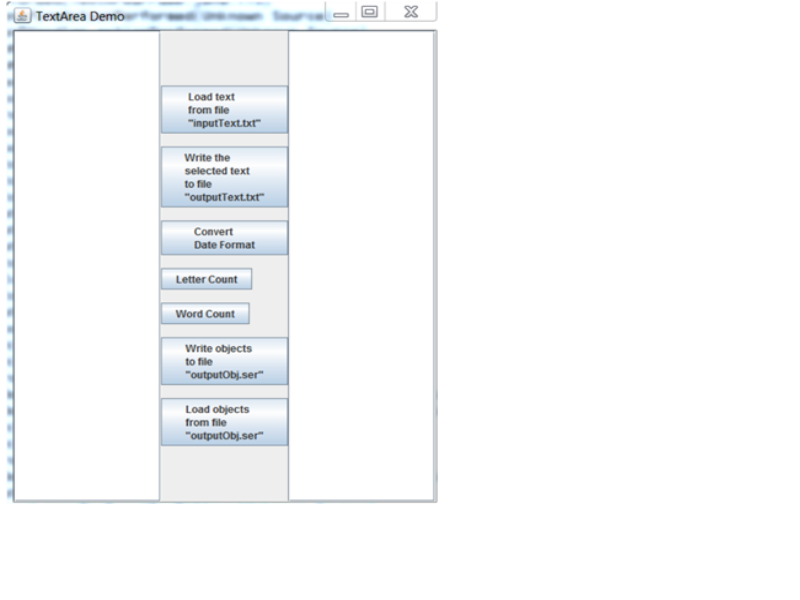
@TextArea Dermo,.---- ?1-XJ Load text from file inputText.txt Write the selected text to file "outputText.txt Convert Date Format Letter Count Word Count Write objects to file Load objects from file @TextArea Dermo,.---- ?1-XJ Load text from file inputText.txt Write the selected text to file "outputText.txt Convert Date Format Letter Count Word Count Write objects to file Load objects from file
Step by Step Solution
There are 3 Steps involved in it

Get step-by-step solutions from verified subject matter experts
 Study Help