







Question: Create a GUI Class with the following functionality. Please note placements of the items and their relative size. Develop a class called ConvertFrame that extends
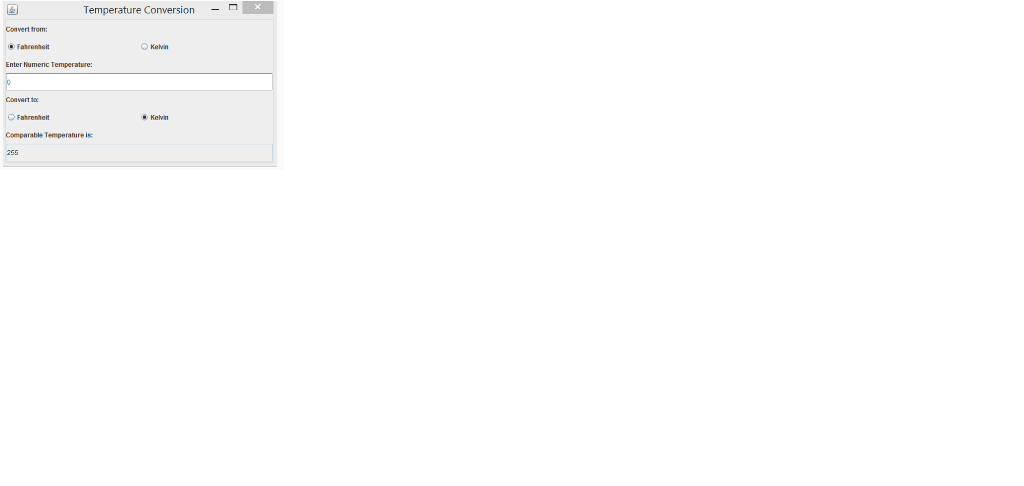
Create a GUI Class with the following functionality. Please note placements of the items and their relative size.
Develop a class called ConvertFrame that extends JFrame. ConvertFram will convert Fahrenheit to Kevin temperature scale or Kelvin to Fahrenheit as show on the image above. Ensure that one of the buttons on the "convert from" side and the "convert to" section is selected when the application starts up.
The buttons on the "covert from" choice must be mutually exclusive so only one button can be selected at a time. The same is true for the "convert to" choice.
Be sure to note placement and size of each as it is important to get all items the proper size and placement.
Pressing enter in the "Convert From" "Enter Numeric Temperature" Field should be used to trigger the conversation, however you can add a button to trigger the conversion if you wish.
Formulas
F to K is K = 5/9 x ( F - 32 ) + 273.15
K to F is F = 9/5 x ( K - 273.15 ) + 32
No need for import statements or comments.
Ensure you code works with the Convert class below
Since JLabels were not on the study guide, here is the code you will need to implement them.:
JLabel label = new JLabel( "Watch my background" );
JLabels may be added to a JFrame or JPanel as you would add a JButton to a JFrame or JPanel..
// Program converts temperatures. import javax.swing.JFrame; public class Convert { public static void main( String[] args ) { ConvertFrame convertFrame = new ConvertFrame(); convertFrame.setDefaultCloseOperation( JFrame.EXIT_ON_CLOSE ); convertFrame.setSize( 300, 220 ); // set frame size convertFrame.setVisible( true ); // display frame } // end main } // end class Convert
Question 4 options:
Step by Step Solution
There are 3 Steps involved in it

Get step-by-step solutions from verified subject matter experts
 Study Help