







Question: Create a GUI like the one shown on the right with the functionality described below. Remember, you want to add a JFrame form, and not
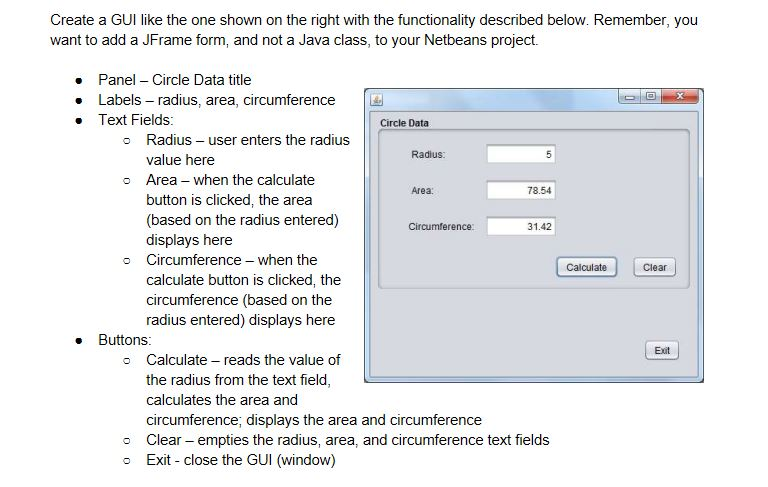
Create a GUI like the one shown on the right with the functionality described below. Remember, you want to add a JFrame form, and not a Java class, to your Netbeans project. Panel Circle Data title Labels radius, area, circumference Text Fields Circle Data o Radius user enters the radius Radius: value here Area - when the calculate button is clicked, the area (based on the radius entered) displays here o Area 78.54 31.42 o Circumference-when the Calculate Clear calculate button is clicked, the circumference (based on the radius entered) displays here Buttons Exit o Calculate reads the value of the radius from the text field calculates the area and circumference, displays the area and circumference o Clear- empties the radius, area, and circumference text fields o Exit close the GUI (window)
Step by Step Solution
There are 3 Steps involved in it

Get step-by-step solutions from verified subject matter experts
 Study Help