







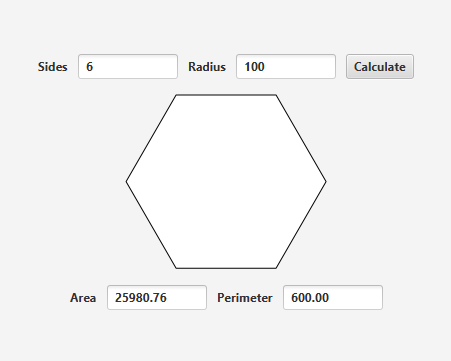
Question: Create a GUI on java that looks like Including this in the project import javafx.collections.ObservableList; import javafx.scene.layout.StackPane; import javafx.scene.paint.Color; import javafx.scene.shape.Polygon; public class UpdateablePolygon extends
Create a GUI on java that looks like
Including this in the project
import javafx.collections.ObservableList;
import javafx.scene.layout.StackPane;
import javafx.scene.paint.Color;
import javafx.scene.shape.Polygon;
public class UpdateablePolygon extends StackPane
private int sides;
private double radius;
public int getSides
return this.sides;
public double getRadius
return this.radius;
public UpdateablePolygon
thissetPrefSize;
this.radius ;
this.paint;
thissetStylefxbordercolor: black";
public void setSidesint sides
if sides
this.sides sides;
this.paint;
private void paint
this.getChildrenclear;
double centerX this.getWidth;
double centerY this.getHeight;
Polygon poly new Polygon;
poly.setFillColorWHITE;
poly.setStrokeColorBLACK;
ObservableList list poly.getPoints;
Add points to the polygon list
for int i ; i this.sides; i
list.addcenterX this.radius Math.cos i Math.PI this.sides;
list.addcenterY this.radius Math.sin i Math.PI this.sides;
this.getChildrenaddpoly;
Step by Step Solution
There are 3 Steps involved in it
1 Expert Approved Answer
Step: 1 Unlock

Question Has Been Solved by an Expert!
Get step-by-step solutions from verified subject matter experts
Step: 2 Unlock
Step: 3 Unlock
 Study Help