







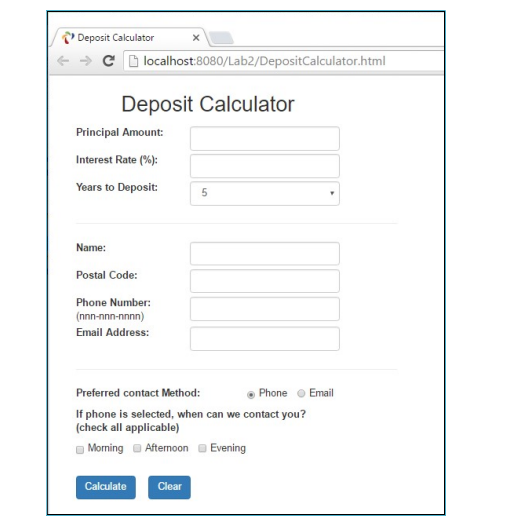
Question: . Create a HTML page, DepositCalculator . html When Calculate button is clicked, the form should be submitted to a PHP page, Deposit Calculator Principal
Create a HTML page, DepositCalculatorhtmlWhen Calculate button is clicked, the form should be submitted to a PHP page, Deposit Calculator
Principal Amount:
Interest Rate :
Years to Deposit:
Postal Code:
Phone Number:
nnnnnnnnnn
Email Address:
Preferred contact Method:
Phone
Email
If phone is selected, when can we contact you?
check all applicable
Afternoon
Evening
DepositCalculator.php
Write PHP page DepositCalculator.php which validate the data entered by the user according to
the following rules:
The user must enter data in all fields, no field can be blank.
Principal Amount must be numeric and greater than zero.
Interest Rate must be numeric and not negative.
Number of years to deposit must be a number from to selection from a dropdown list.
When a user select phone as hisher preferred contact method, heshe must select one or more
contact times morning afternoon andor evening
For now, we will accept any nonblank string entered in the fields of postal code, phone or email
as valid entries. We will learn how to validate a string against a particular format using Regular
Express in our next lecturelab
If the submitted form fails to pass the validation, DepositCalculatorphp display an error page
listing all rule violations in the submitted form. For example if the user submitted a form with the
data as show below
If the submitted form passes validation, DepositCalculatorphp calculates the interest payment
and the total amount for the number of years selected by the user and present the results to the
user in a page similar to the following one:
Step by Step Solution
There are 3 Steps involved in it
1 Expert Approved Answer
Step: 1 Unlock

Question Has Been Solved by an Expert!
Get step-by-step solutions from verified subject matter experts
Step: 2 Unlock
Step: 3 Unlock
 Study Help