







Question: Create a java class called RefisterFrame that extends the JFrame class. The RegisterFrame class must contains the GUI components shown in the figure below. Register
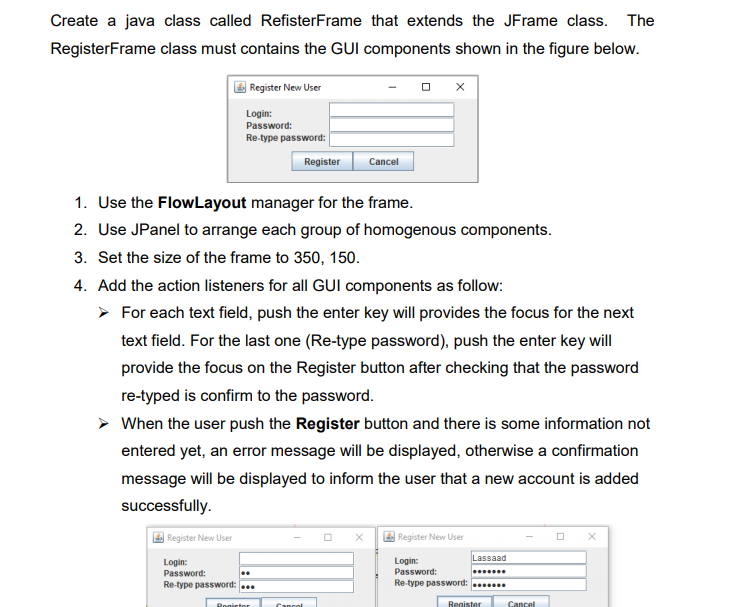
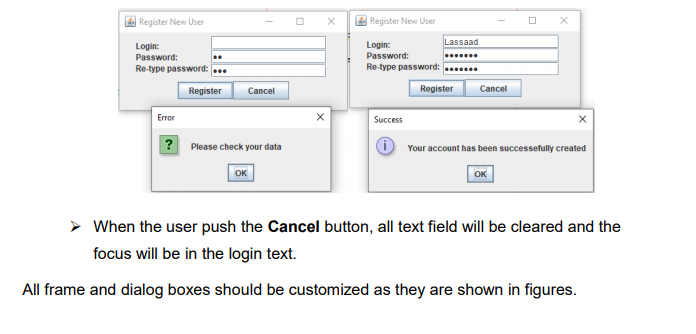
Create a java class called RefisterFrame that extends the JFrame class. The RegisterFrame class must contains the GUI components shown in the figure below. Register New User Login: Password: Re-type password: Register Cancel 1. Use the FlowLayout manager for the frame. 2. Use JPanel to arrange each group of homogenous components. 3. Set the size of the frame to 350, 150. 4. Add the action listeners for all GUI components as follow: For each text field, push the enter key will provides the focus for the next text field. For the last one (Re-type password), push the enter key will provide the focus on the Register button after checking that the password re-typed is confirm to the password. When the user push the Register button and there is some information not entered yet, an error message will be displayed, otherwise a confirmation message will be displayed to inform the user that a new account is added successfully. Register New User Register New User Login: Password: Re-type password: .. Login: Lassaad Password: Re-type password: *** Ronitor Canal Register Cancel Register New User Register New User Login: Password: Re-type password: ... Register Login: Lassaad Password: Retype password: Cancel Register Cancel Error ? Please check your data Success 0 Your account has been successefully created OK OK When the user push the Cancel button, all text field will be cleared and the focus will be in the login text. All frame and dialog boxes should be customized as they are shown in figures
Step by Step Solution
There are 3 Steps involved in it

Get step-by-step solutions from verified subject matter experts
 Study Help