







Question: Create a Java Eclipse Program with the following information provided. Description: For this homework, you will revise and improve Ris from your previous homework in
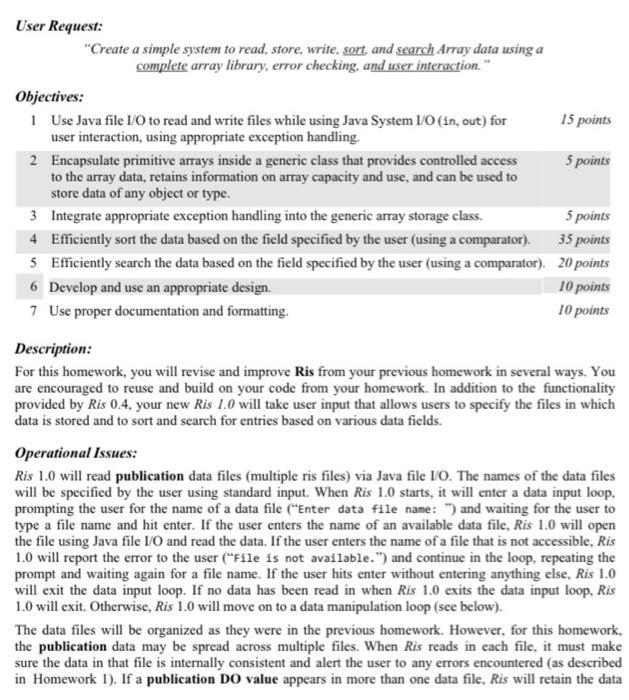
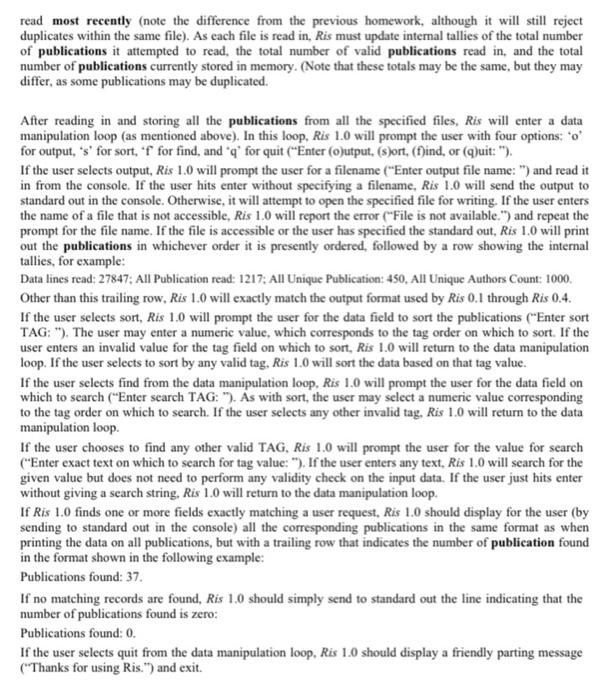
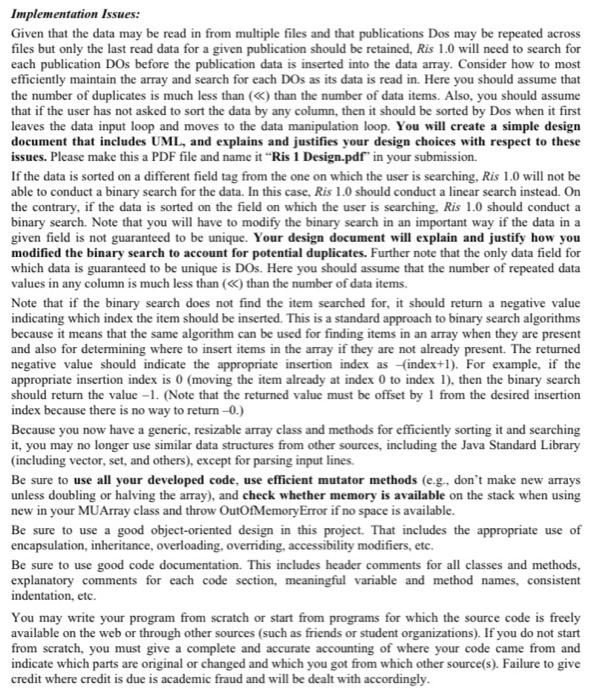
Description: For this homework, you will revise and improve Ris from your previous homework in several ways. You are encouraged to reuse and build on your code from your homework. In addition to the functionality provided by Ris 0.4 , your new Ris 1.0 will take user input that allows users to specify the files in which data is stored and to sort and search for entries based on various data fields. Operational Issues: Ris 1.0 will read publication data files (multiple ris files) via Java file I/O. The names of the data files will be specified by the user using standard input. When Ris 1.0 starts, it will enter a data input loop, prompting the user for the name of a data file ("Enter data file name: ") and waiting for the user to type a file name and hit enter. If the user enters the name of an available data file, Ris 1.0 will open the file using Java file VO and read the data. If the user enters the name of a file that is not accessible, Ris 1.0 will report the error to the user ("File is not available.") and continue in the loop, repeating the prompt and waiting again for a file name. If the user hits enter without entering anything else, Ris 1.0 will exit the data input loop. If no data has been read in when Ris 1.0 exits the data input loop, Ris 1.0 will exit. Otherwise, Ris 1.0 will move on to a data manipulation loop (see below). The data files will be organized as they were in the previous homework. However, for this homework the publication data may be spread across multiple files. When Ris reads in each file, it must make sure the data in that file is internally consistent and alert the user to any errors encountered (as described in Homework 1). If a publication DO value appears in more than one data file, Ris will retain the dat read most recently (note the difference from the previous homework, although it will still reject duplicates within the same file). As each file is read in, Ris must update internal tallies of the total number of publications it attempted to read, the total number of valid publications read in, and the total number of publications currently stored in memory. (Note that these totals may be the same, but they may differ, as some publications may be duplicated. After reading in and storing all the publications from all the specified files, Ris will enter a data manipulation loop (as mentioned above). In this loop, Ris 1.0 will prompt the user with four options: ' o ' for output, 's' for sort, ' f ' for find, and ' q ' for quit ("Enter (o)utput, (s)ort, (f)ind, or (q)uit: "). If the user selects output, Ris 1.0 will prompt the user for a filename ("Enter output file name: ") and read it in from the console. If the user hits enter without specifying a filename, Ris 1.0 will send the output to standard out in the console. Otherwise, it will attempt to open the specified file for writing. If the user enters the name of a file that is not accessible, Ris 1.0 will report the error ("File is not available.") and repeat the prompt for the file name. If the file is accessible or the user has specified the standard out, Ris 1.0 will print out the publications in whichever order it is presently ordered, followed by a row showing the internal tallies, for example: Data lines read: 27847: All Publication read: 1217; All Unique Publication: 450, All Unique Authors Count: 1000. Other than this trailing row, Ris 1.0 will exactly match the output format used by Ris 0.1 through Ris 0.4 . If the user selects sort, Ris 1.0 will prompt the user for the data field to sort the publications ("Enter sort TAG: "). The user may enter a numeric value, which corresponds to the tag order on which to sort. If the user enters an invalid value for the tag field on which to sort, Ris 1.0 will return to the data manipulation loop. If the user selects to sort by any valid tag, Ris 1.0 will sort the data based on that tag value. If the user selects find from the data manipulation loop, Ris 1.0 will prompt the user for the data field on which to search ("Enter search TAG: "). As with sort, the user may select a numeric value corresponding to the tag order on which to search. If the user selects any other invalid tag. Ris 1.0 will return to the data manipulation loop. If the user chooses to find any other valid TAG, Ris 1.0 will prompt the user for the value for search ("Enter exact text on which to search for tag value: "). If the user enters any text, Ris 1.0 will search for the given value but does not need to perform any validity check on the input data. If the user just hits enter without giving a search string, Ris 1.0 will return to the data manipulation loop. If Ris 1.0 finds one or more fields exactly matching a user request, Ris 1.0 should display for the user (by sending to standard out in the console) all the corresponding publications in the same format as when printing the data on all publications, but with a trailing row that indicates the number of publication found in the format shown in the following example: Publications found: 37. If no matching records are found, Ris 1.0 should simply send to standard out the line indicating that the number of publications found is zero: Publications found: 0 . If the user selects quit from the data manipulation loop, Ris 1.0 should display a friendly parting message ("Thanks for using Ris.") and exit. Implementation Issues: Given that the data may be read in from multiple files and that publications Dos may be repeated across files but only the last read data for a given publication should be retained, Ris 1.0 will need to search for each publication DOs before the publication data is inserted into the data array. Consider how to most efficiently maintain the array and search for each DOs as its data is read in. Here you should assume that the number of duplicates is much less than () than the number of data items. Also, you should assume that if the user has not asked to sort the data by any column, then it should be sorted by Dos when it first leaves the data input loop and moves to the data manipulation loop. You will create a simple design document that includes UML, and explains and justifies your design choices with respect to these issues. Please make this a PDF file and name it "Ris 1 Design.pdf" in your submission. If the data is sorted on a different field tag from the one on which the user is searching, Ris 1.0 will not be able to conduct a binary search for the data. In this case, Ris 1.0 should conduct a linear search instead. On the contrary, if the data is sorted on the field on which the user is searching. Ris 1.0 should conduct a binary search. Note that you will have to modify the binary search in an important way if the data in a given field is not guaranteed to be unique. Your design document will explain and justify how you modified the binary search to account for potential duplicates. Further note that the only data field for which data is guaranteed to be unique is DOs. Here you should assume that the number of repeated data values in any column is much less than () than the number of data items. Note that if the binary search does not find the item searched for, it should return a negative value indicating which index the item should be inserted. This is a standard approach to binary search algorithms because it means that the same algorithm can be used for finding items in an array when they are present and also for determining where to insert items in the array if they are not already present. The returned negative value should indicate the appropriate insertion index as - (index +1 ). For example, if the appropriate insertion index is 0 (moving the item already at index 0 to index 1), then the binary search should return the value -1 . (Note that the returned value must be offset by 1 from the desired insertion index because there is no way to return -0 .) Because you now have a generic, resizable array class and methods for efficiently sorting it and searching it, you may no longer use similar data structures from other sources, including the Java Standard Library (including vector, set, and others), except for parsing input lines. Be sure to use all your developed code, use efficient mutator methods (e.g., don't make new arrays unless doubling or halving the array), and check whether memory is available on the stack when using new in your MUArray class and throw OutOfMemoryError if no space is available. Be sure to use a good object-oriented design in this project. That includes the appropriate use of encapsulation, inheritance, overloading, overriding, accessibility modifiers, etc. Be sure to use good code documentation. This includes header comments for all classes and methods, explanatory comments for each code section, meaningful variable and method names, consistent indentation, etc. You may write your program from scratch or start from programs for which the source code is freely available on the web or through other sources (such as friends or student organizations). If you do not start from seratch, you must give a complete and accurate accounting of where your code came from and indicate which parts are original or changed and which you got from which other source(s). Failure to give credit where credit is due is academic fraud and will be dealt with accordingly
Step by Step Solution
There are 3 Steps involved in it

Get step-by-step solutions from verified subject matter experts
 Study Help