







Question: Create a JAVA GUI In the first frame theres a two-button in the center called student and the other one was teacher When you click
Create a JAVA GUI
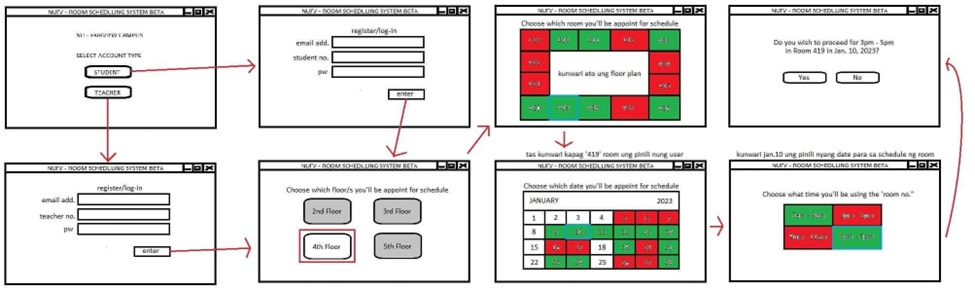
In the first frame theres a two-button in the center called student and the other one was teacher
When you click the student button it will direct to another frame called log-in and registration frame and there is a email address, student no, password
And when you click the teacher button it will also go direct into the other frame called log-in and registration frame and there is an email address, teacher no and password.
After log-in/registration frame it will go to other frame and theres a 4 button asking what floor they want to appoint for schedule
After choosing floors it will go again to other frame asking what room they want to appoint their schedule
And after choosing room another frame with calendar asking what date they want to appoint for schedule
After choosing the date theres another frame asking what time will use the room no.
And after choosing what time it will go to another frame saying do you wish to process (choose time) In room (room choose) in (Date choose) then theres a button yes or no
And if they choose yes another frame will show with message Youll successfully appointed the room
And if they choose no another frame will show with message Registration failed please try again
Check the picture below for reference
Step by Step Solution
There are 3 Steps involved in it

Get step-by-step solutions from verified subject matter experts
 Study Help