







Question: Create a Javascript enabled web page (using an external Javascript file) to build a form containing a random number of input text boxes, enabling the
Create a Javascript enabled web page (using an external Javascript file) to build a form containing a random number of input text boxes, enabling the user to enter a value in each text box. Once entered, the user should click a button to calculate the mean, median and mode of all numbers entered and display the result in a message displayed at the bottom of the form, using the document object model for all interaction between the HTML and JavaScript files. A sample of the form might appear as below: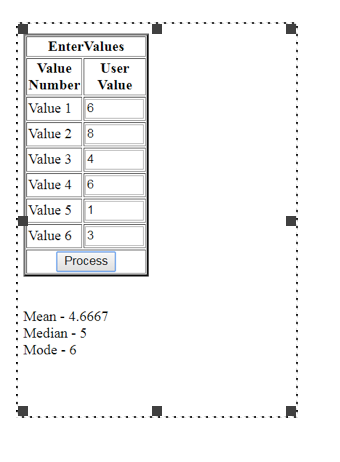
Attached BELOW is an onLoad function code provided by the professor which will produce the randomly generated form. The professor wants us to process the form using repetition and selection logic to produce the results in dynamic response to the form and the user input.
function fn_onLoad()
{
var rndNum;
var strHTML;
var intRows;
rndNum = Math.floor(Math.random() * 11); // returns a random integer from 0 to 10
strHTML = "
";
document.getElementById("frm_Input").innerHTML = strHTML;
}
EnterValues ValueUser Number Value Value 16 Value 2 8 Value 34 Value 4 6 Value 51 Value 6 3 Process Mean 4.6667 : Median 5 : Mode 6
Step by Step Solution
There are 3 Steps involved in it

Get step-by-step solutions from verified subject matter experts
 Study Help