







Question: Create a Matlab Live Script called Sparsity_Check_.mlx containing a local function named sparsity_check. Such function is required to check whether a given matrix is sparse
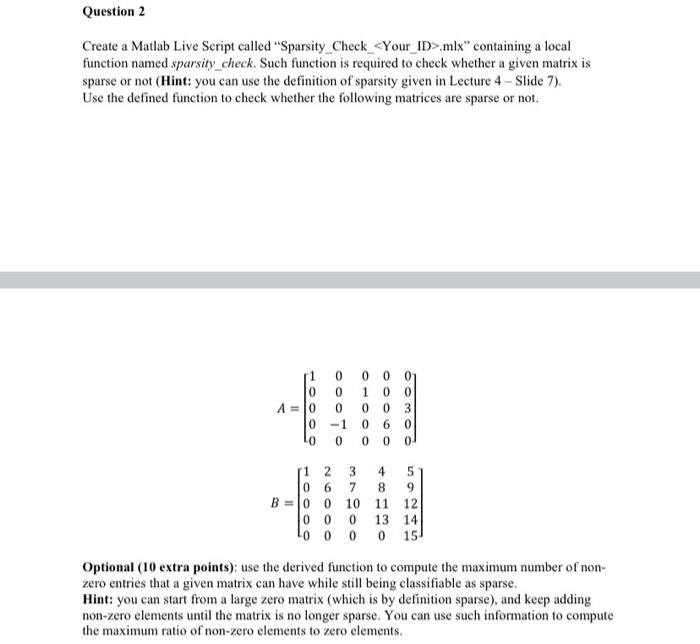
Create a Matlab Live Script called "Sparsity_Check_.mlx" containing a local function named sparsity_check. Such function is required to check whether a given matrix is sparse or not (Hint: you can use the definition of sparsity given in Lecture 4 - Slide 7). Use the defined function to check whether the following matrices are sparse or not. AB=1000000010010000006000300=1000026000371000481113059121415 Optional (10 extra points): use the derived function to compute the maximum number of nonzero entries that a given matrix can have while still being classifiable as sparse. Hint: you can start from a large zero matrix (which is by definition sparse), and keep adding non-zero elements until the matrix is no longer sparse. You can use such information to compute the maximum ratio of non-zero elements to zero elements
Step by Step Solution
There are 3 Steps involved in it

Get step-by-step solutions from verified subject matter experts
 Study Help