







Question: Posted first part since code from jord must be used in the second part In Exercise 1, part (1), you have created Jordan Block matrix
 Posted first part since code from jord must be used in the second part
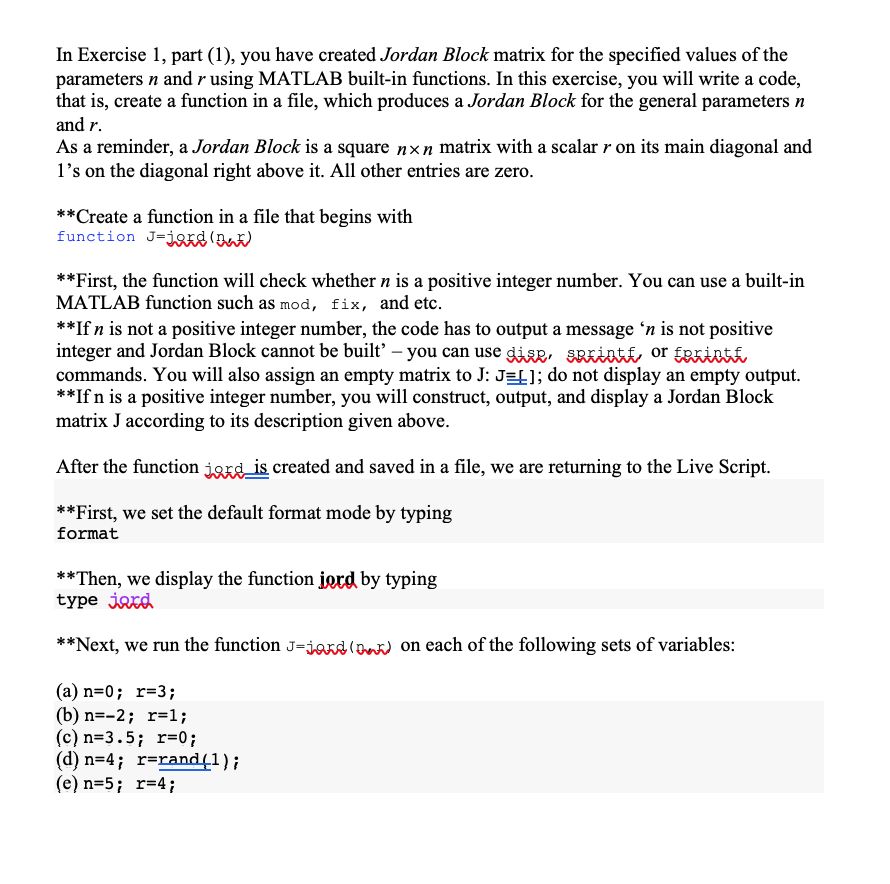
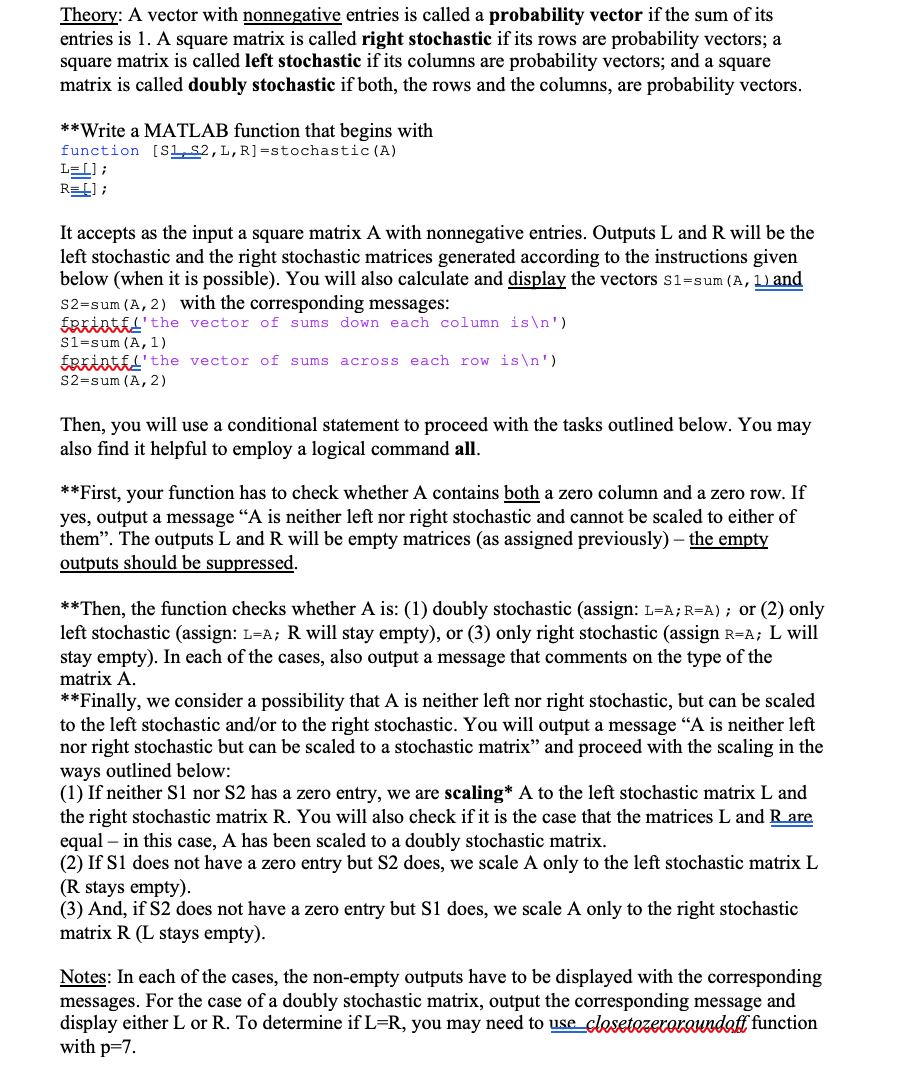
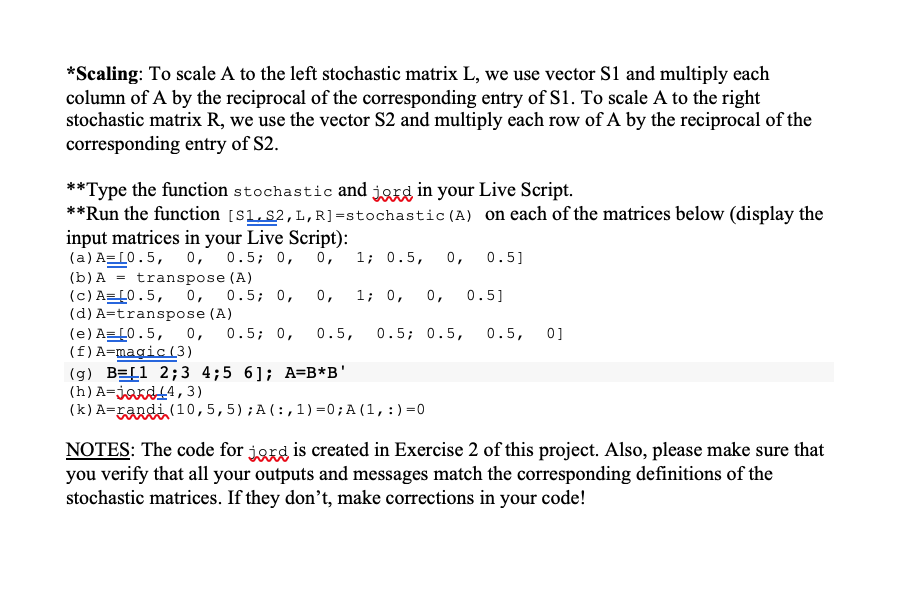
In Exercise 1, part (1), you have created Jordan Block matrix for the specified values of the parameters n and r using MATLAB built-in functions. In this exercise, you will write a code, that is, create a function in a file, which produces a Jordan Block for the general parameters n and r. As a reminder, a Jordan Block is a square nxn matrix with a scalar r on its main diagonal and l's on the diagonal right above it. All other entries are zero. **Create a function in a file that begins with function J=jord (net) **First, the function will check whether n is a positive integer number. You can use a built-in MATLAB function such as mod, fix, and etc. **If n is not a positive integer number, the code has to output a message 'n is not positive integer and Jordan Block cannot be built' - you can use dis, sprintif, or Eprintif commands. You will also assign an empty matrix to J: Jar]; do not display an empty output. **If n is a positive integer number, you will construct, output, and display a Jordan Block matrix J according to its description given above. After the function jord is created and saved in a file, we are returning to the Live Script. **First, we set the default format mode by typing format **Then, we display the function jord by typing type jard **Next, we run the function Jjardinta on each of the following sets of variables: (a) n=0; r=3; (b) n=-2; r=1; (C) n=3.5; r=0; (d) n=4; r=randti); (e) n=5; r=4; Theory: A vector with nonnegative entries is called a probability vector if the sum of its entries is 1. A square matrix is called right stochastic if its rows are probability vectors; a square matrix is called left stochastic if its columns are probability vectors, and a square matrix is called doubly stochastic if both, the rows and the columns, are probability vectors. **Write a MATLAB function that begins with function (S1,S2,L,R]=stochastic (A) L=1); REL]; It accepts as the input a square matrix A with nonnegative entries. Outputs L and R will be the left stochastic and the right stochastic matrices generated according to the instructions given below (when it is possible). You will also calculate and display the vectors Sl=sum (A, 1) and S2=sum (A, 2) with the corresponding messages: Errintfl'the vector of sums down each column is ') Sl=sum (A,1) Eprintiff' the vector of sums across each row is ') S2=sum (A, 2) Then, you will use a conditional statement to proceed with the tasks outlined below. You may also find it helpful to employ a logical command all. **First, your function has to check whether A contains both a zero column and a zero row. If yes, output a message "A is neither left nor right stochastic and cannot be scaled to either of them". The outputs L and R will be empty matrices (as assigned previously) - the empty outputs should be suppressed. **Then, the function checks whether A is: (1) doubly stochastic (assign: L=A; R=A); or (2) only left stochastic (assign: L=A; R will stay empty), or (3) only right stochastic (assign R=A; L will stay empty). In each of the cases, also output a message that comments on the type of the matrix A. **Finally, we consider a possibility that A is neither left nor right stochastic, but can be scaled to the left stochastic and/or to the right stochastic. You will output a message "A is neither left nor right stochastic but can be scaled to a stochastic matrix" and proceed with the scaling in the ways outlined below: (1) If neither S1 nor S2 has a zero entry, we are scaling* A to the left stochastic matrix L and the right stochastic matrix R. You will also check if it is the case that the matrices L and Rare equal in this case, A has been scaled to a doubly stochastic matrix. (2) If S1 does not have a zero entry but S2 does, we scale A only to the left stochastic matrix L (R stays empty). (3) And, if S2 does not have a zero entry but Si does, we scale A only to the right stochastic matrix R (L stays empty). Notes: In each of the cases, the non-empty outputs have to be displayed with the corresponding messages. For the case of a doubly stochastic matrix, output the corresponding message and display either L or R. To determine if L=R, you may need to use_clesetezeroroundoff function with p=7. *Scaling: To scale A to the left stochastic matrix L, we use vector S1 and multiply each column of A by the reciprocal of the corresponding entry of S1. To scale A to the right stochastic matrix R, we use the vector S2 and multiply each row of A by the reciprocal of the corresponding entry of S2. **Type the function stochastic and jord in your Live Script. **Run the function (S1,S2,L,R]=stochastic(A) on each of the matrices below (display the input matrices in your Live Script): (a) A=(0.5, 0, 0.5; 0, 0, 1; 0.5, 0, 0.5] (b) A = transpose (A) (c) A={0.5, 0, 0.5; 0, 0, 1; 0, 0, 0.5] (d) A=transpose (A) (e) A=0.5, 0, 0.5; 0, 0.5, 0.5; 0.5, 0.5, 0] (f) A=magic (3) (g) BEL1 2;3 4;5 6); A=B*B' (h) A-jard44,3) (k) A=randi (10,5,5);A(:,1)=0; A(1,:)=0 NOTES: The code for jord is created in Exercise 2 of this project. Also, please make sure that you verify that all your outputs and messages match the corresponding definitions of the stochastic matrices. If they don't, make corrections in your code! In Exercise 1, part (1), you have created Jordan Block matrix for the specified values of the parameters n and r using MATLAB built-in functions. In this exercise, you will write a code, that is, create a function in a file, which produces a Jordan Block for the general parameters n and r. As a reminder, a Jordan Block is a square nxn matrix with a scalar r on its main diagonal and l's on the diagonal right above it. All other entries are zero. **Create a function in a file that begins with function J=jord (net) **First, the function will check whether n is a positive integer number. You can use a built-in MATLAB function such as mod, fix, and etc. **If n is not a positive integer number, the code has to output a message 'n is not positive integer and Jordan Block cannot be built' - you can use dis, sprintif, or Eprintif commands. You will also assign an empty matrix to J: Jar]; do not display an empty output. **If n is a positive integer number, you will construct, output, and display a Jordan Block matrix J according to its description given above. After the function jord is created and saved in a file, we are returning to the Live Script. **First, we set the default format mode by typing format **Then, we display the function jord by typing type jard **Next, we run the function Jjardinta on each of the following sets of variables: (a) n=0; r=3; (b) n=-2; r=1; (C) n=3.5; r=0; (d) n=4; r=randti); (e) n=5; r=4; Theory: A vector with nonnegative entries is called a probability vector if the sum of its entries is 1. A square matrix is called right stochastic if its rows are probability vectors; a square matrix is called left stochastic if its columns are probability vectors, and a square matrix is called doubly stochastic if both, the rows and the columns, are probability vectors. **Write a MATLAB function that begins with function (S1,S2,L,R]=stochastic (A) L=1); REL]; It accepts as the input a square matrix A with nonnegative entries. Outputs L and R will be the left stochastic and the right stochastic matrices generated according to the instructions given below (when it is possible). You will also calculate and display the vectors Sl=sum (A, 1) and S2=sum (A, 2) with the corresponding messages: Errintfl'the vector of sums down each column is ') Sl=sum (A,1) Eprintiff' the vector of sums across each row is ') S2=sum (A, 2) Then, you will use a conditional statement to proceed with the tasks outlined below. You may also find it helpful to employ a logical command all. **First, your function has to check whether A contains both a zero column and a zero row. If yes, output a message "A is neither left nor right stochastic and cannot be scaled to either of them". The outputs L and R will be empty matrices (as assigned previously) - the empty outputs should be suppressed. **Then, the function checks whether A is: (1) doubly stochastic (assign: L=A; R=A); or (2) only left stochastic (assign: L=A; R will stay empty), or (3) only right stochastic (assign R=A; L will stay empty). In each of the cases, also output a message that comments on the type of the matrix A. **Finally, we consider a possibility that A is neither left nor right stochastic, but can be scaled to the left stochastic and/or to the right stochastic. You will output a message "A is neither left nor right stochastic but can be scaled to a stochastic matrix" and proceed with the scaling in the ways outlined below: (1) If neither S1 nor S2 has a zero entry, we are scaling* A to the left stochastic matrix L and the right stochastic matrix R. You will also check if it is the case that the matrices L and Rare equal in this case, A has been scaled to a doubly stochastic matrix. (2) If S1 does not have a zero entry but S2 does, we scale A only to the left stochastic matrix L (R stays empty). (3) And, if S2 does not have a zero entry but Si does, we scale A only to the right stochastic matrix R (L stays empty). Notes: In each of the cases, the non-empty outputs have to be displayed with the corresponding messages. For the case of a doubly stochastic matrix, output the corresponding message and display either L or R. To determine if L=R, you may need to use_clesetezeroroundoff function with p=7. *Scaling: To scale A to the left stochastic matrix L, we use vector S1 and multiply each column of A by the reciprocal of the corresponding entry of S1. To scale A to the right stochastic matrix R, we use the vector S2 and multiply each row of A by the reciprocal of the corresponding entry of S2. **Type the function stochastic and jord in your Live Script. **Run the function (S1,S2,L,R]=stochastic(A) on each of the matrices below (display the input matrices in your Live Script): (a) A=(0.5, 0, 0.5; 0, 0, 1; 0.5, 0, 0.5] (b) A = transpose (A) (c) A={0.5, 0, 0.5; 0, 0, 1; 0, 0, 0.5] (d) A=transpose (A) (e) A=0.5, 0, 0.5; 0, 0.5, 0.5; 0.5, 0.5, 0] (f) A=magic (3) (g) BEL1 2;3 4;5 6); A=B*B' (h) A-jard44,3) (k) A=randi (10,5,5);A(:,1)=0; A(1,:)=0 NOTES: The code for jord is created in Exercise 2 of this project. Also, please make sure that you verify that all your outputs and messages match the corresponding definitions of the stochastic matrices. If they don't, make corrections in your code
Step by Step Solution
There are 3 Steps involved in it

Get step-by-step solutions from verified subject matter experts
 Study Help