







Question: Create a Matlab Live Script called Species_Growth_.mlx to perform simulations of the so-called Lobtka-Volterra model, which describes the evolution of two animal populations: one defined
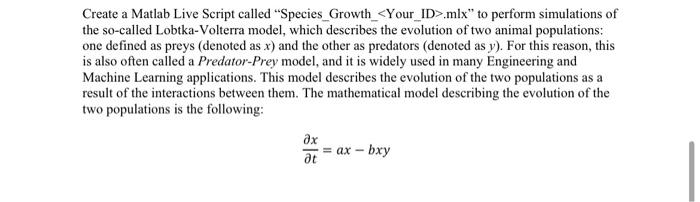
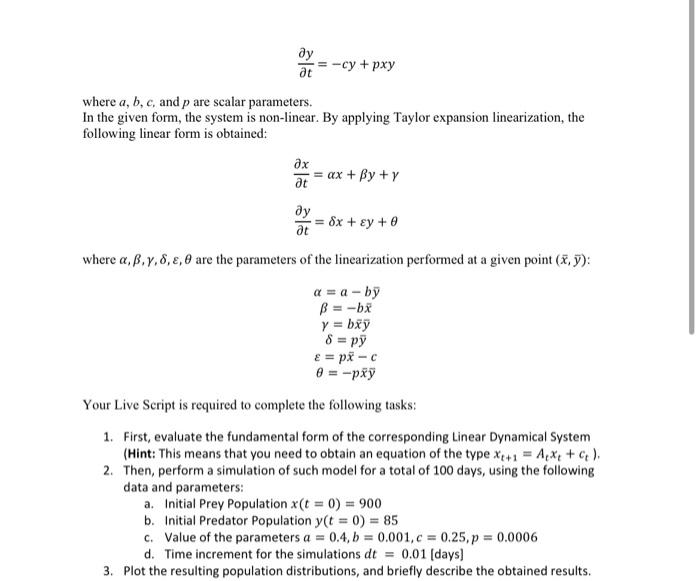
Create a Matlab Live Script called "Species_Growth_.mlx" to perform simulations of the so-called Lobtka-Volterra model, which describes the evolution of two animal populations: one defined as preys (denoted as x ) and the other as predators (denoted as y ). For this reason, this is also often called a Predator-Prey model, and it is widely used in many Engineering and Machine Learning applications. This model describes the evolution of the two populations as a result of the interactions between them. The mathematical model describing the evolution of the two populations is the following: tx=axbxy ty=cy+pxy where a,b,c, and p are scalar parameters. In the given form, the system is non-linear. By applying Taylor expansion linearization, the following linear form is obtained: tx=x+y+ty=x+y+ where ,,,,, are the parameters of the linearization performed at a given point (x,y) : =aby=bx=bxy=py=pxc=pxy Your Live Script is required to complete the following tasks: 1. First, evaluate the fundamental form of the corresponding Linear Dynamical System (Hint: This means that you need to obtain an equation of the type xt+1=Atxt+ct ). 2. Then, perform a simulation of such model for a total of 100 days, using the following data and parameters: a. Initial Prey Population x(t=0)=900 b. Initial Predator Population y(t=0)=85 c. Value of the parameters a=0.4,b=0.001,c=0.25,p=0.0006 d. Time increment for the simulations dt=0.01 [days] 3. Plot the resulting population distributions, and briefly describe the obtained results
Step by Step Solution
There are 3 Steps involved in it

Get step-by-step solutions from verified subject matter experts
 Study Help