







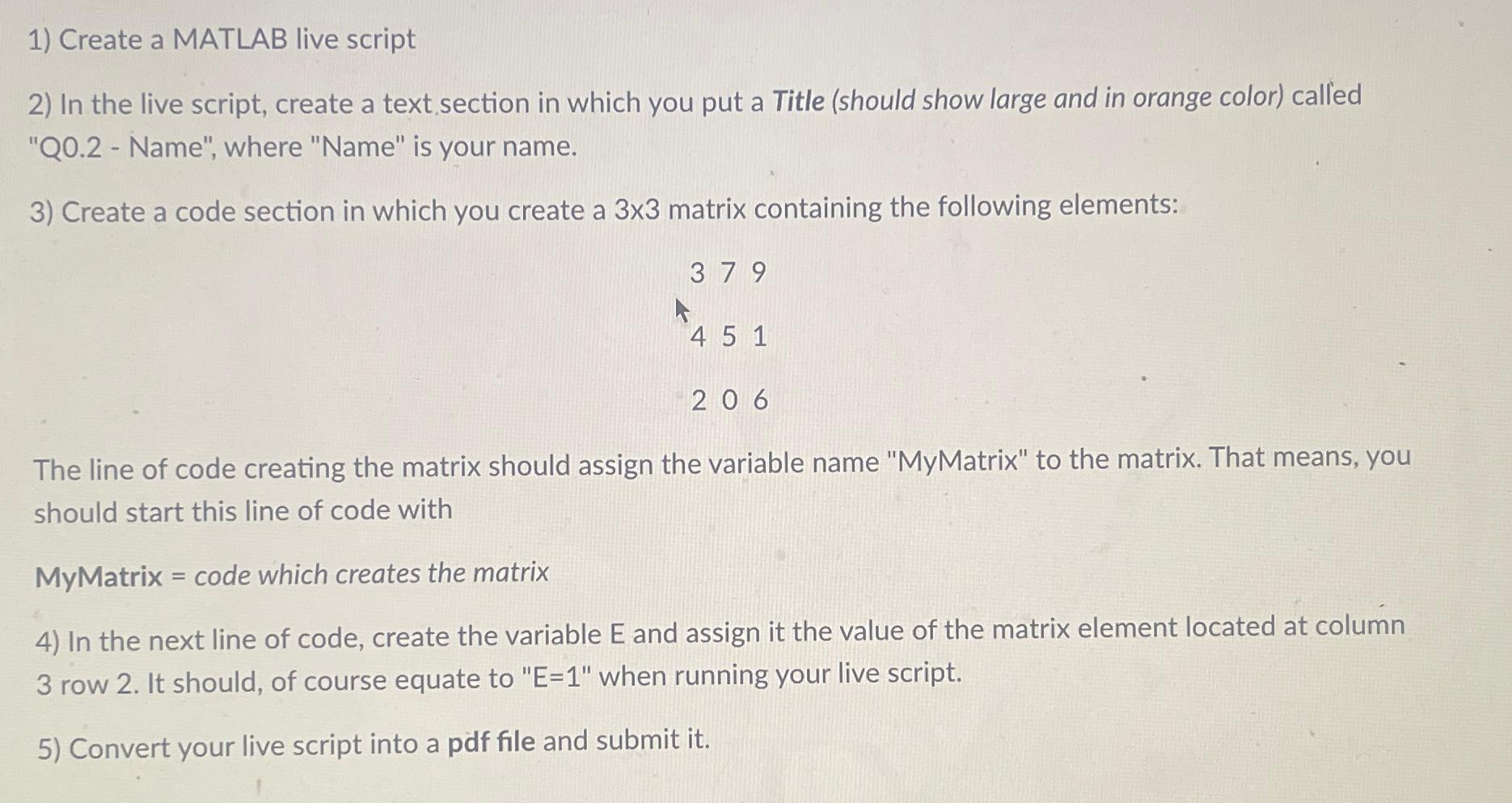
Question: Create a MATLAB live script In the live script, create a text, section in which you put a Title ( should show large and in
Create a MATLAB live script
In the live script, create a text, section in which you put a Title should show large and in orange color called Q Name", where "Name" is your name.
Create a code section in which you create a matrix containing the following elements:
The line of code creating the matrix should assign the variable name "MyMatrix" to the matrix. That means, you should start this line of code with
MyMatrix code which creates the matrix
In the next line of code, create the variable and assign it the value of the matrix element located at column row It should, of course equate to when running your live script.
Convert your live script into a pdf file and submit it
Step by Step Solution
There are 3 Steps involved in it
1 Expert Approved Answer
Step: 1 Unlock

Question Has Been Solved by an Expert!
Get step-by-step solutions from verified subject matter experts
Step: 2 Unlock
Step: 3 Unlock
 Study Help