







Question: Create a new Android project called Assignment1. Set the application name to YourName . Create the first Activity and name it as YourName_LoginActivity . Wrong
Create a new Android project called Assignment1.
Set the application name to YourName. Create the first Activity and name it as YourName_LoginActivity.
| Wrong username or password |
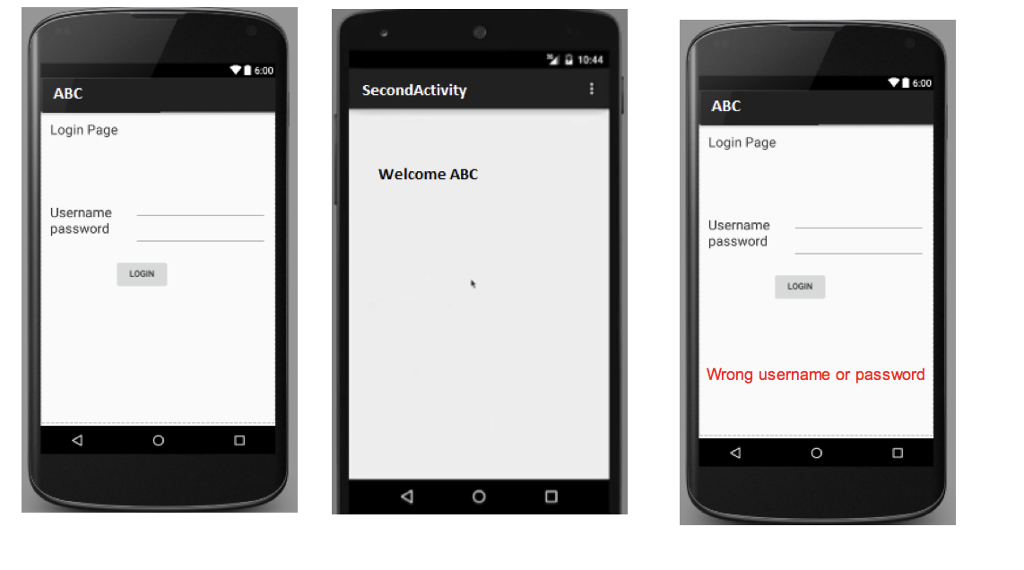
In the LoginActivity, design a login form to input user name and password as well as a LOGIN button as displayed in image below. The user can input his/her name and password. Suppose the required username =sa and required password= sa
Create a second Activity called YourName_SecondActivity. When the user clicks on LOGIN button, compare the entered username and password with sa. If right, the SecondActivity should be started through an intent. The intent should carry first activity name or username and display it in a text view as shown in figure above. If password or username is wrong, a red label appears on the first activity stating wrong username or password (screenshot 3)
Requirement:
Attach both xml and java code for your activities.
"a 10:44 6:00 6:00 ABC SecondActivity ABC Login Page Login Page Welcome ABC Username password Username passworo LOGIN Wrong username or password
Step by Step Solution
There are 3 Steps involved in it

Get step-by-step solutions from verified subject matter experts
 Study Help