







Question: Create a new Java project called 1410_Module03 Create a package called m03 It includes a java file named Module03Gui.java (WindowBuilder JFrame) Inside the package create
Create a new Java project called 1410_Module03
Create a package called m03 It includes a java file named Module03Gui.java (WindowBuilder JFrame)
Inside the package create a folder called Images.
Create a GUI as described below.
It should show the photos of four candidates running for election in Utah. For each of the candidates, there is a text that includes the name, the office the candidate is running for, and a letter indicating their party (R for Republican, D for Democrat). However, the photos and the text are not listed in the same order. When the user clicks the photo, the corresponding text should be displayed in the color of the party (red for Republican, blue for Democrat). When the GUI is first opened and no button has been clicked, all names should be displayed in black.
Class Module03Gui extends JFrame. It should display a window of size:480 x 680
When we run the finished GUI all the names should be displayed in black.
Style | Doc Comments | Refactoring
-Title Area
* The top area of the GUI shows the title
It should show the text 'Utah Elections -Who is Who'
* Look: The text should be centered,foreground: RGB color 150 155 155, background: RGB color 230 235 235
*Font: 'Lucinda Grande' at size 25 (If you don't have this font, you can use a similar-looking font at asimilar size)
There should be some padding of size 7 above and below the text.
-Photos
* On the left, there are 4 buttons -one above the other.
* Each button displays a different picture in the order shown above.
* All buttons should be square and have the same size
*There should be a space of size 5 between the buttons,
and there should be a margin of size 5 on the top, the right, and the left, but not the bottom.
- names and positions
*Next to the buttons, there are 4 labels -one above the other.
* Each label displays a text that includes the name, the position, and a letter in parenthesis to indicate the party.
The text should be ordered by the last name of the candidates.
Karina Andelin Brown Lt. Gov (D)
Spencer Cox Gov (R)
Deidre Henderson Lt Gov (R)
Chris Peterson Gov (D)
* The font should be Arial size 18
*To make the labels align with the buttons on the left, there should be a space of size 5 between the labels,
and there should be a margin of size 5 on the top, the right, and the left, but not the bottom.
-behavior
*Every time a button is clicked, the following should happen:
The corresponding text should change color
The text should be red if the candidate is a Republican and blue if the candidate is a Democrat.
All other names should be displayed in black
Avoid code duplication
I just need the frame and the buttons coded and the code for turning the letters red and blue thanks.
should look like this: 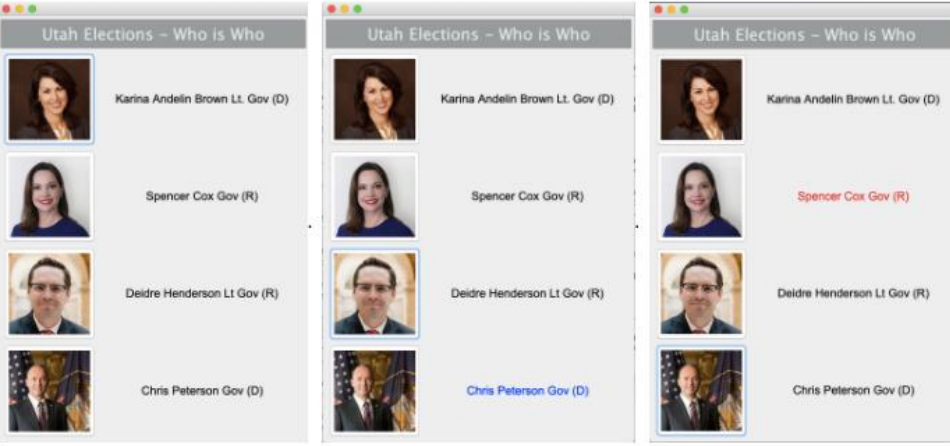
Utah Elections - Who is Who Utah Elections - Who is Who Utah Elections - Who is Who Karina Andeln Brown Lt Gov (D) Karina Andein Brown Lt Gov (D) Karina Andelin Brown Ll Gov (0) Spencer Cox Gov (R) Spencer Cox Gov (R) Spencer Cox Gov (R) Deidre Henderson Lt Gov (R) Deidre Henderson LI GOV (R) Deidre Henderson LI GOVER) Chris Peterson Gov (D) Chris Peterson Gov (D) Chris Peterson GO (D)
Step by Step Solution
There are 3 Steps involved in it

Get step-by-step solutions from verified subject matter experts
 Study Help