





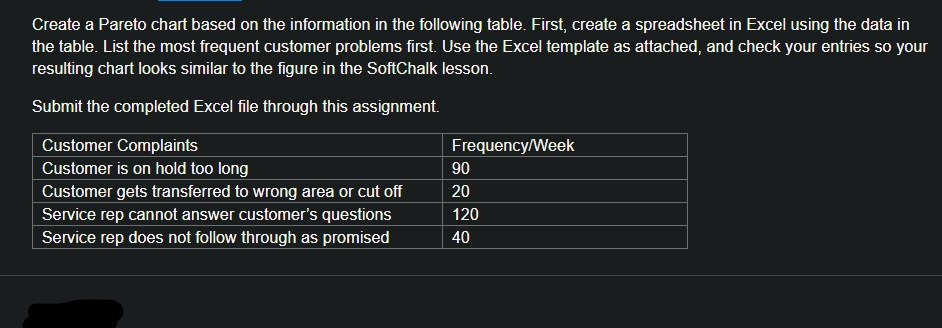
Question: Create a Pareto chart based on the information in the following table. First, create a spreadsheet in Excel using the data in the table. List
Create a Pareto chart based on the information inCreate a Pareto chart based on the information in

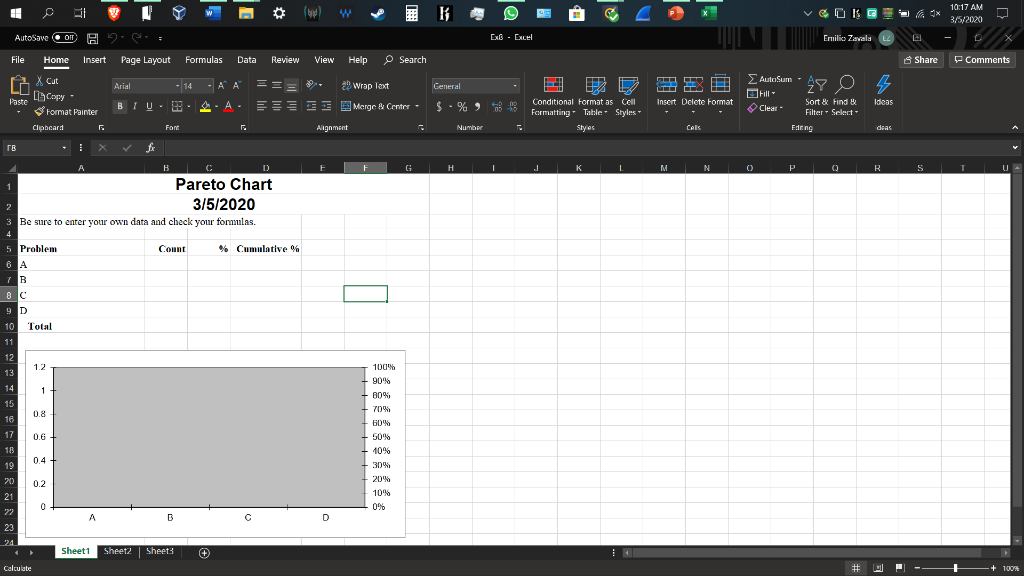
Create a Pareto chart based on the information in the following table. First, create a spreadsheet in Excel using the data in the table. List the most frequent customer problems first. Use the Excel template as attached, and check your entries so your resulting chart looks similar to the figure in the SoftChalk lesson. Submit the completed Excel file through this assignment. Customer Complaints Customer is on hold too long Customer gets transferred to wrong area or cut off Service rep cannot answer customer's questions Service rep does not follow through as promised Frequency/Week 90 20 120 40 V A 4x O EG Emilica Zavala 10:17 AM 3/5/2020 - 0 ExB - Excel 2 View Share Comments AutoSave Of H2S File Home Insert Page Layout Formulas Data Review AXC A riel 14 AA === m indeB . B A S E Clipboard Font Help Search Wrap Text Merac Center - General S. E D Conditional Format as Cell Formatting Table - Styles E o Hallosum 28 0 % Paste 4 copy GR. Insert Delete Format - Sort & Find & Filter Select Ideas Clear Alignment Eden deas E F G H I J K L M N O P Q R S T U - A B C D Pareto Chart 3/5/2020 3 Be sure to enter your own data and check your formulas. 5 Problem Count % Cumulative % 8C 10 Total 100% 90% 80% 70% 50% 50% 10% AB 23 Sheet1 Sheet2 Sheet? Calculate # M - + 100%

Step by Step Solution

There are 3 Steps involved in it

1 Expert Approved Answer
Step: 1 Unlock blur-text-image

Question Has Been Solved by an Expert!

Get step-by-step solutions from verified subject matter experts

Step: 2 Unlock
Step: 3 Unlock

Students Have Also Explored These Related General Management Questions!