







Question: Create a program using classes that does the following in the zyLabs developer below. For this lab, you will be working with two different You
Create a program using classes that does the following in the zyLabs developer below. For this lab, you will be working with two different You had misplaced brackets. Once i fixed it this works. Please make sure you use an IDE and
not zybooks
item info
int itemTotal itemgetPrice itemgetQuantity;
System.out.printlnitemgetName itemgetQuantity @ $ it
output total
System.out.println;
System.out.printTotal: $ cartTotal;
public static class ItemToPurchase
Private fields itemName, itemPrice, and itemQuanity
private String itemName;
private int itemPrice;
private int itemQuantity;
Default Constructor
public ItemToPurchase
itemName "none";
itemPrice ;
itemQuantity ;
public member methods
public void setNameString itemName
this.itemName itemName;
public String getName TOTAL COST
Chocolate Chips @ $ $
Bottled Water @ $ $
Total: $
Current file: ItemToPurchase.java grad
public class ItemToPurchase
Private fields itemName, itemPrice, and itemQuanity
Default Constructor
itemName Initialized to "none"
itemPrice Initialized to
itemQuantity Initialized ito
public member methods mutators & accessors
setName & getName
setPrice & getPrice
setQuantity & getQuantity
Run your program as often as you'd like, before submitting for grading. Below, type any needed
input values in the first box, then click Run program and observe the program's output in the
second box.
Enter program input optional
Chocolate Chips TOTAL COST
Chocolate Chips @ $ $
Bottled Water @ $ $
Total: $
Current file: ItemToPurchase.java grad
public class ItemToPurchase
Private fields itemName, itemPrice, and itemQuanity
Default Constructor
itemName Initialized to "none"
itemPrice Initialized to
itemQuantity Initialized ito
public member methods mutators & accessors
setName & getName
setPrice & getPrice
setQuantity & getQuantity
Run your program as often as you'd like, before submitting for grading. Below, type any needed
input values in the first box, then click Run program and observe the program's output in the
second box.
Enter program input optional
Chocolate Chips TOTAL COST
Chocolate Chips @ $ $
Bottled Water @ $ $
Total: $
Current file: ItemToPurchase.java grad
public class ItemToPurchase
Private fields itemName, itemPrice, and itemQuanity
Default Constructor
itemName Initialized to "none"
itemPrice Initialized to
itemQuantity Initialized ito
public member methods mutators & accessors
setName & getName
setPrice & getPrice
setQuantity & getQuantity
Run your program as often as you'd like, before submitting for grading. Below, type any needed
input values in the first box, then click Run program and observe the program's output in the
second box.
Enter program input optional
Chocolate Chips TOTAL COST
Chocolate Chips @ $ $
Bottled Water @ $ $
Total: $
public class ShoppingCartPrinter
public static void mainString args
Scanner scnr new Scanner
System.in;
int i ;
String productName;
int productPrice ;
int productQuantity ;
int cartTotal ;
ItemToPurchase item new ItemToPurchase;
ItemToPurchase item new ItemToPurchase;
Get item details from user, create itemToPurchase object
Run your program as often as you'd like, before submitting for grading. Below, type any needed
input values in the first box, then click Run program and observe the program's output in the
second box.
Enter program input optional
Chocolate Chips
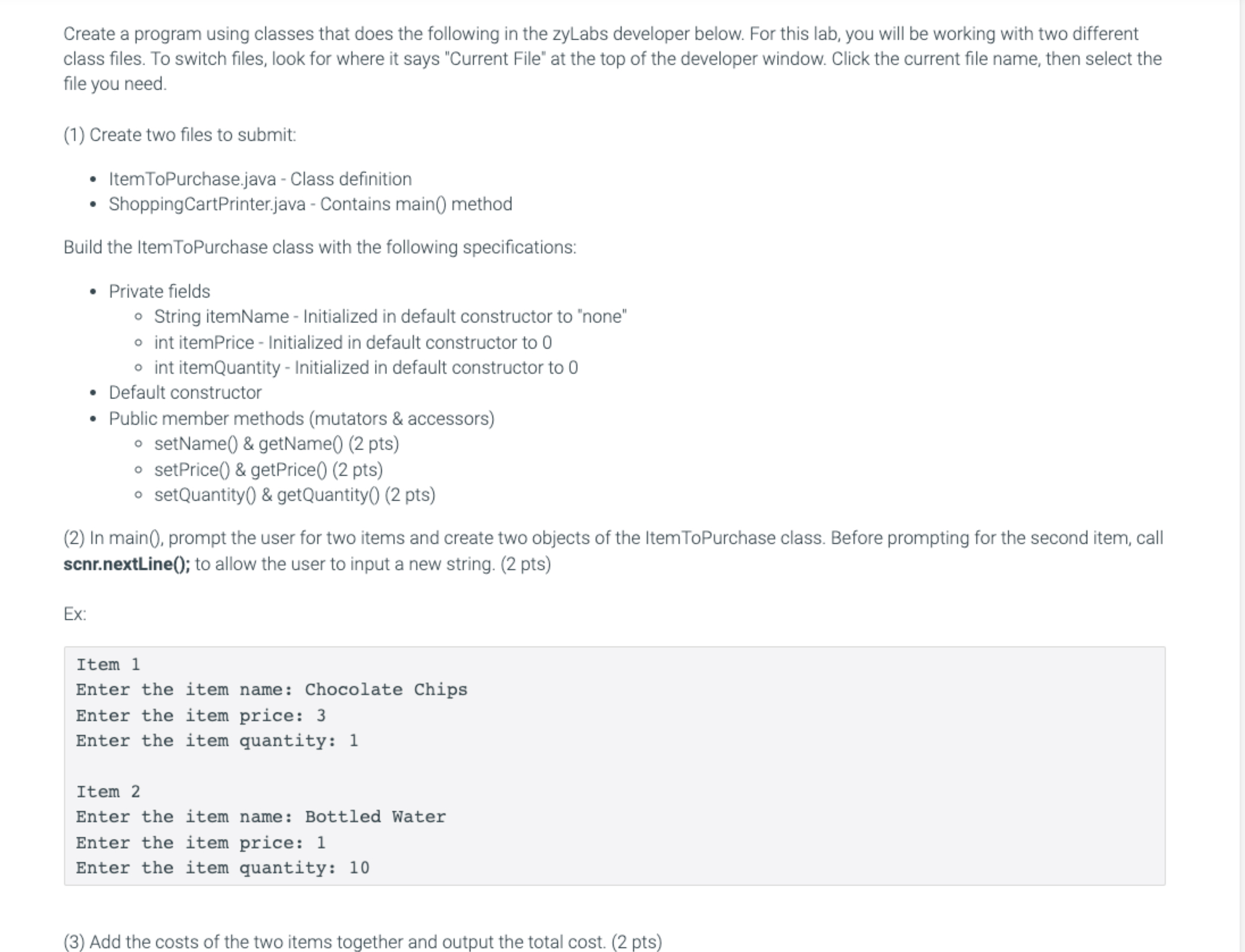
class files. To switch files, look for where it says "Current File" at the top of the developer window. Click the current file name, then select the
file you need.
Create two files to submit:
ItemToPurchase.java Class definition
ShoppingCartPrinter.java Contains main method
Build the ItemToPurchase class with the following specifications:
Private fields
String itemName Initialized in default constructor to "none"
int itemPrice Initialized in default constructor to
int itemQuantity Initialized in default constructor to
Default constructor
Public member methods mutators & accessors
setName & getName pts
setPrice & getPrice pts
setQuantity & getQuantity pts
In main prompt the user for two items and create two objects of the ItemToPurchase class. Before prompting for the second item, call
scnrnextLine; to allow the user to input a new string. pts
Ex:
Item
Enter the item name: Chocolate Chips
Enter the item price:
Enter the item quantity:
Item
Enter the item name: Bottled Water
Enter the item price:
Enter the item quantity:
Add the costs of the two items together and output the total cost. pts
Step by Step Solution
There are 3 Steps involved in it
1 Expert Approved Answer
Step: 1 Unlock

Question Has Been Solved by an Expert!
Get step-by-step solutions from verified subject matter experts
Step: 2 Unlock
Step: 3 Unlock
 Study Help