







Question: I need some help with this java program I have to do. There is a lot of information. So then there is a file that
I need some help with this java program I have to do. There is a lot of information.
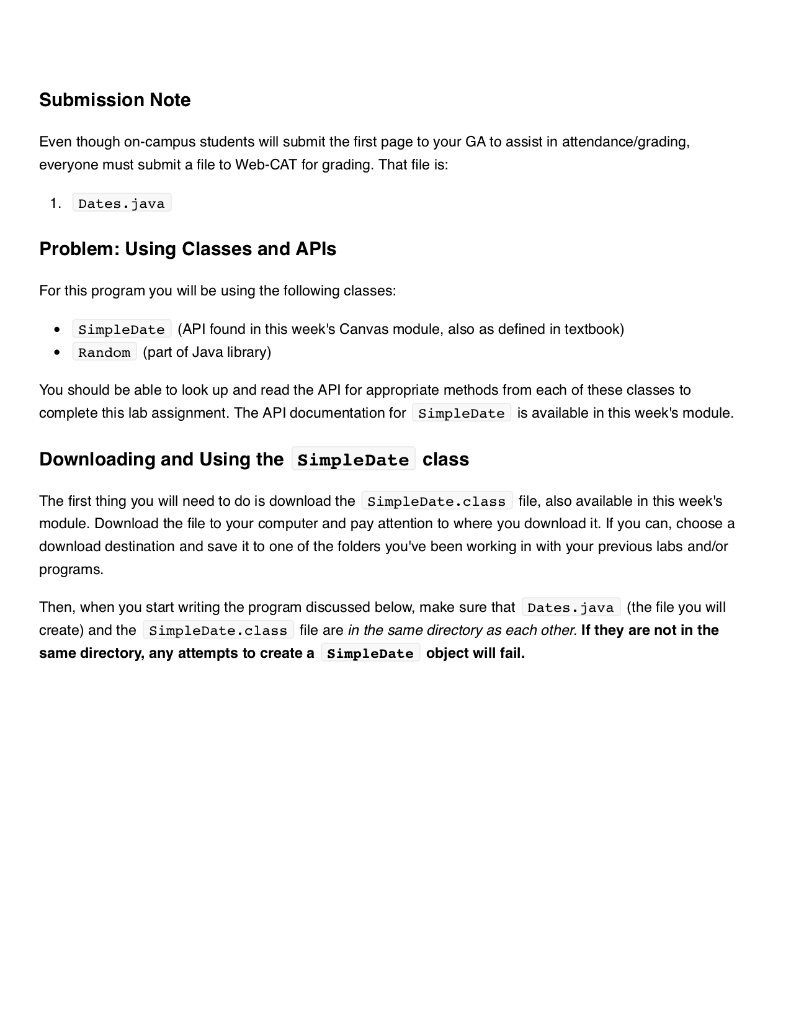
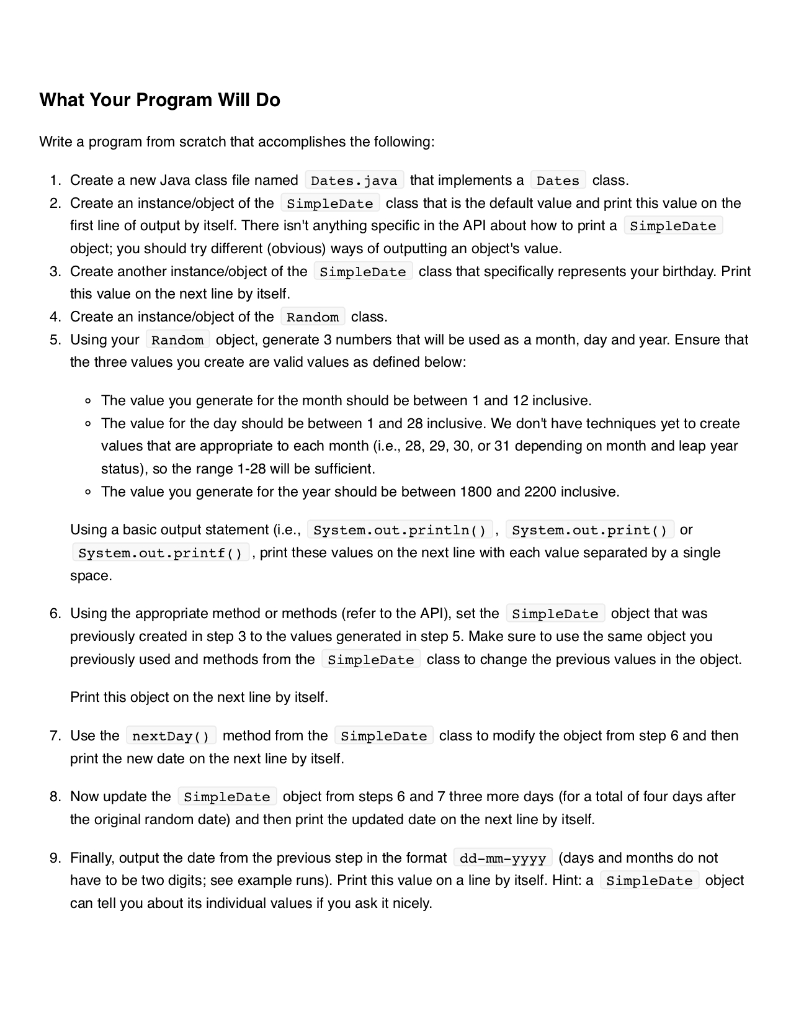
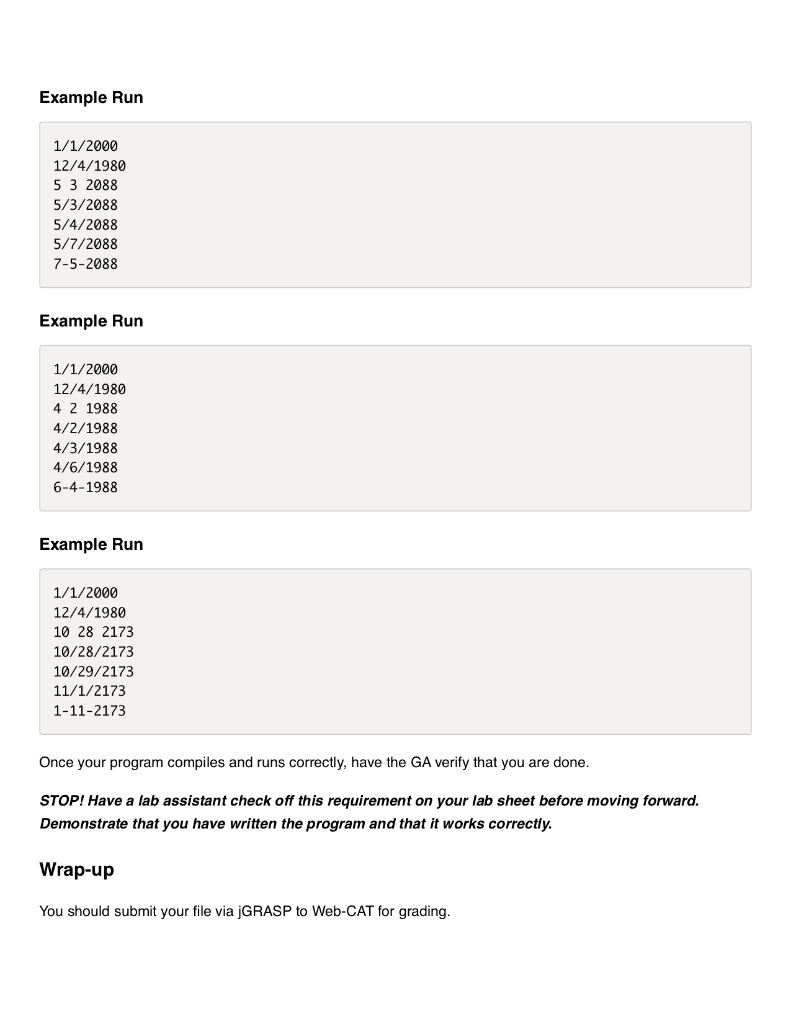
So then there is a file that they provide which is called SimpleDate.class. I would upload the file but I don't think you can do that. So here is a pdf that they provide which is what SimpleData.class contains. If you are able to download the file, here is the file: https://filebin.net/6jv5e7pydg8wbk1c/SimpleDate.class?t=nczlnpzd
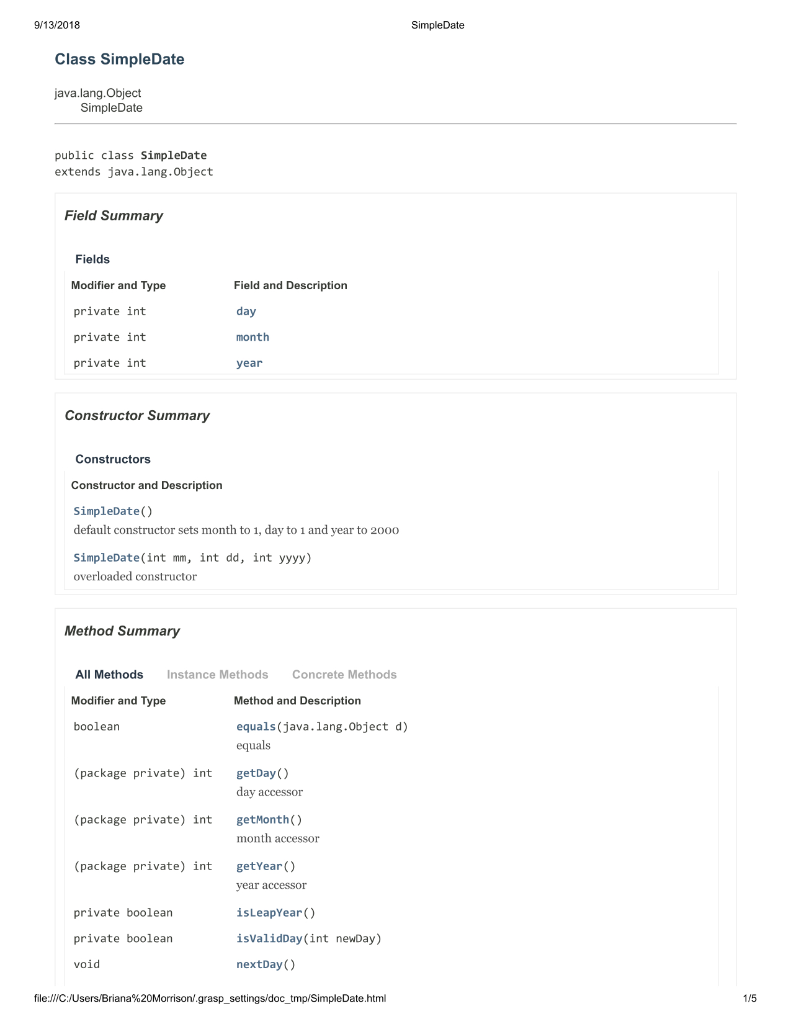
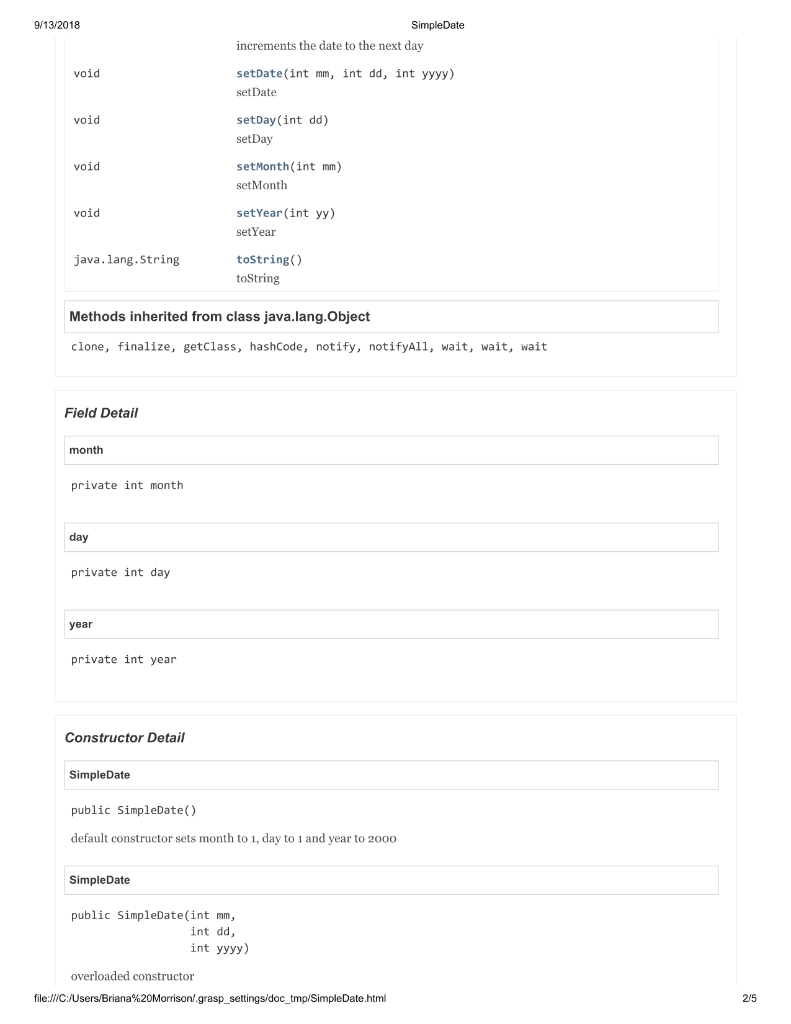
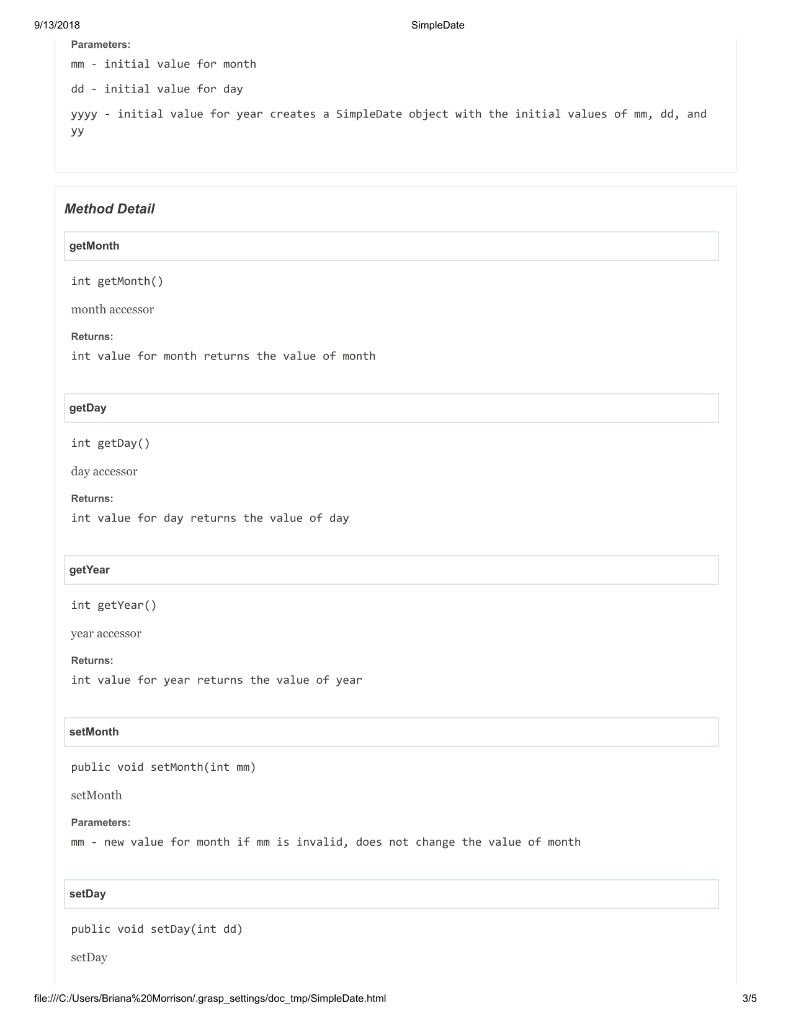
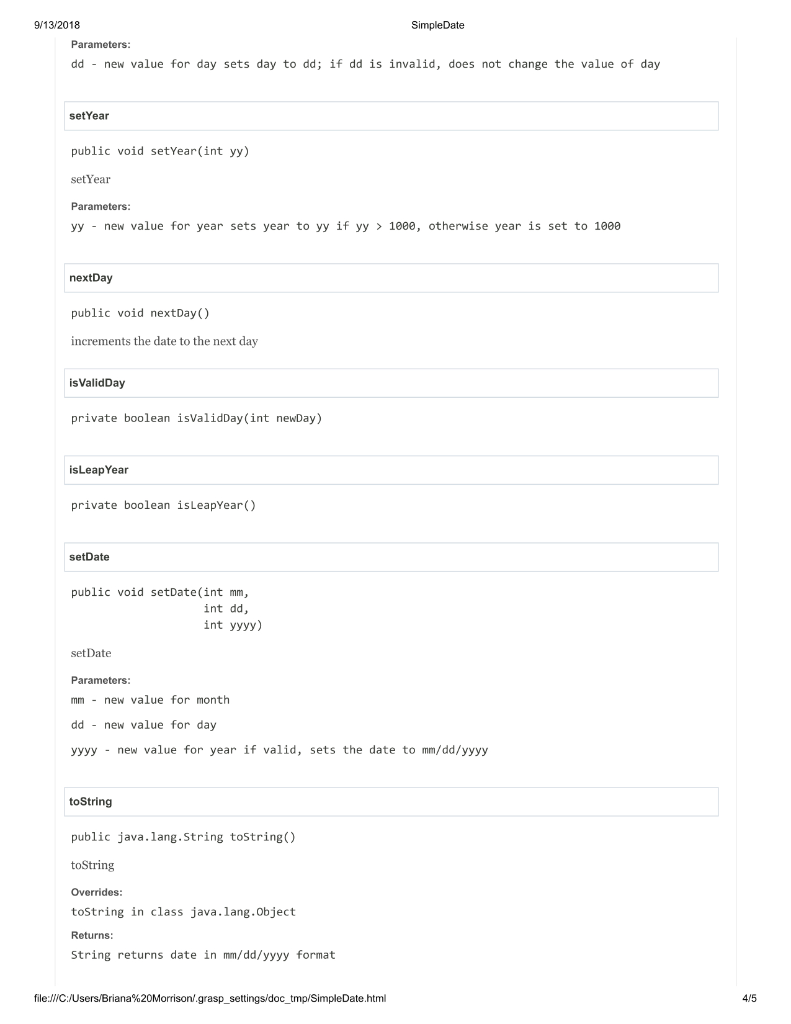
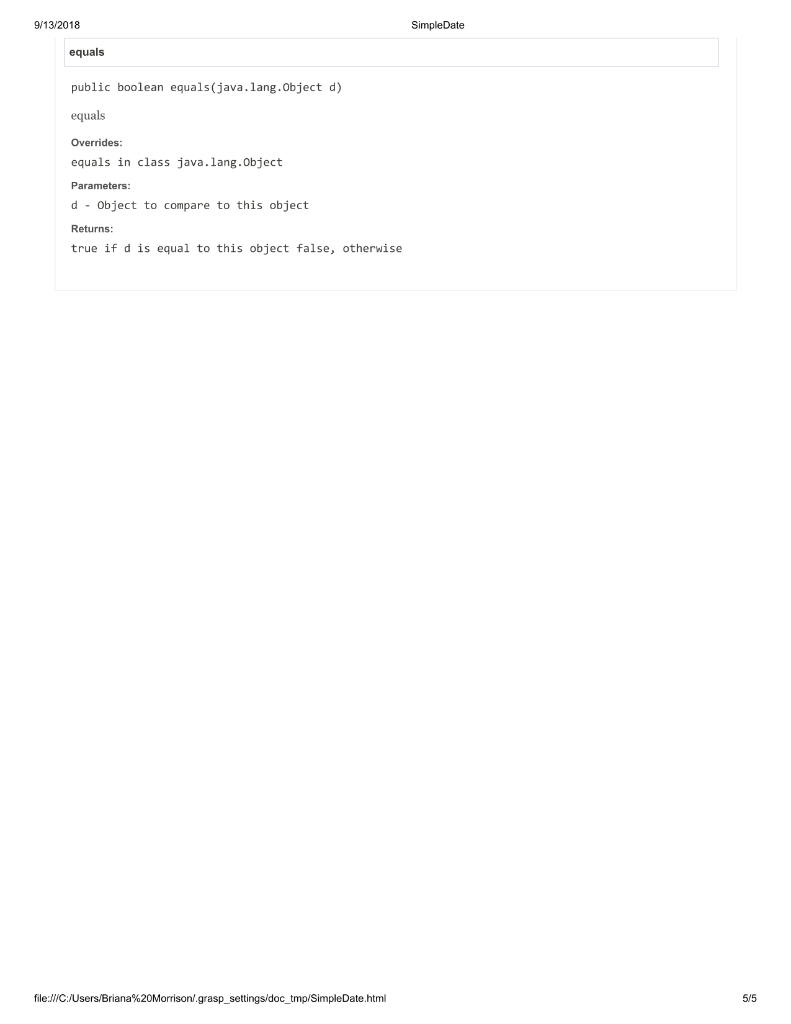
Submission Note Even though on-campus students will submit the first page to your GA to assist in attendance/grading, everyone must submit a file to Web-CAT for grading. That file is: 1. Dates.java Problem: Using Classes and APIs For this program you will be using the following classes: SimpleDate (API found in this week's Canvas module, also as defined in textbook) Random (part of Java library) You should be able to look up and read the API for appropriate methods from each of these classes to complete this lab assignment. The API documentation for SimpleDate is available in this week's module. Downloading and Using the simpleDate class The first thing you will need to do is download the SimpleDate.class file, also available in this week's module. Download the file to your computer and pay attention to where you download it. If you can choose a download destination and save it to one of the folders you've been working in with your previous labs and/or programs. Then, when you start writing the program discussed below, make sure that Dates.java (the file you will create) and the SimpleDate.class file are in the same directory as each other. If they are not in the same directory, any attempts to create a simpleDate object will fail. What Your Program Will Do Write a program from scratch that accomplishes the following: 1. Create a new Java class file named Dates.java that implements a Dates class 2. Create an instance/object of the SimpleDate class that is the default value and print this value on the first line of output by itself. There isn't anything specific in the API about how to print a SimpleDate object; you should try different (obvious) ways of outputting an object's value. 3. Create another instance/object of the SimpleDate class that specifically represents your birthday. Print this value on the next line by itself. 4. Create an instance/object of the Random class 5. Using your Random object, generate 3 numbers that will be used as a month, day and year. Ensure that the three values you create are valid values as defined below: The value you generate for the month should be between 1 and 12 inclusive. The value for the day should be between 1 and 28 inclusive. We don't have techniques yet to create values that are appropriate to each month (.e., 28, 29, 30, or 31 depending on month and leap year status), so the range 1-28 will be sufficient. o The value you generate for the year should be between 1800 and 2200 inclusive. Using a basic output statement (.e., System.out.println(); System.out.print() or System.out.printf() , print these values on the next line with each value separated by a single space. 6. Using the appropriate method or methods (refer to the API), set the SimpleDate object that was previously created in step 3 to the values generated in step 5. Make sure to use the same object you previously used and methods from the SimpleDate class to change the previous values in the object. Print this object on the next line by itself. 7. Use the nextDay() method from the SimpleDate class to modify the object from step 6 and then print the new date on the next line by itself. 8. Now update the SimpleDate object from steps 6 and 7 three more days (for a total of four days after the original random date) and then print the updated date on the next line by itself. 9. Finally, output the date from the previous step in the format dd-mm-yyyy (days and months do not have to be two digits; see example runs). Print this value on a line by itself. Hint: a SimpleDate object can tell you about its individual values if you ask it nicely. Example Run 1/1/2000 12/4/1980 5 3 2088 5/3/2088 5/4/2088 5/7/2088 7-5-2088 Example Run 1/1/2000 12/4/1980 4 2 1988 4/2/1988 4/3/1988 4/6/1988 6-4-1988 Example Run 1/1/2000 12/4/1980 10 28 2173 10/28/2173 10/29/2173 11/1/2173 1-11-2173 Once your program compiles and runs correctly, have the GA verify that you are done. STOP! Have a lab assistant check off this requirement on your lab sheet before moving forward. Demonstrate that you have written the program and that it works correctly. Wrap-up You should submit your file via jGRASP to Web-CAT for grading. 9/13/2018 SimpleDate Class SimpleDate java.lang. Object SimpleDate public class SimpleDate extends java.lang.Object Field Summary Fields Modifier and Type Field and Description private int day private int month private int year Constructor Summary Constructors Constructor and Description SimpleDate() default constructor sets month to 1, day to 1 and year to 2000 SimpleDate(int mm, int dd, int yyyy) overloaded constructor Method Summary All Methods Instance Methods Concrete Methods Modifier and Type Method and Description boolean equals(java.lang.Object d) equals (package private) int getDay() day accessor (package private) int getMonth() month accessor (package private) int getYear() year accessor private boolean isLeapYear private boolean isValidDay(int newDay) void nextDay file:///C:/Users/Briana%20Morrison grasp_settings/doc_tmp/SimpleDate.html 115 9/13/2018 SimpleDate increments the date to the next day void setDate(int mm, int dd, int yyyy) set Date void setDay(int dd) setDay void setMonth(int mm) set Month void setYear(int yy) setYear java.lang.String toString() toString Methods inherited from class java.lang. Object clone, finalize, getClass, hashCode, notify, notifyAll, wait, wait, wait Field Detail month private int month day private int day year private int year Constructor Detail SimpleDate public SimpleDate() default constructor sets month to 1, day to 1 and year to 2000 SimpleDate public SimpleDate(int mm, int dd, int yyyy) overloaded constructor file:///C:/Users/Briana%20Morrison grasp_settings/doc_tmp/SimpleDate.html SimpleDate 9/13/2018 Parameters: mm - initial value for month dd - initial value for day yyyy - initial value for year creates a SimpleDate object with the initial values of mm, dd, and Method Detail getMonth int getMonth() month accessor Returns: int value for month returns the value of month getDay int getDay() day accessor Returns: int value for day returns the value of day getYear int getYear() year accessor Returns: int value for year returns the value of year setMonth public void setMonth(int mm) set Month Parameters: mm - new value for month if mm is invalid, does not change the value of month setDay public void setDay(int dd) set Day file:///C:/Users/Briana%20Morrison grasp_settings/doc_tmp/SimpleDate.html 9/13/2018 SimpleDate Parameters: dd - new value for day sets day to dd; if dd is invalid, does not change the value of day setYear public void setYear(int yy) set Year Parameters: yy - new value for year sets year to yy if yy > 1000, otherwise year is set to 1000 nextDay public void nextDay() increments the date to the next day is Valid Day private boolean isValidDay(int newDay) isLeap Year private boolean isLeapYear() setDate public void setDate(int mm, int dd, int yyyy) set Date Parameters: mm - new value for month dd - new value for day yyyy - new value for year if valid, sets the date to mm/dd/yyyy toString public java.lang.String toString() toString Overrides: toString in class java.lang.Object Returns: String returns date in mm/dd/yyyy format file:///C:/Users/Briana%20Morrison grasp_settings/doc_tmp/SimpleDate.html 4/5 9/13/2018 SimpleDate equals public boolean equals(java.lang. Object d) equals Overrides: equals in class java.lang.Object Parameters: d - Object to compare to this object Returns: true if d is equal to this object false, otherwise file:///C:/Users/Briana%20Morrison grasp_settings/doc_tmp/SimpleDate.html Submission Note Even though on-campus students will submit the first page to your GA to assist in attendance/grading, everyone must submit a file to Web-CAT for grading. That file is: 1. Dates.java Problem: Using Classes and APIs For this program you will be using the following classes: SimpleDate (API found in this week's Canvas module, also as defined in textbook) Random (part of Java library) You should be able to look up and read the API for appropriate methods from each of these classes to complete this lab assignment. The API documentation for SimpleDate is available in this week's module. Downloading and Using the simpleDate class The first thing you will need to do is download the SimpleDate.class file, also available in this week's module. Download the file to your computer and pay attention to where you download it. If you can choose a download destination and save it to one of the folders you've been working in with your previous labs and/or programs. Then, when you start writing the program discussed below, make sure that Dates.java (the file you will create) and the SimpleDate.class file are in the same directory as each other. If they are not in the same directory, any attempts to create a simpleDate object will fail. What Your Program Will Do Write a program from scratch that accomplishes the following: 1. Create a new Java class file named Dates.java that implements a Dates class 2. Create an instance/object of the SimpleDate class that is the default value and print this value on the first line of output by itself. There isn't anything specific in the API about how to print a SimpleDate object; you should try different (obvious) ways of outputting an object's value. 3. Create another instance/object of the SimpleDate class that specifically represents your birthday. Print this value on the next line by itself. 4. Create an instance/object of the Random class 5. Using your Random object, generate 3 numbers that will be used as a month, day and year. Ensure that the three values you create are valid values as defined below: The value you generate for the month should be between 1 and 12 inclusive. The value for the day should be between 1 and 28 inclusive. We don't have techniques yet to create values that are appropriate to each month (.e., 28, 29, 30, or 31 depending on month and leap year status), so the range 1-28 will be sufficient. o The value you generate for the year should be between 1800 and 2200 inclusive. Using a basic output statement (.e., System.out.println(); System.out.print() or System.out.printf() , print these values on the next line with each value separated by a single space. 6. Using the appropriate method or methods (refer to the API), set the SimpleDate object that was previously created in step 3 to the values generated in step 5. Make sure to use the same object you previously used and methods from the SimpleDate class to change the previous values in the object. Print this object on the next line by itself. 7. Use the nextDay() method from the SimpleDate class to modify the object from step 6 and then print the new date on the next line by itself. 8. Now update the SimpleDate object from steps 6 and 7 three more days (for a total of four days after the original random date) and then print the updated date on the next line by itself. 9. Finally, output the date from the previous step in the format dd-mm-yyyy (days and months do not have to be two digits; see example runs). Print this value on a line by itself. Hint: a SimpleDate object can tell you about its individual values if you ask it nicely. Example Run 1/1/2000 12/4/1980 5 3 2088 5/3/2088 5/4/2088 5/7/2088 7-5-2088 Example Run 1/1/2000 12/4/1980 4 2 1988 4/2/1988 4/3/1988 4/6/1988 6-4-1988 Example Run 1/1/2000 12/4/1980 10 28 2173 10/28/2173 10/29/2173 11/1/2173 1-11-2173 Once your program compiles and runs correctly, have the GA verify that you are done. STOP! Have a lab assistant check off this requirement on your lab sheet before moving forward. Demonstrate that you have written the program and that it works correctly. Wrap-up You should submit your file via jGRASP to Web-CAT for grading. 9/13/2018 SimpleDate Class SimpleDate java.lang. Object SimpleDate public class SimpleDate extends java.lang.Object Field Summary Fields Modifier and Type Field and Description private int day private int month private int year Constructor Summary Constructors Constructor and Description SimpleDate() default constructor sets month to 1, day to 1 and year to 2000 SimpleDate(int mm, int dd, int yyyy) overloaded constructor Method Summary All Methods Instance Methods Concrete Methods Modifier and Type Method and Description boolean equals(java.lang.Object d) equals (package private) int getDay() day accessor (package private) int getMonth() month accessor (package private) int getYear() year accessor private boolean isLeapYear private boolean isValidDay(int newDay) void nextDay file:///C:/Users/Briana%20Morrison grasp_settings/doc_tmp/SimpleDate.html 115 9/13/2018 SimpleDate increments the date to the next day void setDate(int mm, int dd, int yyyy) set Date void setDay(int dd) setDay void setMonth(int mm) set Month void setYear(int yy) setYear java.lang.String toString() toString Methods inherited from class java.lang. Object clone, finalize, getClass, hashCode, notify, notifyAll, wait, wait, wait Field Detail month private int month day private int day year private int year Constructor Detail SimpleDate public SimpleDate() default constructor sets month to 1, day to 1 and year to 2000 SimpleDate public SimpleDate(int mm, int dd, int yyyy) overloaded constructor file:///C:/Users/Briana%20Morrison grasp_settings/doc_tmp/SimpleDate.html SimpleDate 9/13/2018 Parameters: mm - initial value for month dd - initial value for day yyyy - initial value for year creates a SimpleDate object with the initial values of mm, dd, and Method Detail getMonth int getMonth() month accessor Returns: int value for month returns the value of month getDay int getDay() day accessor Returns: int value for day returns the value of day getYear int getYear() year accessor Returns: int value for year returns the value of year setMonth public void setMonth(int mm) set Month Parameters: mm - new value for month if mm is invalid, does not change the value of month setDay public void setDay(int dd) set Day file:///C:/Users/Briana%20Morrison grasp_settings/doc_tmp/SimpleDate.html 9/13/2018 SimpleDate Parameters: dd - new value for day sets day to dd; if dd is invalid, does not change the value of day setYear public void setYear(int yy) set Year Parameters: yy - new value for year sets year to yy if yy > 1000, otherwise year is set to 1000 nextDay public void nextDay() increments the date to the next day is Valid Day private boolean isValidDay(int newDay) isLeap Year private boolean isLeapYear() setDate public void setDate(int mm, int dd, int yyyy) set Date Parameters: mm - new value for month dd - new value for day yyyy - new value for year if valid, sets the date to mm/dd/yyyy toString public java.lang.String toString() toString Overrides: toString in class java.lang.Object Returns: String returns date in mm/dd/yyyy format file:///C:/Users/Briana%20Morrison grasp_settings/doc_tmp/SimpleDate.html 4/5 9/13/2018 SimpleDate equals public boolean equals(java.lang. Object d) equals Overrides: equals in class java.lang.Object Parameters: d - Object to compare to this object Returns: true if d is equal to this object false, otherwise file:///C:/Users/Briana%20Morrison grasp_settings/doc_tmp/SimpleDate.html
Step by Step Solution
There are 3 Steps involved in it

Get step-by-step solutions from verified subject matter experts
 Study Help