







Question: Create a project called Student MarksApp. In this project use MVC pattern. Separate your Model. View and Controller using folders. After that create three pages,
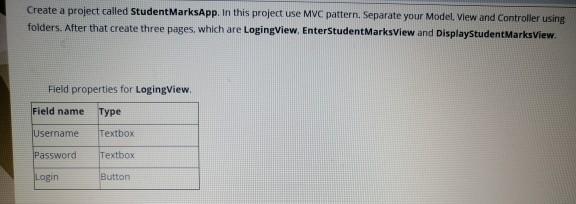
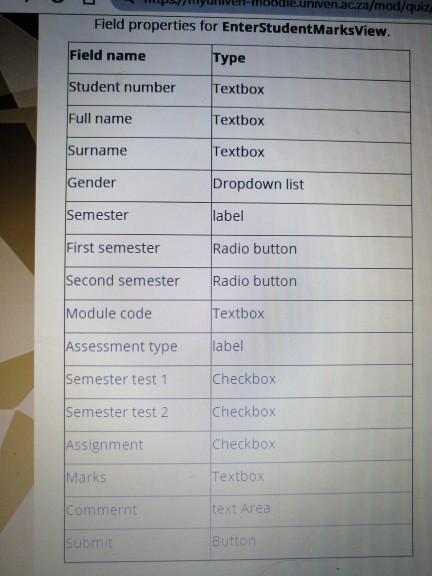
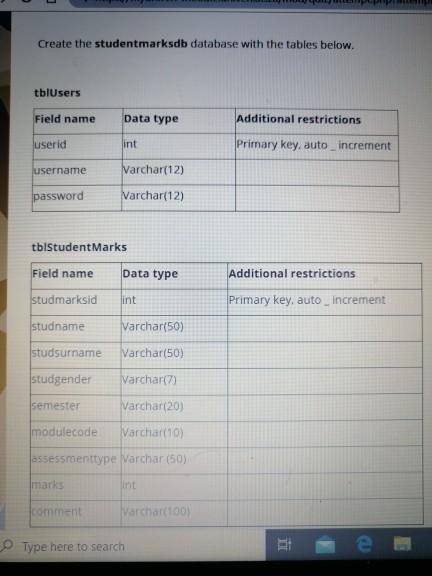
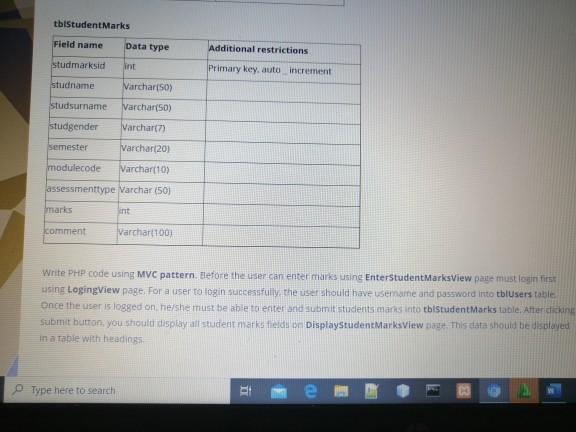
Create a project called Student MarksApp. In this project use MVC pattern. Separate your Model. View and Controller using folders. After that create three pages, which are LogingView, EnterstudentMarksview and DisplayStudentMarksview. Held properties for LogingView Field name Type Username Textbox Password Textbox Login Button niven.ac.za/mod/quiz Field properties for EnterStudentMarksView. Field name Type Student number Textbox Full name Textbox Surname Textbox Gender Dropdown list Semester label First semester Radio button Second semester Radio button Module code Textbox Assessment type label Semester test 1 Checkbox Semester test 2 Checkbox Assignment Checkbox Marks Textbox Commernt text Area Submit Button tbtstudentMarks Field name Data type Additional restrictions studmarksid int Primary key, auto increment studname Varchar(50) Studsurname Varchar(50) studgender Varchar(7) Varchar(20) Semester modulecode Varchar(10) assessmenttype Varchar (50) marks int comment Varchar 100 Write PHP code using MVC pattern. Before the user can enter marks using EnterStudentMarksView pate must login first using LogingView page. For a user to login successfully, the user should have username and password into tblusers table Once the user is logged on ne she must be able to enter and submit students mans into tblstudentMarks table. After clicking Submit button, you should display all student marks fields on Displaystudent Marks View Dout. This data should be displayed in a table with headings Type here to search i Create a project called Student MarksApp. In this project use MVC pattern. Separate your Model. View and Controller using folders. After that create three pages, which are LogingView, EnterstudentMarksview and DisplayStudentMarksview. Held properties for LogingView Field name Type Username Textbox Password Textbox Login Button niven.ac.za/mod/quiz Field properties for EnterStudentMarksView. Field name Type Student number Textbox Full name Textbox Surname Textbox Gender Dropdown list Semester label First semester Radio button Second semester Radio button Module code Textbox Assessment type label Semester test 1 Checkbox Semester test 2 Checkbox Assignment Checkbox Marks Textbox Commernt text Area Submit Button tbtstudentMarks Field name Data type Additional restrictions studmarksid int Primary key, auto increment studname Varchar(50) Studsurname Varchar(50) studgender Varchar(7) Varchar(20) Semester modulecode Varchar(10) assessmenttype Varchar (50) marks int comment Varchar 100 Write PHP code using MVC pattern. Before the user can enter marks using EnterStudentMarksView pate must login first using LogingView page. For a user to login successfully, the user should have username and password into tblusers table Once the user is logged on ne she must be able to enter and submit students mans into tblstudentMarks table. After clicking Submit button, you should display all student marks fields on Displaystudent Marks View Dout. This data should be displayed in a table with headings Type here to search
Step by Step Solution
There are 3 Steps involved in it

Get step-by-step solutions from verified subject matter experts
 Study Help