







Question: Create a project utilizing the ListView example pictured above. Modify the items that appear in the list. Make sure the code can be used using
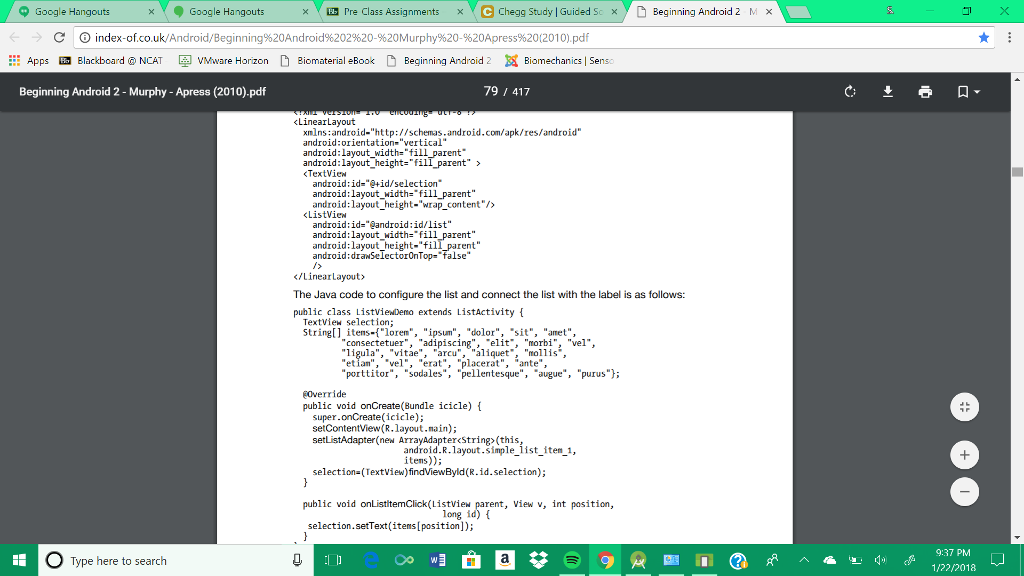 Create a project utilizing the ListView example pictured above.
Modify the items that appear in the list.
Make sure the code can be used using android studio and explain ALL changes made.
Im using android 6.0 (marshmallow)
Google Hangouts . Google Hangouts Erre Class Assignments eChegg Study Guided S Beginning Android 2 MX > d index-of.co.uk/Android/Beginning%20Android%2029620-%20Murphy%20.%20Apress%20(2010).pdf ::: Apps Blackboard @ NCAT VMware Horizon D Bic material eBook D Beginning Android 2Biomechanics Sens: Beginning Android 2 - Murphy - Apress (2010).pdf 79 417 Linearlayout xmlns:android-"http://schemas.android.com/apk/res/android" android:orientation-"vertical" android:layout_width-"fill_parent android:layout_height-"fill parent" TextView android ; id="@+id/selection. android: layout width-"fill_parent" android: layout height-"wrap content"/> ListView android id="@android ; id/list" android:layout_width-"fill android:layout height-"fill_parent" android:draSelectorOnTop- false The Java code to configure the list and connect the list with the label is as follows: public class ListviewDemo extends ListActivity TextView selection String itens-"lorem", "ipsum", "dolor", "sit", "amet", ..adipiscing","elit", "morbi", "vel", "ligula", "vitae", "arcu", "aliquet*, "mollis", "etian","vel", "erat", "placerat", "ante", "porttitor", "sodales", "pellentesque", augue, "purus" EOverride public void onCreate(Bundle icicle) super.onCreate(icicle); setContentview(R.layout.nain); setListAdapter (new ArrayAdapterString>(this android.R.layout.simple list item , itens)) selection-(TextView)findViewByld (R.id.selection); public void onListitemClick(Listview , View v, int pasition, long id) t selection.setText(items[position]); 9:37 PM Type here to search
Step by Step Solution
There are 3 Steps involved in it

Get step-by-step solutions from verified subject matter experts
 Study Help