







Question: Create a Python - based GUI application, named Carmax, to manage a car inventory system. This application will interface with a MySQL database hosted
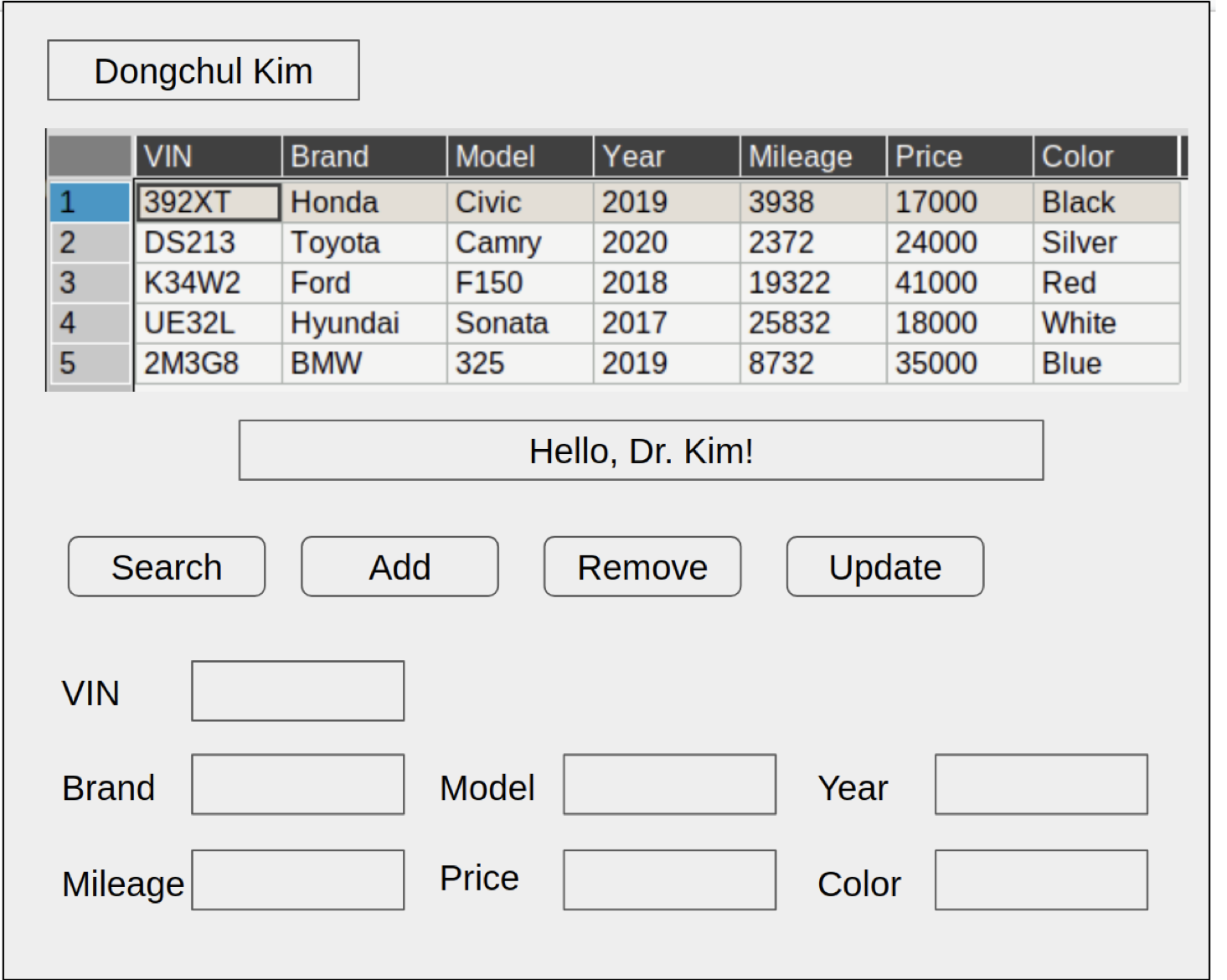
Create a Pythonbased GUI application, named "Carmax,
to manage a car inventory system. This
application will interface with a MySQL database hosted on Google Cloud SQL offering functionalities like
displaying, searching, updating, deleting, and adding car inventory records.
Program Requirements:
Startup Display:
Upon launching, the application should display all entries from the car inventory table
automatically.
The developer's name should appear prominently at the top of the application window.
Ensure the inventory table is scrollable to accommodate varying numbers of rows, becoming
scrollable if more than rows are displayed.
Search Functionality:
Implement a 'Search' feature allowing users to query the inventory using one of the following
eight attributes: VIN, Brand, Model, Year, Mileage, Price, Condition UsedNew and Color.
Only a single attribute can be used for each search; multipleattribute searches are not allowed.
If search results match, display all corresponding entries. If no matches are found, display an
empty table with a message indicating no records found.
If no search criteria are provided, display the entire inventory.
Validate the search inputs to alert users when attempting to search with more than one criterion.
Deletion of Records:
Allow users to delete inventory records using a 'Delete' button, requiring a valid VIN number.
Display a warning message if an attempt is made to delete without specifying a VIN.
Updating Records:
Provide an 'Update' feature for modifying a cars information. Users must specify the VIN and the
new value for a single field.
Notify users if the 'Update' button is pressed without a VIN.
Ensure that only one field can be updated per operation.
Adding New Records:
Include an 'Add' function to insert new car records into the database, requiring all eight fields to
be filled.
Display a warning message if the user tries to add a new record without completing all required
fields.
Technical Specifications:
Establish database connectivity using Google Cloud MySQL to enable remote access and
grading.
Design the GUI layout with a message bar between the inventory table and the operation buttons
Search Delete, Update, Add to provide feedback and instructions to users.
Extra Credits points:
Create a login feature that appears when the program starts.
The login screen should accept a hardcoded id of "admin" and password of
If the credentials match, display the inventory management interface. Include a 'Logout' button
that returns the user to the login screen.
As there is only one account, use incode validation for the login without needing database
integration.
Submission Requirements:
Submit the source code files for the application.
Include a screenshot of the application's interface in action, capturing the full window.
Evaluation Rubric for 'Carmax' Inventory Management Program:
Your submission will be evaluated based on the following criteria:
Functionality points:
Startup Display points: Displays all rows from the car inventory table upon startup, including
a scrollable feature for tables with more than rows.
Search Feature points: Implements a search feature that accurately displays results based
on one of eight fields and handles empty or invalid searches.
Delete Function points: Enables deletion of car records using the VIN, with appropriate
messaging for missing VIN input.
Update Function points: Allows updating a specific field using a VIN, correctly updates the
database, and limits changes to one field per update.
Add Function points: Supports adding new car records with all required fields. Properly
handles missing information.
User Interface Design points:
Layout and Accessibility points: Features a userfriendly interface, including clear display
of the user's name, a wellpositioned message bar, and intuitive button placement.
Visual Appeal and Usability points: Aesthetic design that enhances usability and
navigation across all features.
Database Integration points:
Google Cloud SQL Server Usage points: Demonstrates integration with a Google Cloud
MySQL database, allowing effective data management.
Data Handling and Security points: Manages data transactions with attention to security,
maintaining data integrity.
Code Quality and Documentation points:
Code Efficiency and Readability points: The code is wellstructured, easy to read, with
clear variable naming and logical organization.
Documentation and Comments points: Provides comprehensive documentation and
comments to explain functionality and logic, enhancing code understanding.
VIN
Step by Step Solution
There are 3 Steps involved in it
1 Expert Approved Answer
Step: 1 Unlock

Question Has Been Solved by an Expert!
Get step-by-step solutions from verified subject matter experts
Step: 2 Unlock
Step: 3 Unlock
 Study Help