







Question: Create a simple cashier system Windows application. Name the project as CashierApplication and the form as frmPurchaseDiscountedItem. The application should perform the following specifications: get
Create a simple cashier system Windows application. Name the project as CashierApplication and the form as frmPurchaseDiscountedItem. The application should perform the following specifications: get the item to purchase, price, discount, and quantity;
• compute the total amount to purchase;
• get the amount of payment then compute the change. *Figure 2 shows the layout and the required controls for the project.
Notes:
• To convert the discount value into a double type, multiply the discount by 0.01 (discount * 0.01).
• To compute the discounted price, multiply the discount by the regular item price (32% * price), then subtract the result from the regular price (discounted price = price * result);
• Use the Convert.ToDouble() and Convert.ToInt32() methods to convert the texts into double or integer types. 2. The application should contain two (2) separate classes: Item and DiscountedItem. The DiscountedItem class should inherit from the Item class. Make these classes members of the namespace named ItemNamespace. Refer to the UML class diagram in Figure 1 for the required class members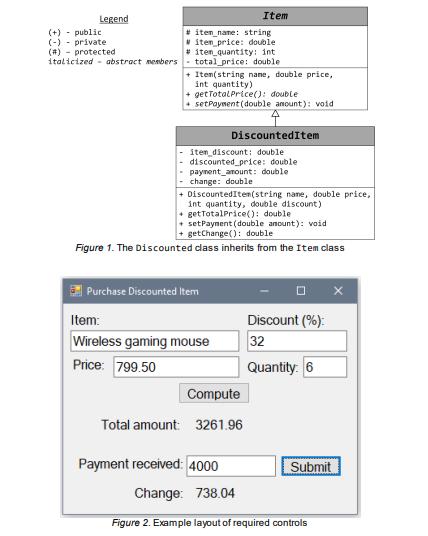
Legend (+) public (-) private (#) #iten name: string item_price: double #item_quantity: int italicized abstract members total_price: double protected +Item(string name, double price, int quantity) + getTotal Price(): double setPayment (double amount): void Item Total amount: item discount: double discounted_price: double payment amount: double change: double + DiscountedItem(string name, double price, int quantity, double discount) getTotalPrice(): double Purchase Discounted Item Discounted Item + setPayment (double amount): void +getChange(): double Figure 1. The Discounted class inherits from the Item class Item: Wireless gaming mouse Price: 799.50 Compute 3261.96 Payment received: 4000 Discount (%): 32 Quantity: 6 Submit Change: 738.04 Figure 2. Example layout of required controls
Step by Step Solution
3.37 Rating (150 Votes )
There are 3 Steps involved in it
Heres an example of a simple cashier system Windows application that follows the specifications you provided It includes the Cashier Application proje... View full answer

Get step-by-step solutions from verified subject matter experts
 Study Help