







Question: Create a temporary Python file and open a non-existent data file (called file1.txt) for writing: f = open('file1.txt', 'w') Try adding multiple lines: f.write('Line
- Create a temporary Python file and open a non-existent data file (called file1.txt) for writing:
f = open('file1.txt', 'w')
- Try adding multiple lines:
f.write('Line 1\nLine 2 is a little longer\nLine 3 is too\n')
Once the write() method has completed, the final step is to close() the file. The file MUST be closed properly or else data will not consistently be written to the file. NOTE: Not closing a file can lead to corrupted or missing file contents.:
f.close()
- You will now create a new file called file2.txt, but this time call the write() method multiple times in sequence. You will often write to a file multiple times inside a loop:
- f = open('file2.txt', 'w')
- f.write('Line 1\nLine 2 is a little longer\nLine 3 is as well\n')
- f.write('This is the 4th line\n')
- f.write('Last line in file\n')
f.close()
- Create one last file via the steps below
- my_number = 1000
- my_list = [1,2,3,4,5]
- f = open('file3.txt', 'w')
- f.write(str(my_number) + '\n')
- for num in my_list:
- f.write(str(num) + '\n')
- f.close()
Create a Python Script Demonstrating Writing to Files
- Copy ~/ops445/lab4/lab4f.py script to ~/ops445/lab4/lab4g.py script (We need the previous read functions that you created).
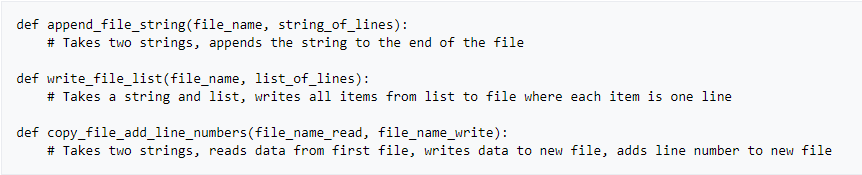
- Add the following functions below the two functions that you already created:
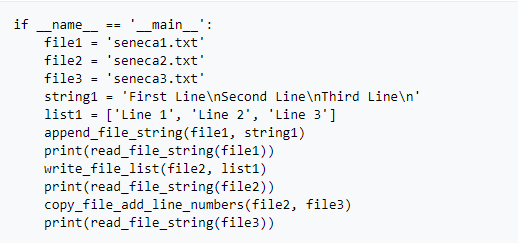
- Replace the main coding block of your Python script near the bottom with the following
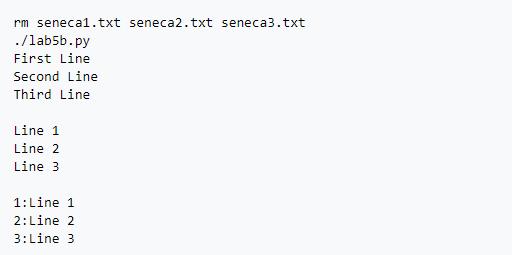
append_file_string():
- Takes two string arguments
- Appends to the file(Argument 1) all data from the string(Argument 2)
write_file_list():
- Takes two arguments: a string and a list
- Writes to file(Argument 1) all lines of data found in the list(Argument 2)
copy_file_add_line_numbers():
- Takes two arguments: Both are files path-names (which happen to be strings)
- Reads all data from first file(Argument 1), and writes all lines into second file(Argument 2) adding line numbers
- Line numbers should be added to the beginning of each line with a colon next to them(see sample output below for reference)
- Hint: Use an extra variable for the line number
def append_file_string (file_name, string_of_lines): # Takes two strings, appends the string to the end of the file def write_file_list(file_name, list_of_lines): # Takes a string and list, writes all items from list to file where each item is one line def copy_file_add_line_numbers(file_name_read, file_name_write): # Takes two strings, reads data from first file, writes data to new file, adds line number to new file
Step by Step Solution
There are 3 Steps involved in it
Here is the Python code Create a temporary Python file Open a ... View full answer

Get step-by-step solutions from verified subject matter experts
 Study Help