







Question: Create a user interface in C# Visual Studio (GUI) for an alarm clock which should look something like this: (Feel free to make it nicer
Create a user interface in C# Visual Studio (GUI) for an alarm clock which should look something like this:
(Feel free to make it nicer with the time looking like LEDs for instance or whatever strikes your fancy, this is a minimal example I came up with in like 5 minutes).
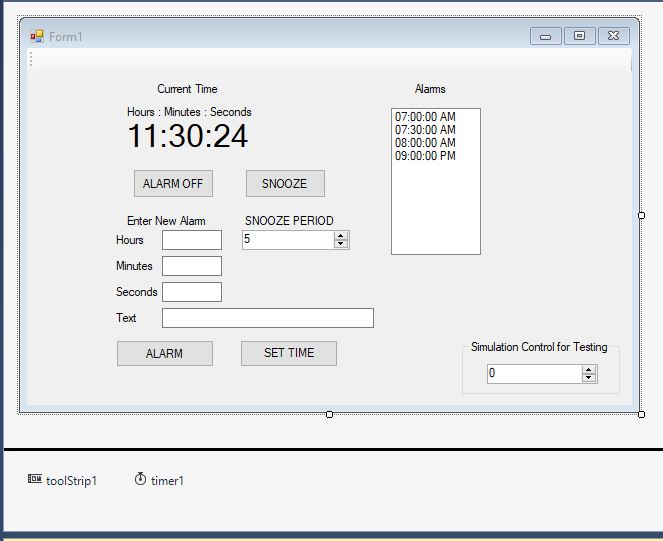
The function of the GUI Controls should be as follows:
SET TIME Capture the Text in the Hours, Minutes and Seconds Text Boxes and set the current time to that value. (Current time should be a Time2 Object)
ALARM: - Capture the Text in the TextBoxes - the Hours, Minutes, Seconds and Text and create a new AlarmTime object with those for values for Hours, Minutes, Seconds and Message and enter the time of the alarm in the ListBox (the ListBox should always be sorted).
The timer control should advance the current time at an appropriate rate. The Simulation NumericUpDown control should be used to accelerate the rate at which the current time advances, by changing the properties of the timer object, so you can demo the program and show that the alarms are detected and triggered.
When an alarm is triggered your program should flash the message in the window and (optionally) use a synthesizer class to convert the message to speech.
ALARM OFF should stop the flashing of the message (and optional speech) and wait for the next alarm to be triggered (do not remove the alarm from the list)
SNOOZE should stop the flashing of the message (and optional speech) and reset the alarm for the appropriate time according to the snooze period value in the NumericUPDown control. Note that the value in the alarm object should NOT be changed, so you might want to also add a Snooze field to the AlarmTime Class so that each alarm will have its own snooze period (you might need more than that).
User should be able to delete an alarm from the list by clicking on it or by selecting it and using a DELETE button (not pictured above).
The ToolStrip object should be used to inform the user what each control is for and how to use it.
Form1 Current Time Hours: Minutes Seconds Alams 07:00:00 AM 07:30:00 AM 08:00:00 AM 09:00:00 PM 11:30:24 ALARM OFIF SNOOZE Enter New Alam SNOOZE PERIOD Hours Minutes Seconds Text Simulation Control for Testing ALARM SET TIME toolStrip! O timerl Form1 Current Time Hours: Minutes Seconds Alams 07:00:00 AM 07:30:00 AM 08:00:00 AM 09:00:00 PM 11:30:24 ALARM OFIF SNOOZE Enter New Alam SNOOZE PERIOD Hours Minutes Seconds Text Simulation Control for Testing ALARM SET TIME toolStrip! O timerl
Step by Step Solution
There are 3 Steps involved in it

Get step-by-step solutions from verified subject matter experts
 Study Help