



Question: For this exercise you need to upload the Form1.cs and Form1.Designer.cs files. DO NOT SUBMIT ANSWER FROM ANOTHER CHEGG QUESTION. For this exercise you are
For this exercise you need to upload the Form1.cs and Form1.Designer.cs files. DO NOT SUBMIT ANSWER FROM ANOTHER CHEGG QUESTION.
For this exercise you are asked to write a Windows Forms application to allow users to add numbers to a listbox and click a button to sort them.
Create a GUI with the following elements:
A Form with the caption 'ListBox Sorter'. This form must be named Form1
A NumericUpDown control.
A Button with the text 'Add'. When the user clicks this, the number in the NumericUpDown control will be added to the bottom of the ListBox.
A ListBox, which will initially be empty but will contain numbers added to it with the 'Add' button.
A Button with the text 'Sort'. When this button is clicked the numbers in the ListBox will be sorted into ascending order.
The form should initially look something like this:
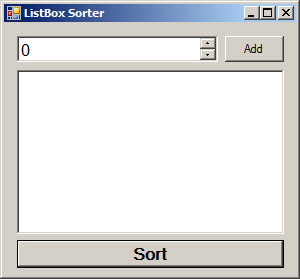
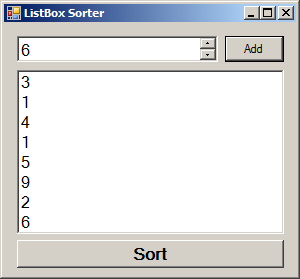
Each time the 'Add' button is clicked the number in the NumericUpDown is added to the ListBox, where it will occupy the last place.:
Then, after the 'Sort' button is clicked, the numbers in the ListBox should be rearranged to be in ascending order:
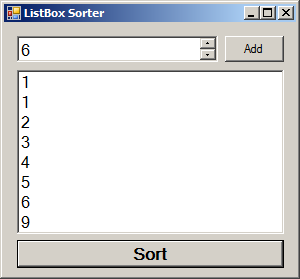
If new numbers are added to the list box after it is sorted, they will appear at the end like they did before.
Here's some tips specific to this problem:
NumericUpDown.Value (the number in the NumericUpDown control) is of the type 'decimal'. This is not an int- however, it can be cast to an int. e.g. int number = (int)numericUpDown1.Value
The items in a ListBox are accessed via the Items property, which has methods like 'Add', 'Clear' and allows use of array notation.e.g. listBox1.Items.Add(3);)
Any type can be stored in a ListBox- however, if you get something from a ListBox with array notation you will have to cast it back to its original type before using it. e.g. int num = (int)listBox1.Items[0];
You may use Array.Sort or any other .NET framework sorting method for this exercise, as the exercise here is in creating a GUI and manipulating the ListBox and NumericUpDown controls, not writing a sort method.
Here's some additional implementation details for this exercise:
The form must be named Form1. This is the Visual Studio default and is necessary for the tester to find your form.
The namespace that Form1 appears in must be named ListBoxSorter.
For this activity you are not given sample code because Visual Studio creates a substantial framework for you already.
Make sure you create a Visual C# Windows Forms App (.NET Framework) when creating the project in Visual Studio.
The solution should be named ListBoxSorter. This is not necessary; however the namespace must be named ListBoxSorter and naming the solution ListBoxSorter is a good way to ensure that it is correct by default.
The form must be named Form1. This is the default form name when creating a Windows Forms App.
Ensure that your buttons, captions etc. contain the text they are required to. The names of the buttons in the source code is irrelevant; however, the text on the buttons is used to find them within the form. The same is true for labels, checkboxes and any other form elements.
REMEBER, please submit code in Form1.cs and Form1.Designer.cs files.
Step by Step Solution
There are 3 Steps involved in it

Get step-by-step solutions from verified subject matter experts