







Question: Create a View in SQL 2. Description 2.1 Tables with Primary Keys The primary key for each table is underlined. Movies(movieID, name, year, rating, length,
Create a View in SQL
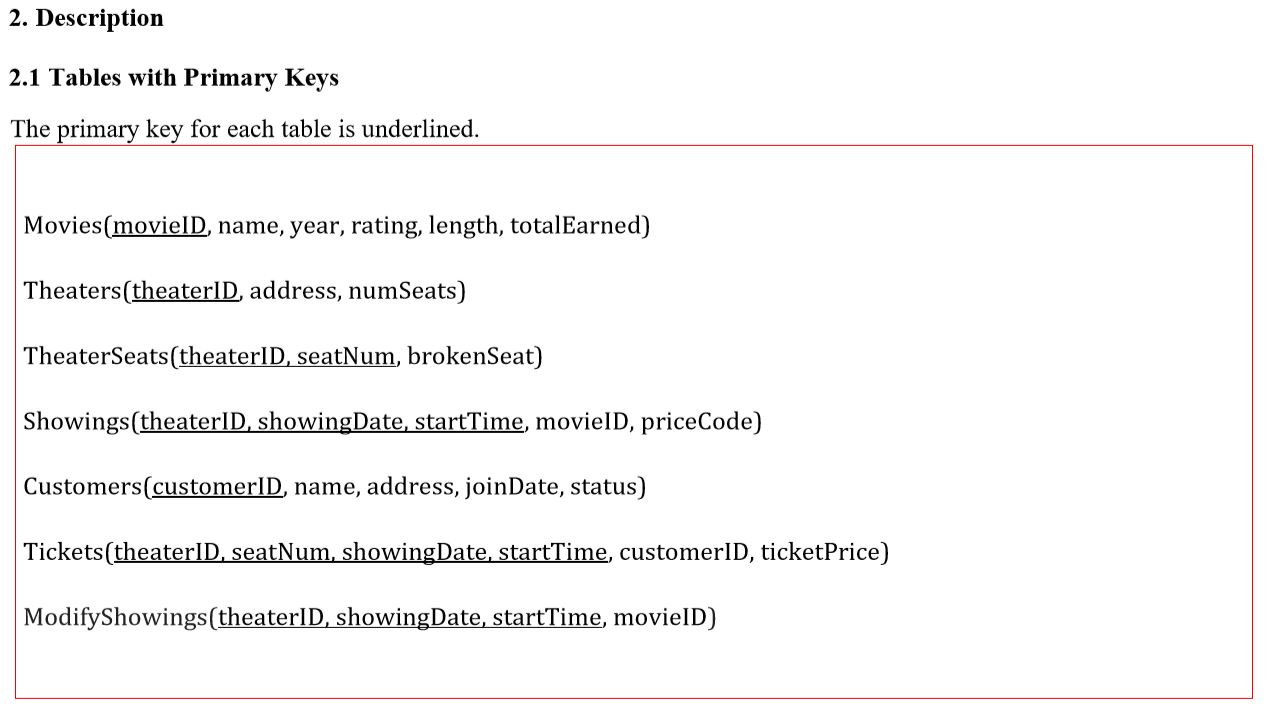
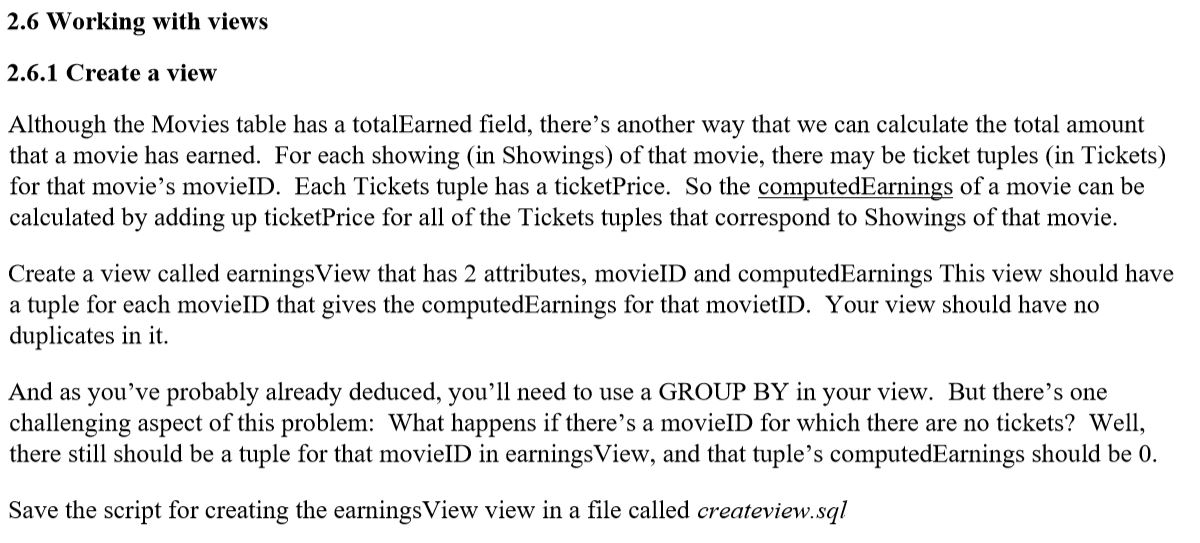
2. Description 2.1 Tables with Primary Keys The primary key for each table is underlined. Movies(movieID, name, year, rating, length, totalEarned) Theaters(theaterID, address, numSeats) TheaterSeats(theater D, seatNum, brokenSeat) Showings(theaterID, showingDate, startTime, movielD, priceCode) Customers(customerID, name, address, joinDate, status) Tickets(theaterID, seatNum, showingDate, startTime, customerID, ticketPrice) ModifyShowings(theaterID, showingDate, startTime, movieID) 2.6 Working with views 2.6.1 Create a view Although the Movies table has a totalEarned field, there's another way that we can calculate the total amount that a movie has earned. For each showing (in Showings) of that movie, there may be ticket tuples (in Tickets) for that movie's movieID. Each Tickets tuple has a ticketPrice. So the computedEarnings of a movie can be calculated by adding up ticketPrice for all of the Tickets tuples that correspond to Showings of that movie. Create a view called earningsView that has 2 attributes, movieID and computedEarnings This view should have a tuple for each movieID that gives the computedEarnings for that movietID. Your view should have no duplicates in it. And as you've probably already deduced, you'll need to use a GROUP BY in your view. But there's one challenging aspect of this problem: What happens if there's a movieID for which there are no tickets? Well, there still should be a tuple for that movieID in earnings View, and that tuple's computedEarnings should be 0. Save the script for creating the earnings View view in a file called createview.sql 2. Description 2.1 Tables with Primary Keys The primary key for each table is underlined. Movies(movieID, name, year, rating, length, totalEarned) Theaters(theaterID, address, numSeats) TheaterSeats(theater D, seatNum, brokenSeat) Showings(theaterID, showingDate, startTime, movielD, priceCode) Customers(customerID, name, address, joinDate, status) Tickets(theaterID, seatNum, showingDate, startTime, customerID, ticketPrice) ModifyShowings(theaterID, showingDate, startTime, movieID) 2.6 Working with views 2.6.1 Create a view Although the Movies table has a totalEarned field, there's another way that we can calculate the total amount that a movie has earned. For each showing (in Showings) of that movie, there may be ticket tuples (in Tickets) for that movie's movieID. Each Tickets tuple has a ticketPrice. So the computedEarnings of a movie can be calculated by adding up ticketPrice for all of the Tickets tuples that correspond to Showings of that movie. Create a view called earningsView that has 2 attributes, movieID and computedEarnings This view should have a tuple for each movieID that gives the computedEarnings for that movietID. Your view should have no duplicates in it. And as you've probably already deduced, you'll need to use a GROUP BY in your view. But there's one challenging aspect of this problem: What happens if there's a movieID for which there are no tickets? Well, there still should be a tuple for that movieID in earnings View, and that tuple's computedEarnings should be 0. Save the script for creating the earnings View view in a file called createview.sql
Step by Step Solution
There are 3 Steps involved in it

Get step-by-step solutions from verified subject matter experts
 Study Help