







Question: Write SQL Statements 2. Description 2.1 Tables with Primary Keys The primary key for each table is underlined. Movies(movieID, name, year, rating, length, totalEarned) Theaters(theaterID,
Write SQL Statements
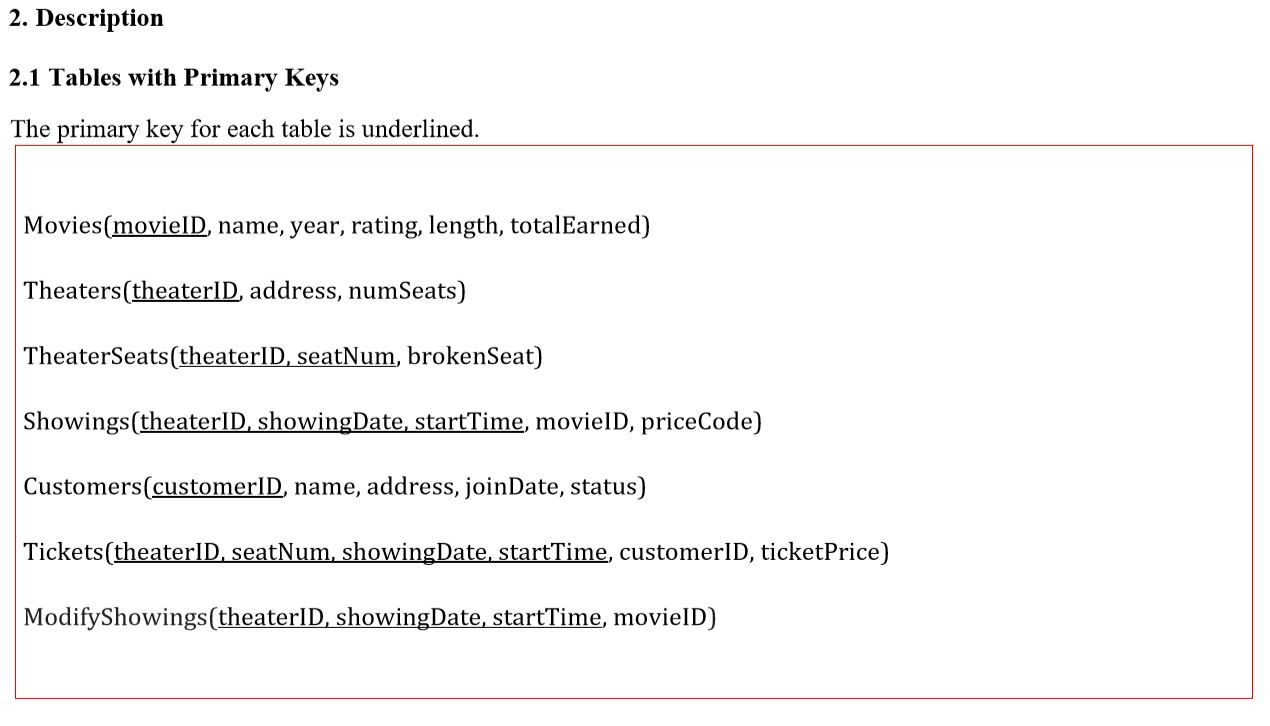
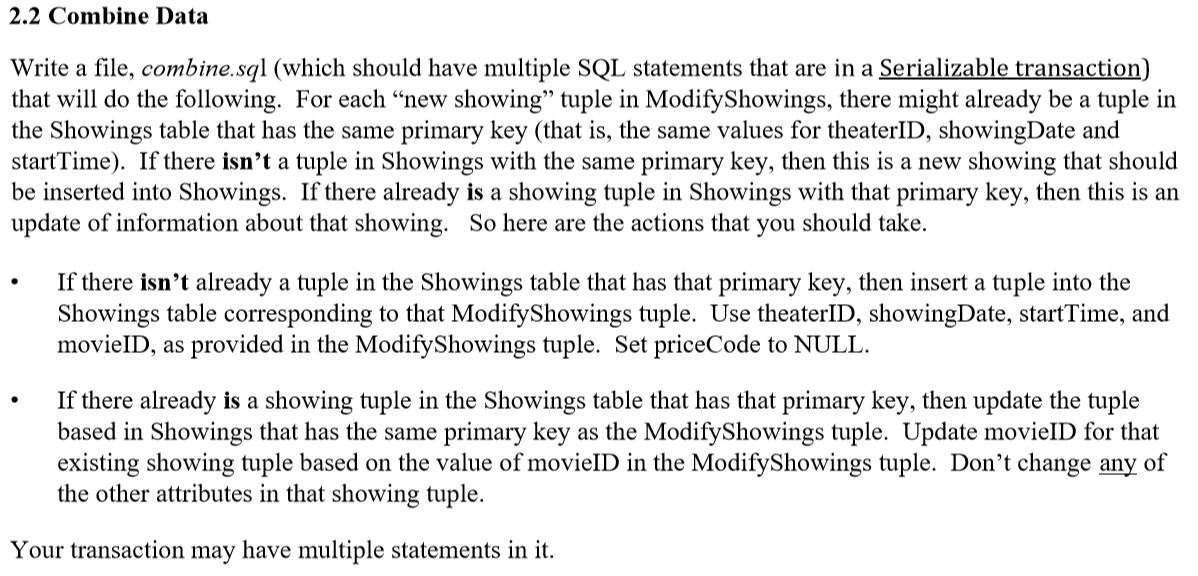
2. Description 2.1 Tables with Primary Keys The primary key for each table is underlined. Movies(movieID, name, year, rating, length, totalEarned) Theaters(theaterID, address, numSeats) TheaterSeats(theater D, seatNum, brokenSeat) Showings(theaterID, showingDate, startTime, movielD, priceCode) Customers(customerID, name, address, joinDate, status) Tickets(theaterID, seatNum, showingDate, startTime, customerID, ticketPrice) ModifyShowings(theaterID, showingDate, startTime, movieID) 2.2 Combine Data Write a file, combine.sql (which should have multiple SQL statements that are in a Serializable transaction) that will do the following. For each new showing tuple in ModifyShowings, there might already be a tuple in the Showings table that has the same primary key (that is, the same values for theaterID, showingDate and startTime). If there isn't a tuple in Showings with the same primary key, then this is a new showing that should be inserted into Showings. If there already is a showing tuple in Showings with that primary key, then this is an update of information about that showing. So here are the actions that you should take. If there isn't already a tuple in the Showings table that has that primary key, then insert a tuple into the Showings table corresponding to that ModifyShowings tuple. Use theaterID, showingDate, startTime, and movieID, as provided in the ModifyShowings tuple. Set priceCode to NULL. If there already is a showing tuple in the Showings table that has that primary key, then update the tuple based in Showings that has the same primary key as the ModifyShowings tuple. Update movieID for that existing showing tuple based on the value of movieID in the ModifyShowings tuple. Don't change any of the other attributes in that showing tuple. Your transaction may have multiple statements in it. 2. Description 2.1 Tables with Primary Keys The primary key for each table is underlined. Movies(movieID, name, year, rating, length, totalEarned) Theaters(theaterID, address, numSeats) TheaterSeats(theater D, seatNum, brokenSeat) Showings(theaterID, showingDate, startTime, movielD, priceCode) Customers(customerID, name, address, joinDate, status) Tickets(theaterID, seatNum, showingDate, startTime, customerID, ticketPrice) ModifyShowings(theaterID, showingDate, startTime, movieID) 2.2 Combine Data Write a file, combine.sql (which should have multiple SQL statements that are in a Serializable transaction) that will do the following. For each new showing tuple in ModifyShowings, there might already be a tuple in the Showings table that has the same primary key (that is, the same values for theaterID, showingDate and startTime). If there isn't a tuple in Showings with the same primary key, then this is a new showing that should be inserted into Showings. If there already is a showing tuple in Showings with that primary key, then this is an update of information about that showing. So here are the actions that you should take. If there isn't already a tuple in the Showings table that has that primary key, then insert a tuple into the Showings table corresponding to that ModifyShowings tuple. Use theaterID, showingDate, startTime, and movieID, as provided in the ModifyShowings tuple. Set priceCode to NULL. If there already is a showing tuple in the Showings table that has that primary key, then update the tuple based in Showings that has the same primary key as the ModifyShowings tuple. Update movieID for that existing showing tuple based on the value of movieID in the ModifyShowings tuple. Don't change any of the other attributes in that showing tuple. Your transaction may have multiple statements in it
Step by Step Solution
There are 3 Steps involved in it

Get step-by-step solutions from verified subject matter experts
 Study Help